
With the rapid development of artificial intelligence technology, the barrier to video translation has been significantly lowered. It's no longer difficult to achieve a completely local, offline, zero-cost solution.
However, the biggest challenges of local deployment are its complexity and hardware limitations. Models are often smaller, and translation quality can be suboptimal. The full version of pyvideotrans offers both local and online API solutions. While powerful, it can be daunting for beginners—the installation package alone (without models) is 1.9GB, and with models, it balloons to over 5GB.
To address these issues, following the simplified 302.ai version, we are now launching the Alibaba Bailian Simplified Version. This version requires no model downloads and has no special hardware requirements. You simply need to activate the service on Alibaba Cloud Bailian, obtain an API KEY, and you can quickly experience the convenience of video translation.
The simplified version includes video translation, speech recognition, subtitle dubbing, and subtitle translation, meeting basic daily needs.
Unlike the full version, all features of the simplified version rely on the platform's API services. After the free quota provided by the platform is exhausted, you will need to pay to continue using it. However, considering its easy deployment, higher translation quality, and the increasingly lower cost of API services, it is undoubtedly worthwhile for users who prioritize efficiency.
Of course, if you completely rule out paid options, you can still continue to use the fully-featured pyvideotrans full version.
Bailian Simplified Version Download Links
Baidu Netdisk: https://pan.baidu.com/s/1XsAt8Vt1_IccOKt0QAvC_g?pwd=6rgd
Comparison Table: Full Version vs. Bailian Simplified Version
| Feature | pyvideotrans Full Version | pyvideotrans Bailian Simplified Version |
|---|---|---|
| Software Size | 1.9GB (without models), 5GB+ (with models) | 130MB |
| Ease of Use | Complex configuration, high customizability | Simple to use, just fill in the API KEY |
| VPN Required? | Required for Gemini, ChatGPT, Google channels | Not required |
| Cost | Can be completely free, fully local and offline | Requires Alibaba Cloud Bailian service. Payment needed after free quota is used. |
| Features | Powerful. Includes all simplified version features plus many others. | Only supports video translation, speech recognition, speech synthesis, subtitle translation. |
| Voice Roles | Supports many. Can support more third-party TTS services via API. | Alibaba Bailian models only support Chinese, English, German, Italian, Thai. Built-in edge-tts supports more languages. |
How to Choose a Version:
pyvideotransFull Version is suitable for:- Users who want to use it completely for free.
- Users with some technical skills who are willing to tinker.
- Users who can use a VPN.
- Users who want to delve deeper and master more detailed features.
pyvideotransBailian Simplified Version is suitable for:- Users who don't want to spend too much effort on deployment and configuration, just want to use it simply.
- Users willing to pay for API services.
- Users unfamiliar with or unwilling to use a VPN.
The following are instructions on how to activate Alibaba Cloud Bailian and Alibaba Cloud OSS, as well as how to fill in the information in the software.
Part 1: Create an Alibaba Cloud Bailian API KEY
First, you need an Alibaba Cloud account with real-name verification. Register, log in, and complete real-name verification here: https://www.aliyun.com
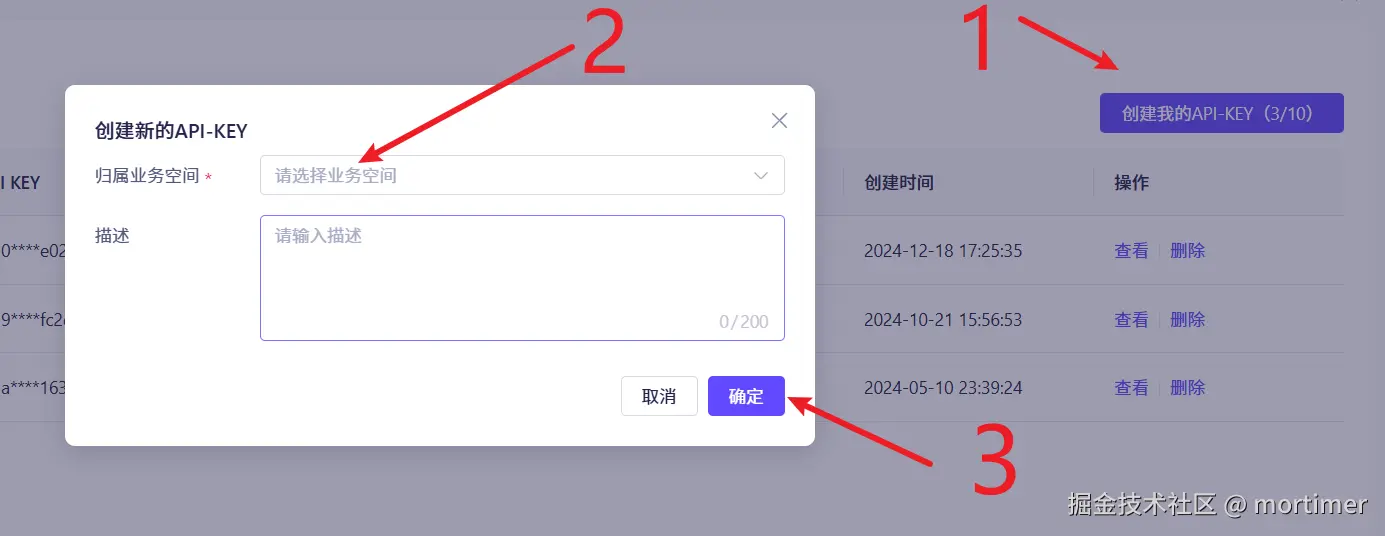
Get the Alibaba Bailian API KEY. After logging in, directly open this URL to go to the API KEY page: https://bailian.console.aliyun.com/?apiKey=1#/api-key Create one directly as shown in the image.
After creation, view and copy it.
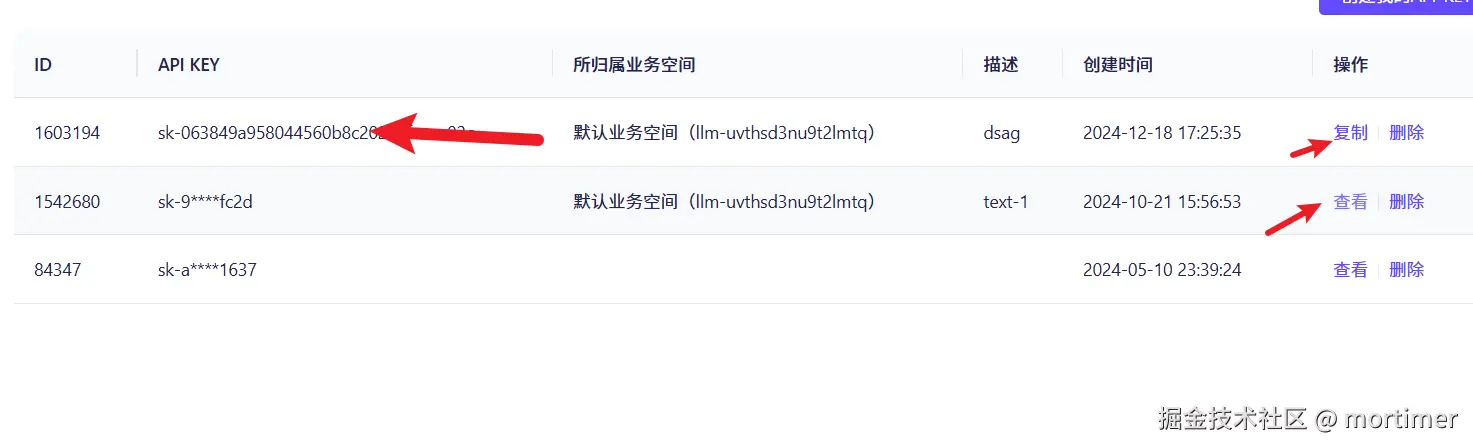
Most models have a free quota.
Part 2: Create an Alibaba Cloud OSS Bucket
Why is this needed? Because Alibaba Cloud's Speech Recognition API does not support direct upload of audio/video files. It must be given a network URL address for the audio/video, which it then downloads on the server for recognition.
You don't need to set up your own server for this. The simplest way is to use Alibaba Cloud OSS directly. Upload to OSS and provide the API with an internal network address, which also avoids download traffic charges.
1. After logging into Alibaba Cloud, open the URL to activate the OSS service.
Directly open this address: https://oss.console.aliyun.com/overview If not activated, you will be prompted to activate it.
2. After activation, the interface is as follows. Start creating a Bucket.
Click Create Bucket as shown below.
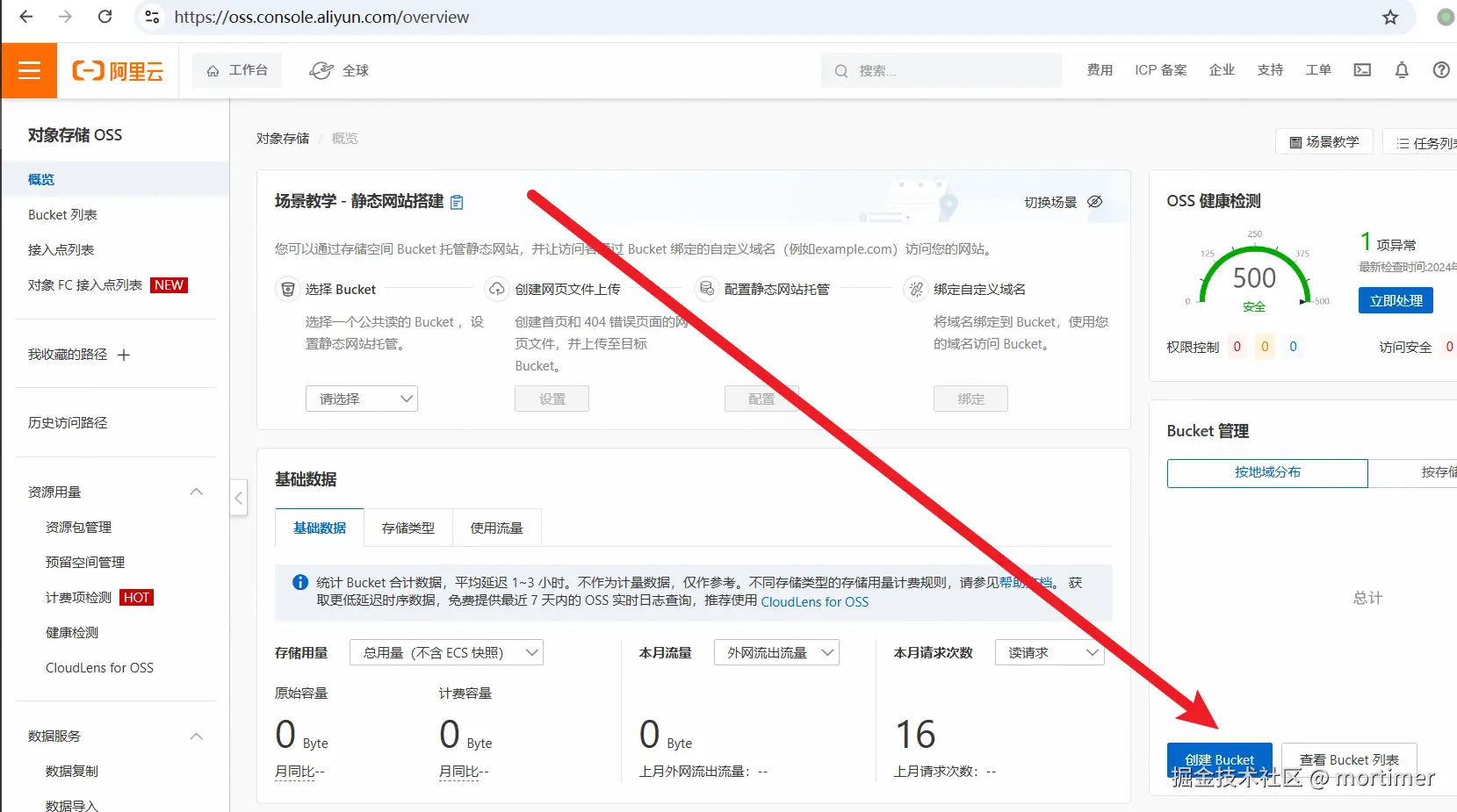
Note: You must select the region China North 2 (Beijing) for internal network use.
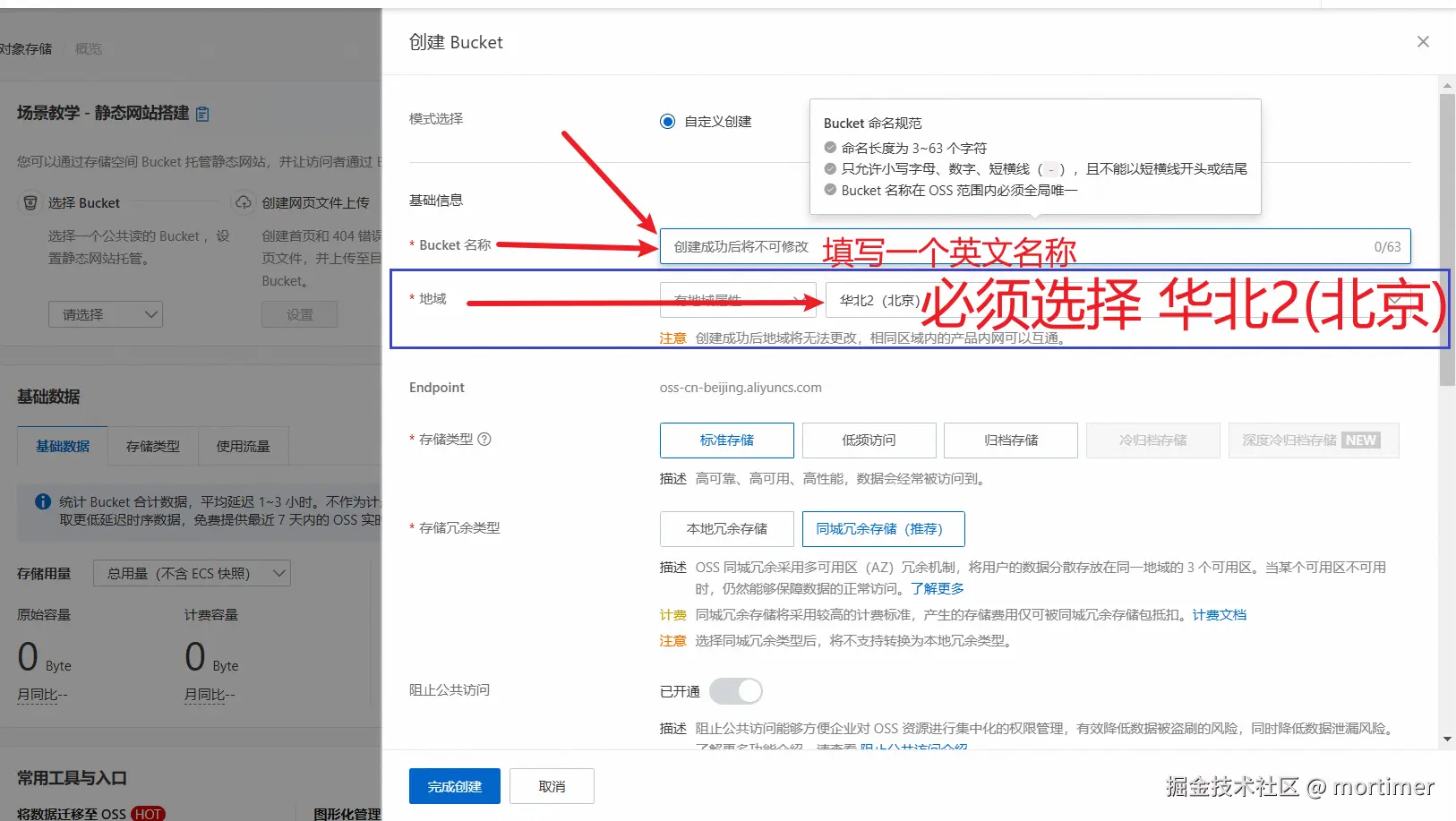
Keep other settings as default.
3. Enable Public Read permission.
This must be enabled; otherwise, access is not possible.
After successful creation, click Bucket List in the top left, find the name you just created, and click to enter the Bucket management interface.
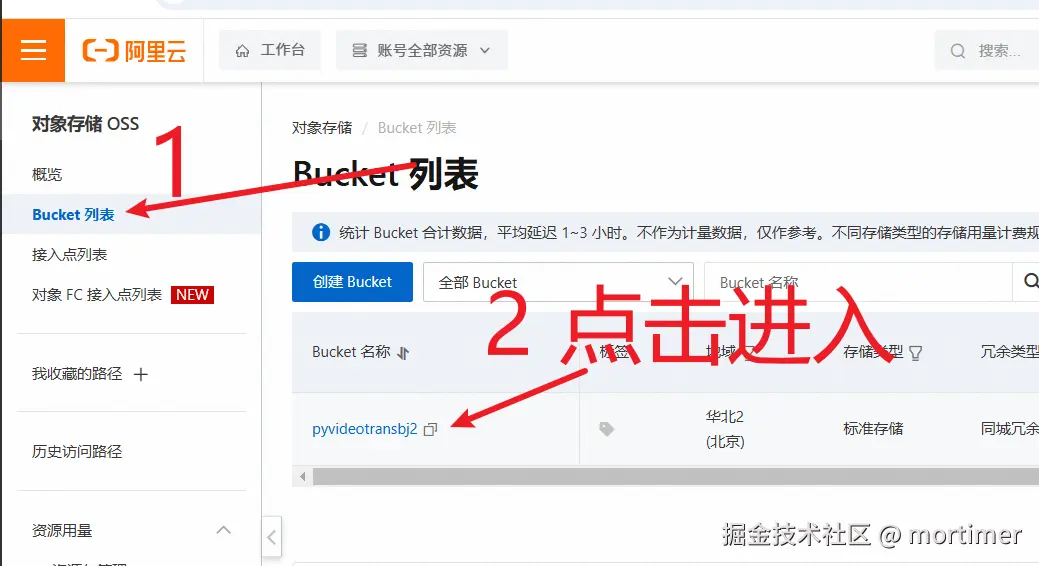
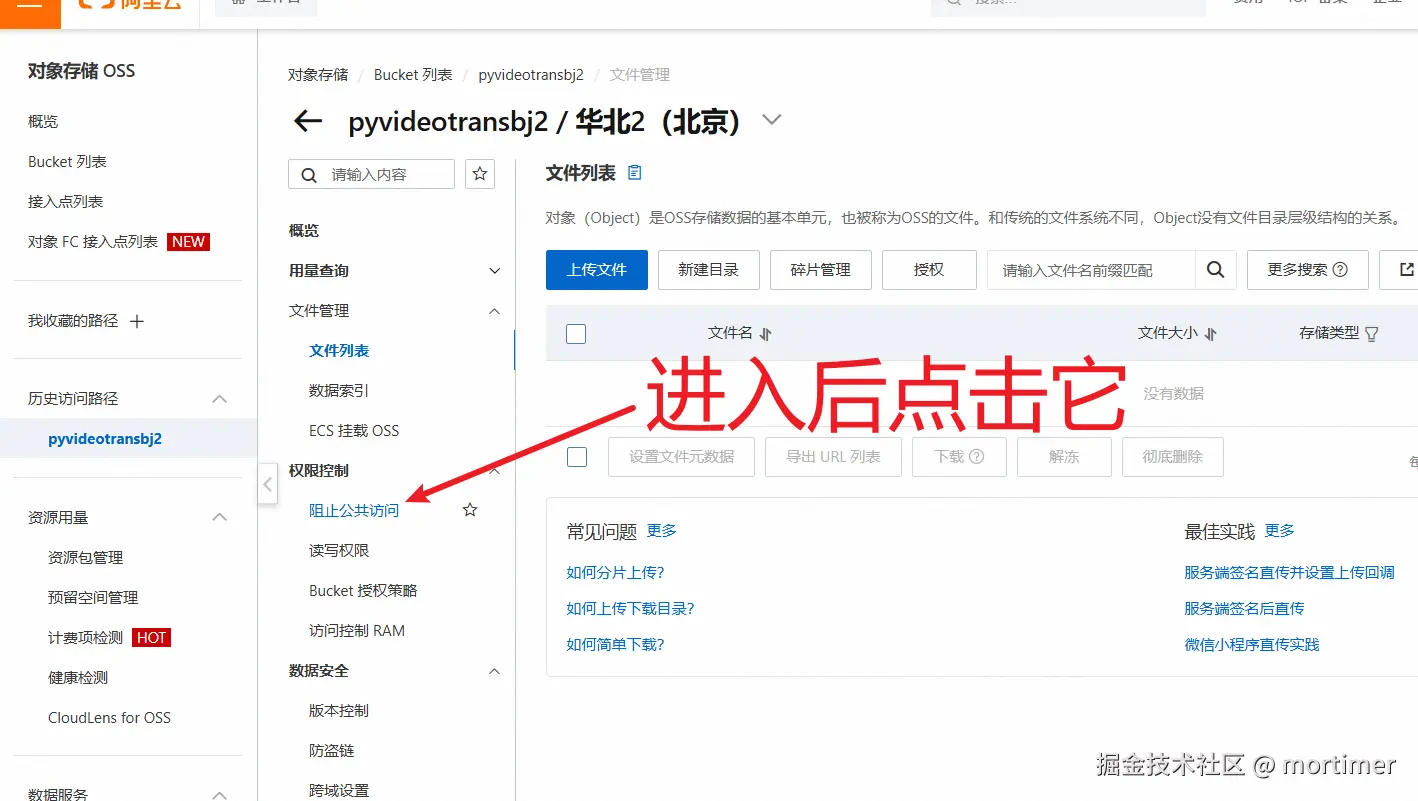
After entering, as shown below, click Block Public Access.
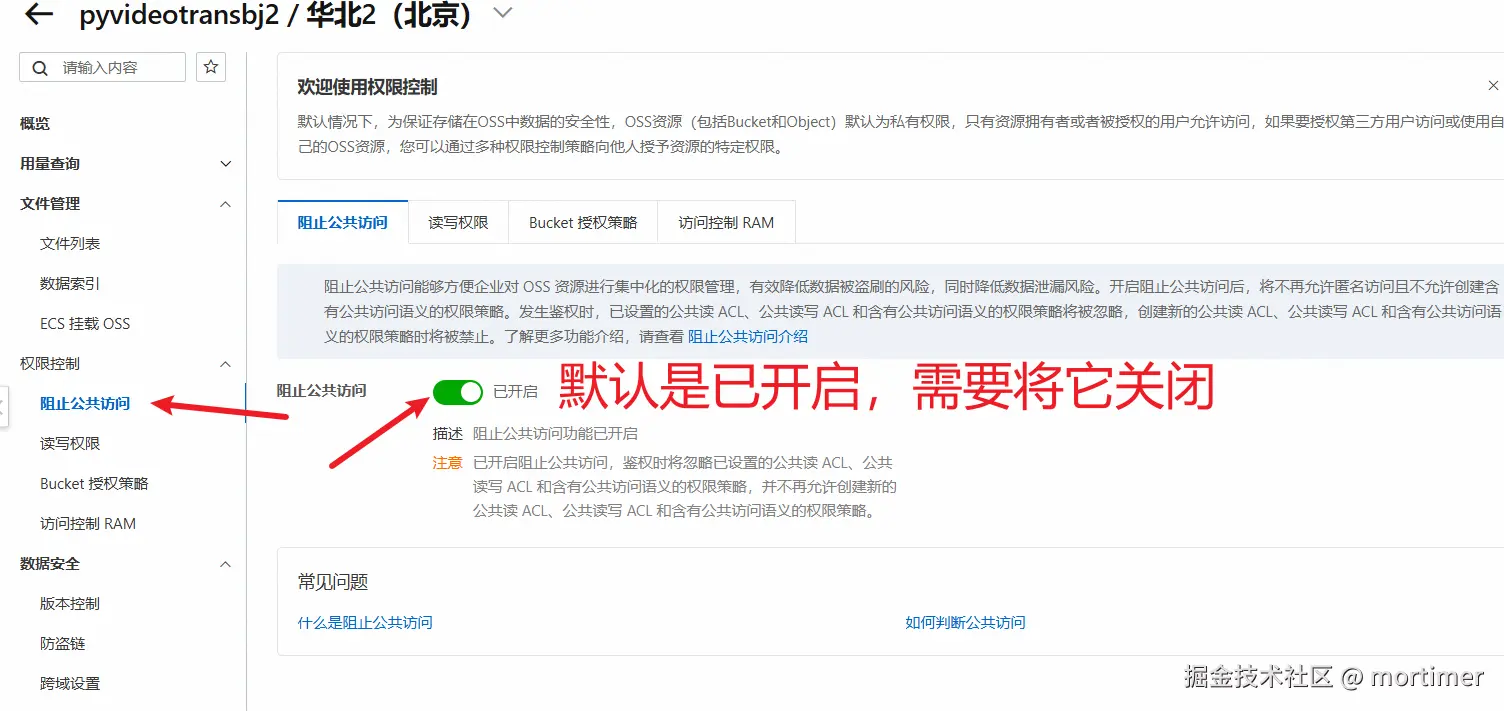
After clicking, as shown, it is enabled by default. Turn it off.
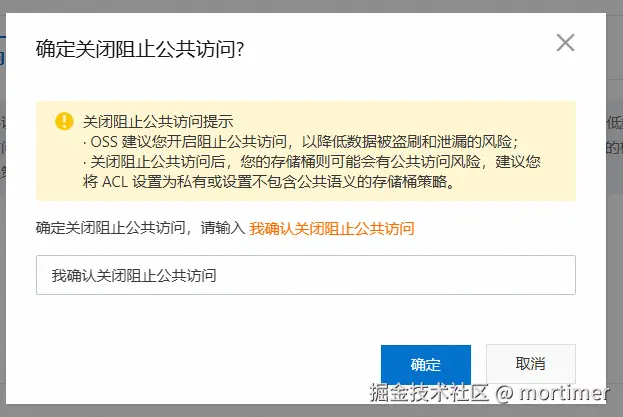
After confirming it's off, continue to click "Read/Write Permissions", then click "Settings", and then select "Public Read". Note: You need to click "Settings" first before you can select "Public Read".
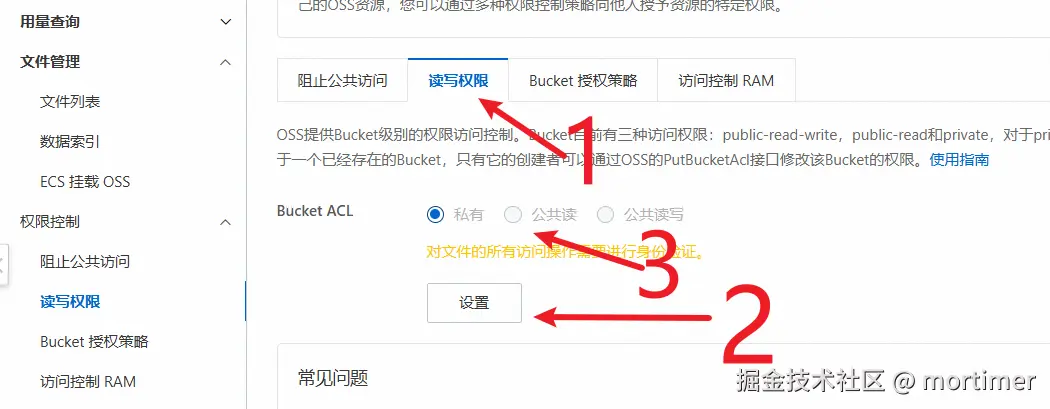
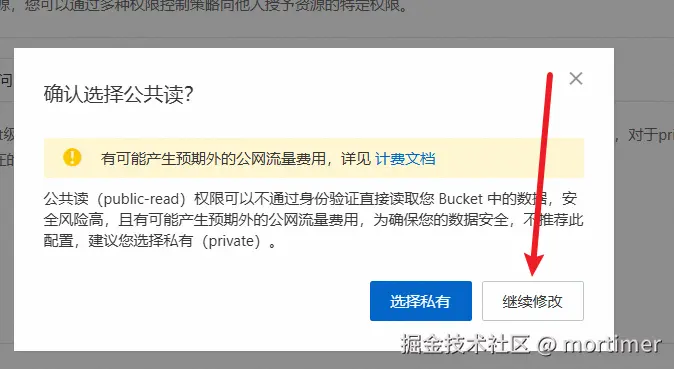
After selecting "Public Read", a prompt will appear. Click "Continue to Modify".
Then save.
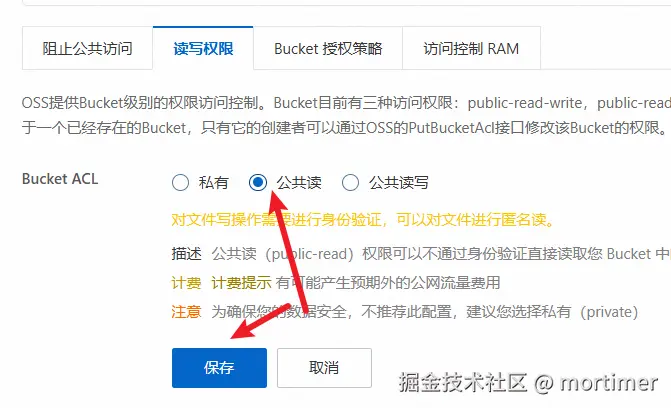
Don't worry about the warning about potential extra traffic fees. Access within the
China North 2 (Beijing)node is via the internal network. Moreover, the uploaded files are only used internally during the speech recognition stage. You can delete all uploaded files at any time after your video translation work is complete.
Part 3: Obtain AccessKey
To upload files to OSS, you need an AccessKey.
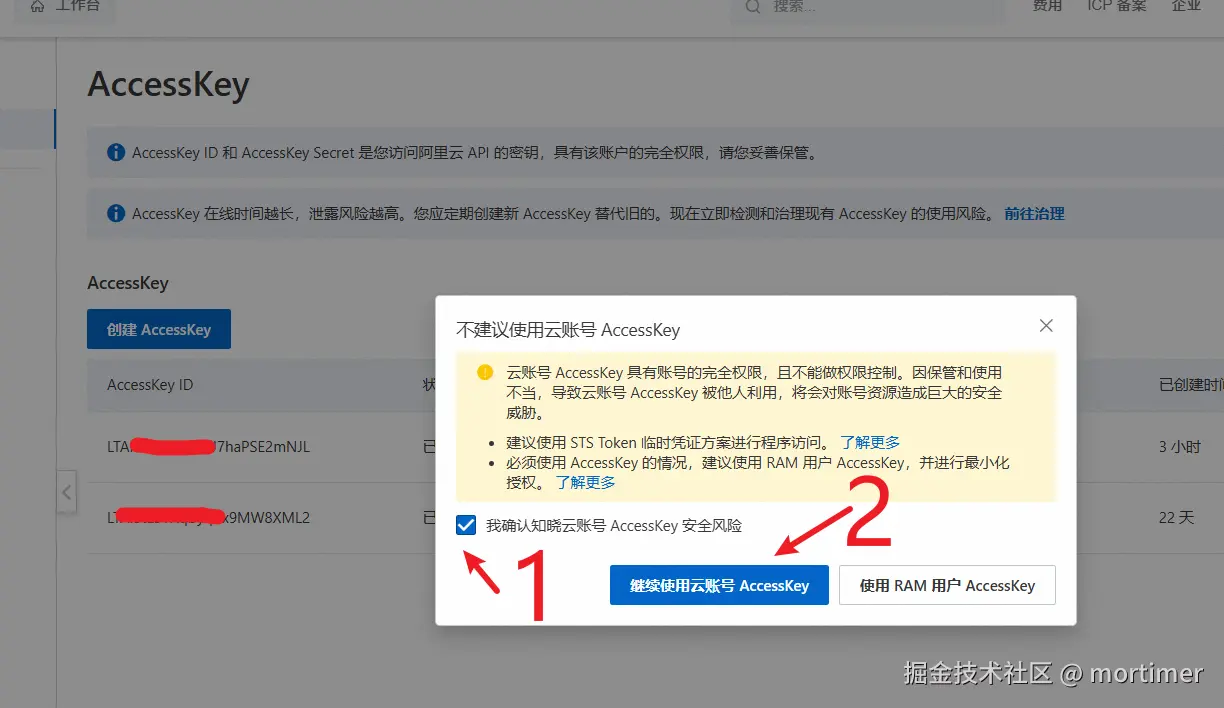
After creating OSS, directly open this address: https://ram.console.aliyun.com/profile/access-keys
Select as shown below; ignore its suggestions.
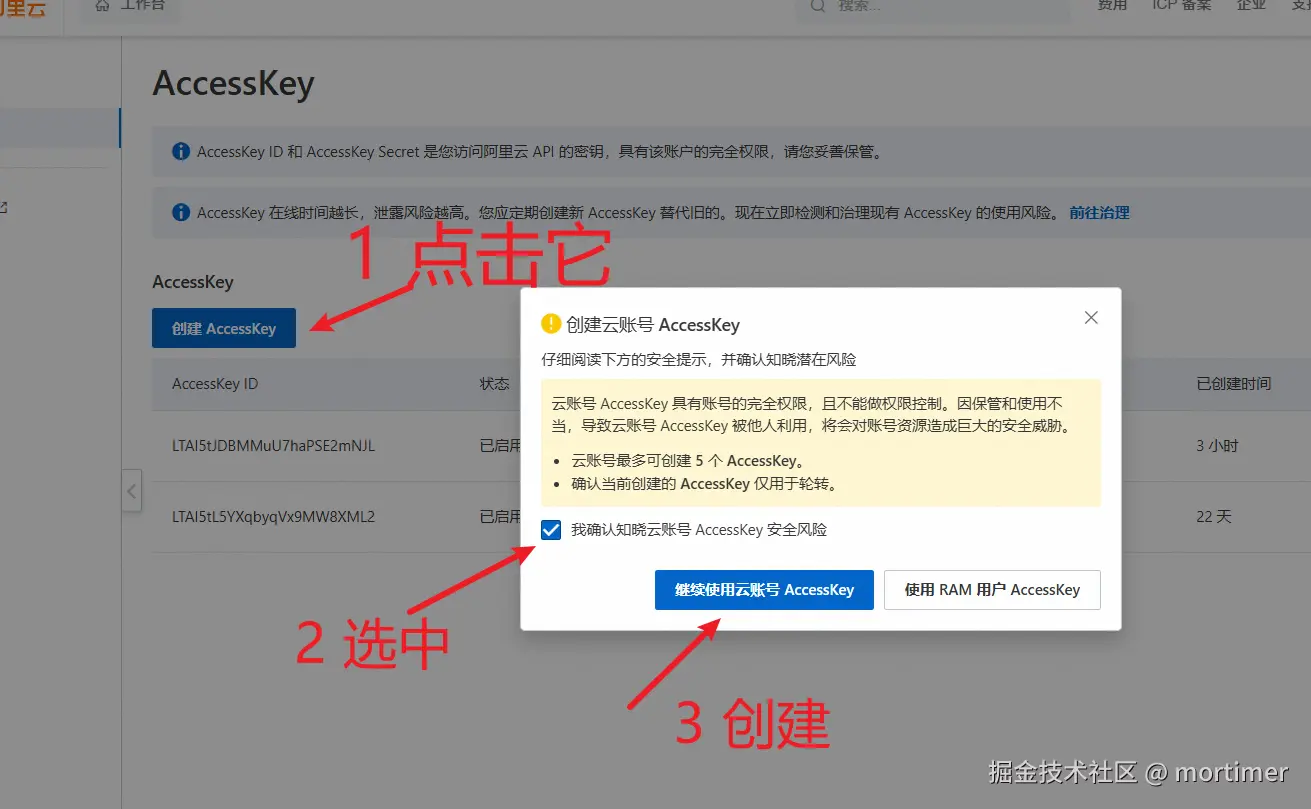
On the page, click "Create AccessKey" on the left.
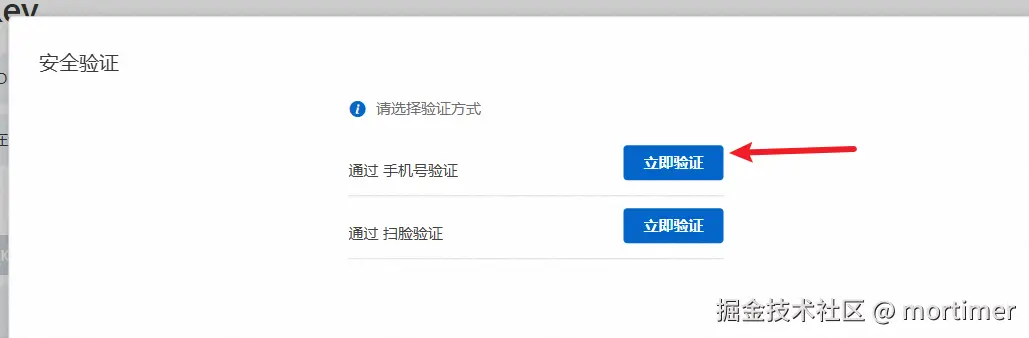
You may need to verify your phone number. After verification, the automatically created AccessKey ID and AccessKey Secret will be displayed.
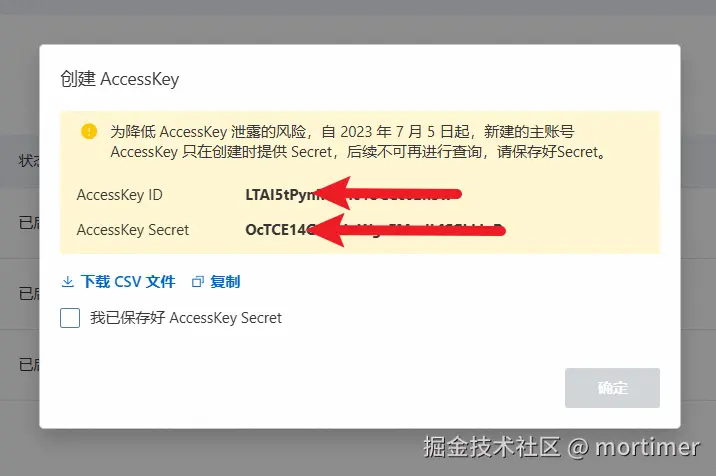
Remember these two pieces of information.
Part 4: Fill in the Alibaba Bailian Information into the Software
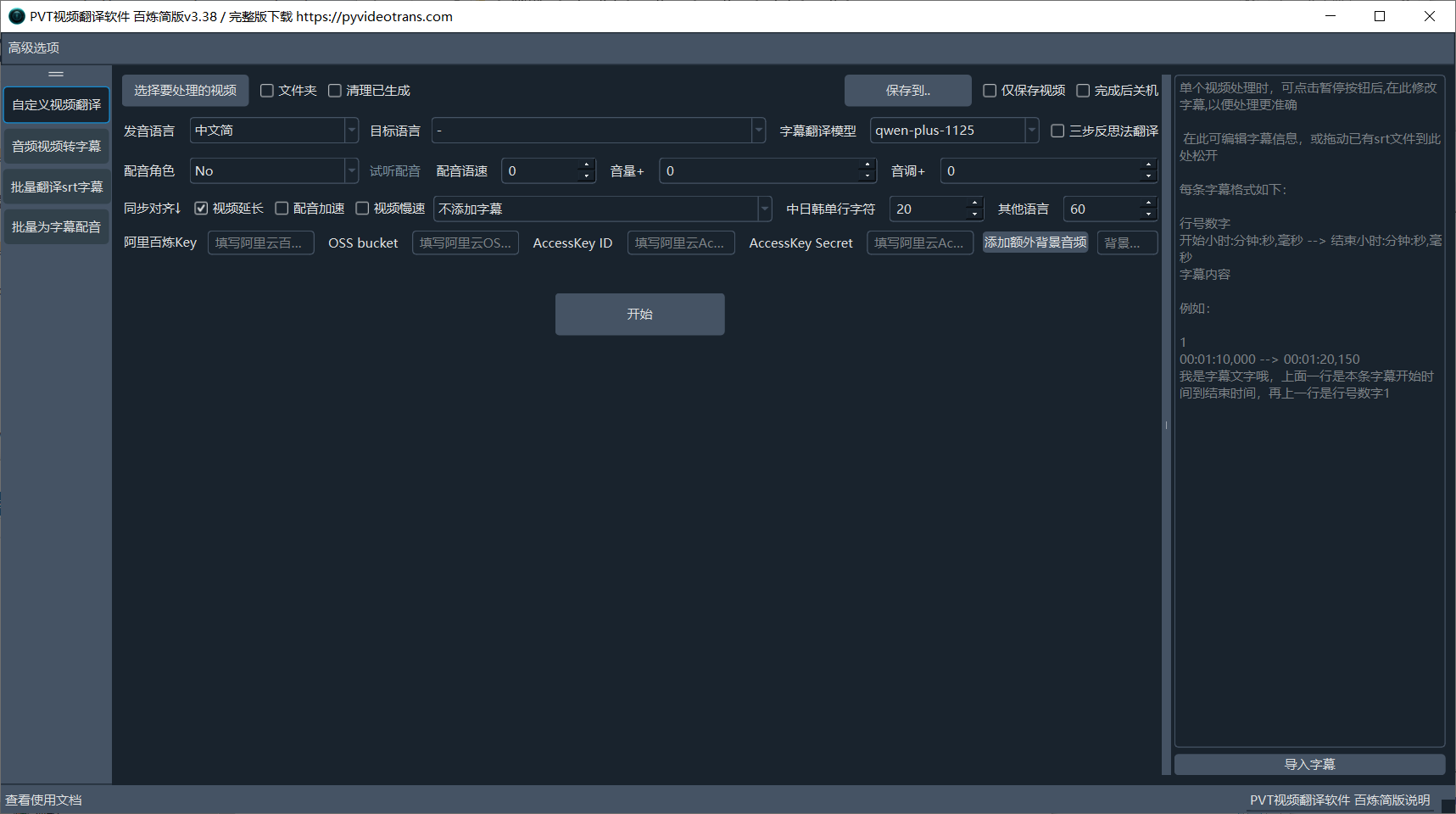
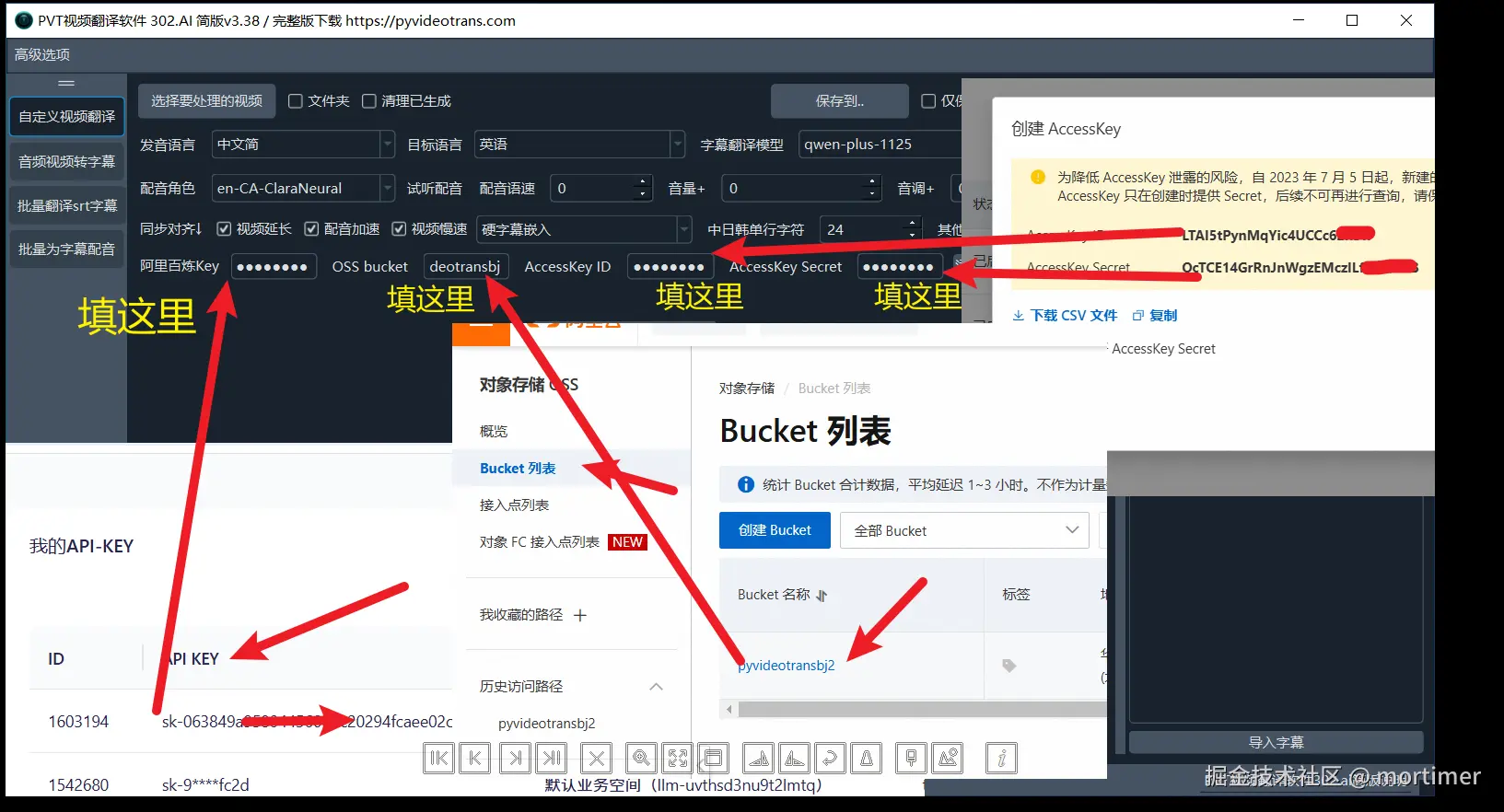
Fill the OSS Bucket name, Bailian API KEY, AccessKey ID, and AccessKey Secret created above into the software, as shown in the image below.
Alibaba Bailian Models Used in the Software
- Speech Recognition Stage (converting speech in audio/video to subtitles): Uses the
SenseVoiceSmallmodel, which supports over twenty languages and has a certain free quota. - Speech Synthesis Stage (dubbing based on subtitles): Uses a combination of
CosyVoice,Sambert, andedge-tts.edge-ttsis Microsoft's free speech synthesis service.CosyVoiceandSambertare Alibaba Bailian's speech synthesis models with a certain free quota. - Subtitle Translation Stage: Uses the Tongyi Qianwen large model series:
qwen-plus-1125, qwen-plus-1127, qwen-turbo-1101, qwen-max, qwen-max-latest, qwen-plus, qwen2.5-72b-instruct. Models ending with numbers have a free quota; others do not.
Important Notes
- If you use video translation or audio/video to subtitle features, you must activate OSS and fill in the Bucket name and AccessKey; otherwise, these features cannot be used.
- If other functions work normally but the audio/video to subtitle (speech recognition) function fails, it is likely because OSS was not created, or the Bucket's public read permission was not enabled.
- The video translation software itself is free to download and use. Fees generated by third-party APIs are unrelated to the software.