
Gemini TTS Voice Channel
What is it?
Gemini TTS is a speech synthesis feature from Google, built on the Gemini 2.5 model. It supports multi-speaker text dubbing with 24 languages and 30 voice characters.
Supported Models:
gemini-2.5-flash-preview-tts(recommended — lower limits, higher free quota)gemini-2.5-pro-preview-tts
Prerequisites:
- Google account
- pyVideoTrans v3.70+ or later
Step 1: Get a Gemini API Key
- Visit Google AI Studio
- Log in with your Google account
- Go to the API Keys page
- Create and copy your API Key
Step 2: Configure the Software
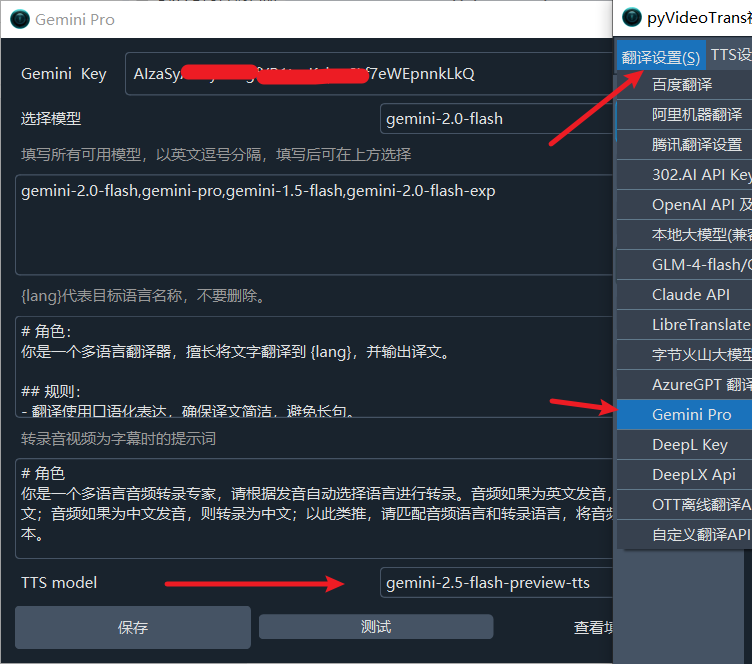
- Open the software and go to Menu → Translation Settings → Gemini Pro
- Enter your API Key
- At the bottom, under TTS Model, select a model:
- Recommended:
gemini-2.5-flash-preview-tts(higher free quota)
- Recommended:
- Save the settings
Step 3: Use Gemini TTS
- Return to the main interface
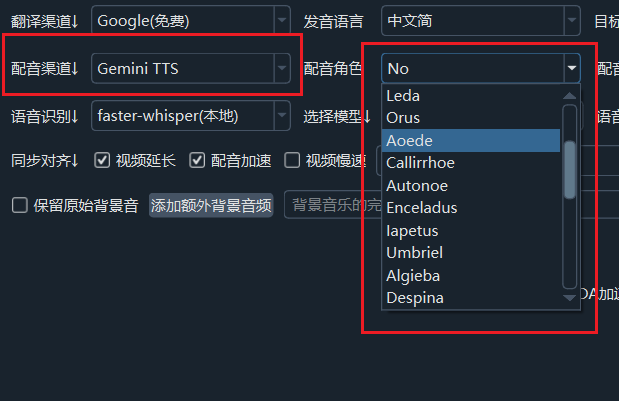
- Select
Gemini TTSfrom the Voice Channel dropdown - Choose the target language
- Select a voice from the Voice dropdown
- Click the dubbing button to start
Available Voices (30)
Gemini TTS provides the following voices:
Zephyr, Puck, Charon, Kore, Fenrir, Leda, Orus, Aoede,
Callirrhoe, Autonoe, Enceladus, Iapetus, Umbriel, Algieba,
Despina, Erinome, Algenib, Rasalgethi, Laomedeia, Achernar,
Alnilam, Schedar, Gacrux, Pulcherrima, Achird, Zubenelgenubi,
Vindemiatrix, Sadachbia, Sadaltager, SulafatCommon Issues and Solutions
429 Rate Limit Error
Gemini currently enforces strict API rate limits. When processing many text lines, especially in dual-speaker mode, you may encounter generation failures (particularly with Chinese text). The error message will contain the 429 error code.
Solutions:
- Wait and retry: Wait a few minutes or longer, then try again
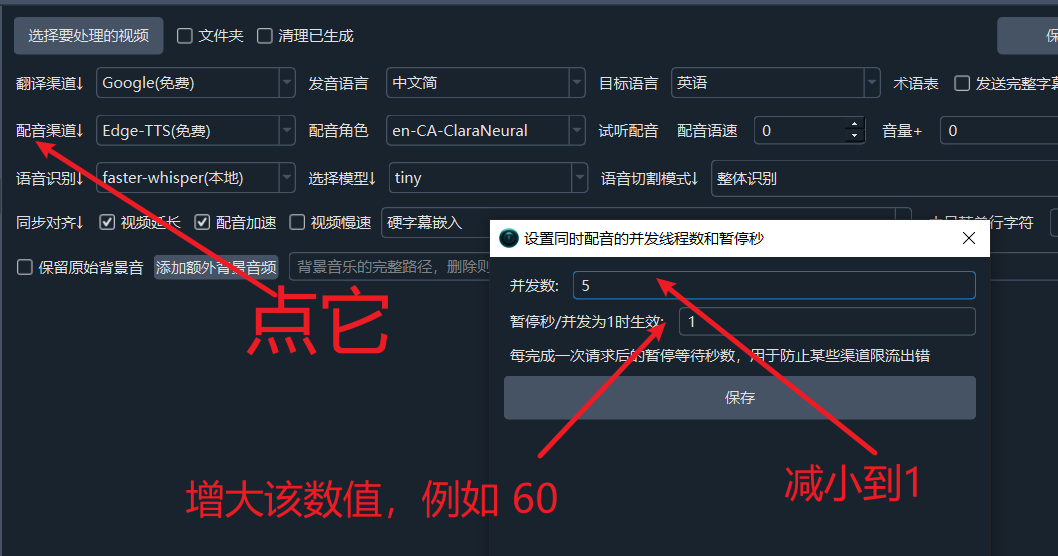
- Adjust concurrency settings:
- Increase the pause duration after each dubbing request
- Reduce the number of concurrent requests
- Upgrade to a paid account: Subscribe to Google's paid plan for higher limits
Important Notes
- Google account: You need a free Google account. If you don't have one, you can register at the Google website — a phone number is typically sufficient for registration.
Troubleshooting
| Issue | Solution |
|---|---|
| Cannot connect to API | Check your network connection and ensure you can access Google services |
| 429 rate limit | Wait and retry, or reduce concurrency |
| Insufficient balance | Upgrade to a paid Google account |
| Can't find TTS settings | Make sure you're using v3.70+ or later |