
M2M100 Translation Channel
What is it?
M2M100 is an open-source multilingual machine translation model from Meta (Facebook) that supports direct translation between 100 languages without requiring an intermediate language. pyVideoTrans supports M2M100 as a local offline translation channel starting from v3.94 — completely free with no internet required.
Prerequisites
- pyVideoTrans v3.94 or higher
- M2M100 model files downloaded (~5 GB)
- Recommended: NVIDIA GPU (CUDA acceleration); can also run on CPU (slower)
Model Download and Setup
Step 1: Download the model
Download the model archive from ModelScope: https://modelscope.cn/models/himyworld/videotrans/resolve/master/m2m100_12b_model.zip
The file is large (~5 GB), so please be patient.
Step 2: Extract the archive
After downloading, extract the archive to get a folder named m2m100_12b.
Step 3: Place the model
Copy the m2m100_12b folder into pyVideoTrans's models directory. The path should be:
pyVideoTrans/
├── sp.py (or sp.exe)
├── models/
│   └── m2m100_12b/    ← Place the model here
│       ├── model.bin
│       ├── sentencepiece.model
│ └── ...The folder should be inside models/, at the same level as sp.py (or sp.exe).
Step 4: Launch the software
Once the model is placed correctly, start pyVideoTrans and select M2M100 as the translation channel.
The software automatically detects whether the model has been downloaded. If not found, it will download it automatically.
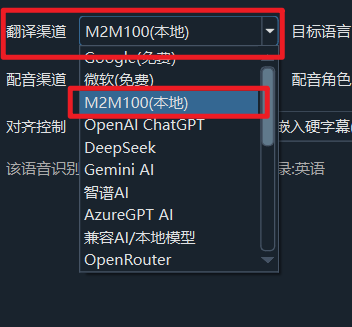
Recommended Configuration
| Setting | Recommended Value |
|---|---|
| Translation Channel | M2M100 |
| Model Path | models/m2m100_12b (auto-detected) |
Supported Languages
M2M100 supports translation between the following languages:
| Language | Code | Language | Code |
|---|---|---|---|
| English | en | Chinese | zh |
| French | fr | German | de |
| Japanese | ja | Korean | ko |
| Russian | ru | Spanish | es |
| Thai | th | Italian | it |
| Portuguese | pt | Vietnamese | vi |
| Arabic | ar | Hindi | hi |
| Turkish | tr | Indonesian | id |
| Malay | ms | Polish | pl |
| Dutch | nl | Swedish | sv |
| Hebrew | he | Bengali | bn |
| Ukrainian | uk | Czech | cs |
Troubleshooting
| Issue | Cause | Solution |
|---|---|---|
| Model not found | Model folder not in the correct location | Confirm m2m100_12b is inside the models/ directory |
| Very slow translation | Running in CPU mode | Install CUDA-enabled PyTorch for GPU acceleration |
| Insufficient memory | Model is large (~5 GB) | Ensure your system has enough memory (16 GB+ recommended) |
| Certain languages not supported | Language not in the supported list | Check the supported languages list above |
| GPU unavailable | CUDA drivers not installed | Install NVIDIA CUDA drivers, or use CPU mode |