
This article describes how to manually download models from the Hugging Face website if the faster-whisper [local] speech recognition channel fails to download.
Make sure you have upgraded to version v3.91
When using the faster-whisper [local] speech recognition channel, you need to download the model from the external website https://huggingface.co or from a domestic mirror https://hf-mirror.com. The former requires a VPN/proxy with a stable and reliable connection, otherwise it can easily fail. The latter mirror site itself seems to have unstable network connections, often leading to download timeouts.
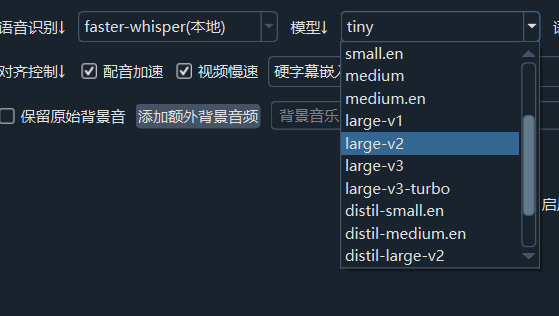
Manually Download Models for the faster-whisper (Local) Channel
Choose the model you want to use. The best model is
large-v3. When not using CUDA acceleration, ensure at least 16GB of RAM; with CUDA acceleration, ensure at least 10GB of VRAM.
Download the tiny model:
- Create a folder: In the
modelsfolder located in the same directory assp.exe(orsp.py), create a folder namedmodels--Systran--faster-whisper-tiny. - Open the model download page: https://huggingface.co/Systran/faster-whisper-tiny/tree/main
- Download all
.json,.bin, and.txtfiles from that page and copy them into the folder you created. If files already exist, you can overwrite them directly.
- Create a folder: In the
Download the tiny.en model (English only):
- Create a folder: In the
modelsfolder (same directory assp.exe/sp.py), create a folder namedmodels--Systran--faster-whisper-tiny.en. - Open the model download page: https://huggingface.co/Systran/faster-whisper-tiny.en/tree/main
- Download all
.json,.bin, and.txtfiles from that page and copy them into the folder. Overwrite if needed.
- Create a folder: In the
Download the base model:
- Create a folder named
models--Systran--faster-whisper-baseinside themodelsfolder. - Open the download page: https://huggingface.co/Systran/faster-whisper-base/tree/main
- Download all
.json,.bin, and.txtfiles and copy them into the folder. Overwrite if needed.
- Create a folder named
Download the base.en model (English only):
- Create a folder named
models--Systran--faster-whisper-base.eninside themodelsfolder. - Open the download page: https://huggingface.co/Systran/faster-whisper-base.en/tree/main
- Download all
.json,.bin, and.txtfiles and copy them into the folder. Overwrite if needed.
- Create a folder named
Download the small model:
- Create a folder named
models--Systran--faster-whisper-smallinside themodelsfolder. - Open the download page: https://huggingface.co/Systran/faster-whisper-small/tree/main
- Download all
.json,.bin, and.txtfiles and copy them into the folder. Overwrite if needed.
- Create a folder named
Download the small.en model (English only):
- Create a folder named
models--Systran--faster-whisper-small.eninside themodelsfolder. - Open the download page: https://huggingface.co/Systran/faster-whisper-small.en/tree/main
- Download all
.json,.bin, and.txtfiles and copy them into the folder. Overwrite if needed.
- Create a folder named
Download the medium model:
- Create a folder named
models--Systran--faster-whisper-mediuminside themodelsfolder. - Open the download page: https://huggingface.co/Systran/faster-whisper-medium/tree/main
- Download all
.json,.bin, and.txtfiles and copy them into the folder. Overwrite if needed.
- Create a folder named
Download the medium.en model (English only):
- Create a folder named
models--Systran--faster-whisper-medium.eninside themodelsfolder. - Open the download page: https://huggingface.co/Systran/faster-whisper-medium.en/tree/main
- Download all
.json,.bin, and.txtfiles and copy them into the folder. Overwrite if needed.
- Create a folder named
Download the large-v3-turbo model:
- Create a folder named
models--mobiuslabsgmbh--faster-whisper-large-v3-turboinside themodelsfolder. - Open the download page: https://huggingface.co/mobiuslabsgmbh/faster-whisper-large-v3-turbo/tree/main
- Download all
.json,.bin, and.txtfiles and copy them into the folder. Overwrite if needed.
- Create a folder named
Download the large-v1 model:
- Create a folder named
models--Systran--faster-whisper-large-v1inside themodelsfolder. - Open the download page: https://huggingface.co/Systran/faster-whisper-large-v1/tree/main
- Download all
.json,.bin, and.txtfiles and copy them into the folder. Overwrite if needed.
- Create a folder named
Download the large-v2 model:
- Create a folder named
models--Systran--faster-whisper-large-v2inside themodelsfolder. - Open the download page: https://huggingface.co/Systran/faster-whisper-large-v2/tree/main
- Download all
.json,.bin, and.txtfiles and copy them into the folder. Overwrite if needed.
- Create a folder named
Download the large-v3 model:
- Create a folder named
models--Systran--faster-whisper-large-v3inside themodelsfolder. - Open the download page: https://huggingface.co/Systran/faster-whisper-large-v3/tree/main
- Download all
.json,.bin, and.txtfiles and copy them into the folder. Overwrite if needed.
- Create a folder named
The following distilled models are only suitable for transcribing English audio/video content.
Download the distil-large-v3 model:
- Create a folder named
models--Systran--faster-distil-whisper-large-v3inside themodelsfolder. - Open the download page: https://huggingface.co/Systran/faster-distil-whisper-large-v3/tree/main
- Download all
.json,.bin, and.txtfiles and copy them into the folder. Overwrite if needed.
- Create a folder named
Download the distil-large-v3.5 model:
- Create a folder named
models--distil-whisper--distil-large-v3.5-ct2inside themodelsfolder. - Open the download page: https://huggingface.co/distil-whisper/distil-large-v3.5-ct2/tree/main
- Download all
.json,.bin, and.txtfiles and copy them into the folder. Overwrite if needed.
- Create a folder named
Download the distil-small.en model:
- Create a folder named
models--Systran--faster-distil-whisper-small.eninside themodelsfolder. - Open the download page: https://huggingface.co/Systran/faster-distil-whisper-small.en/tree/main
- Download all
.json,.bin, and.txtfiles and copy them into the folder. Overwrite if needed.
- Create a folder named
Download the distil-medium.en model:
- Create a folder named
models--Systran--faster-distil-whisper-medium.eninside themodelsfolder. - Open the download page: https://huggingface.co/Systran/faster-distil-whisper-medium.en/tree/main
- Download all
.json,.bin, and.txtfiles and copy them into the folder. Overwrite if needed.
- Create a folder named
Download the distil-large-v2 model:
- Create a folder named
models--Systran--faster-distil-whisper-large-v2inside themodelsfolder. - Open the download page: https://huggingface.co/Systran/faster-distil-whisper-large-v2/tree/main
- Download all
.json,.bin, and.txtfiles and copy them into the folder. Overwrite if needed.
- Create a folder named