
The easiest way to install FFmpeg on Windows is to download the official executable.
Official FFmpeg download address: https://www.gyan.dev/ffmpeg/builds
There are multiple versions on the download page, as shown in the image below. What are the differences between them, and which one should you download?
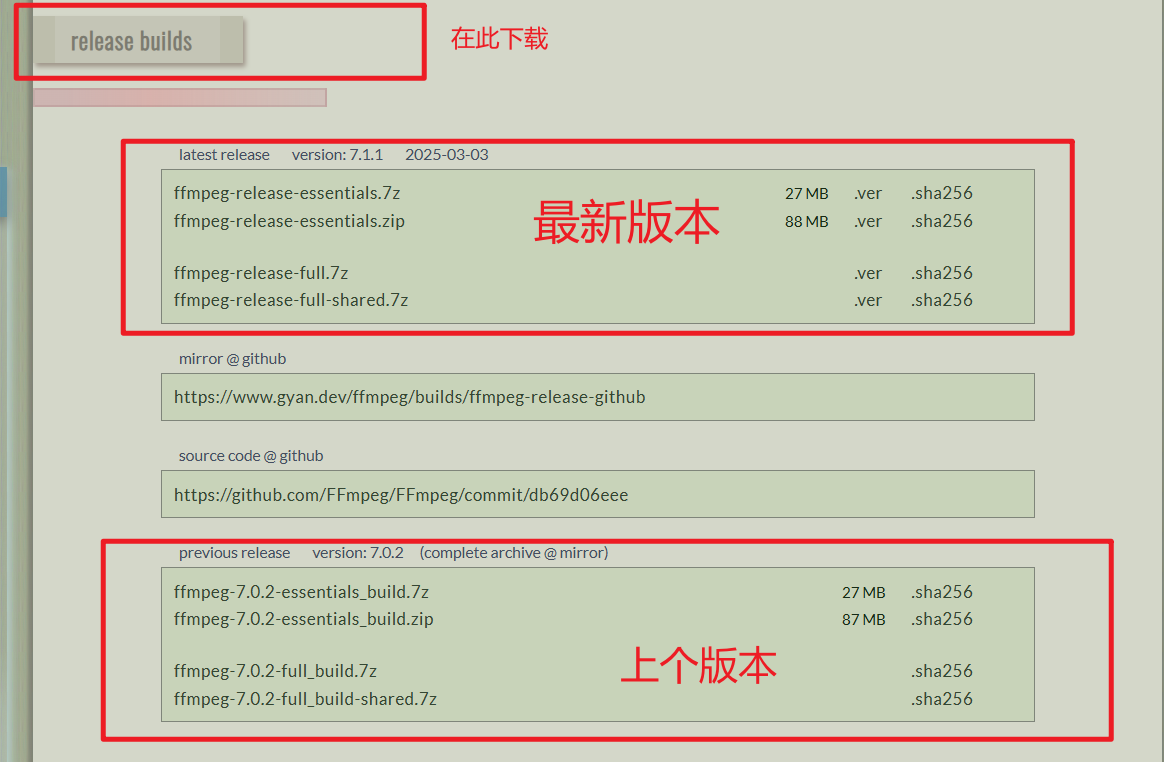
Detailed Explanation of Each Version
1. Versions starting with ffmpeg-release-essentials (Essentials / Basic Version)
- Contents:
ffmpeg.exe(Main program for audio/video conversion and processing)ffprobe.exe(Used to view detailed information of media files)ffplay.exe(A simple player for quick preview)- Includes a set of the most core and commonly used libraries (encoders, decoders, filters, etc.), such as H.264, H.265 (HEVC), AAC, MP3, VP9, etc.
- Characteristics:
- Smallest file size.
- Functionality is sufficient for the vast majority of everyday use cases, such as format conversion, video editing, merging, extracting audio, etc.
- Who it's for:
- The vast majority of general users and beginners. If you are unsure what you need, choosing this version is almost always the right choice.
2. ffmpeg-release-full (Full Version)
- Contents:
- Contains everything from the
essentialsversion. - Additionally includes many non-essential but powerful third-party libraries and filters. For example:
- More professional encoders (e.g.,
svt-av1forAV1). - Advanced filters (e.g.,
libvmaffor video quality assessment). - Support for more uncommon formats and protocols.
- More professional encoders (e.g.,
- Contains everything from the
- Characteristics:
- Most comprehensive functionality, supporting almost everything FFmpeg can do.
- File size is larger than the
essentialsversion. - This is a "static" build, meaning all dependent libraries are compiled into the executable files like
ffmpeg.exe. This makes the program very portable (only the.exefile is needed to run), but also results in a larger.exefile itself.
- Who it's for:
- Everyone, or when you encounter an "Unknown encoder/decoder/filter..." error message while using the
essentialsversion, it means the feature you need is not in the basic version. In that case, you should download the full version.
- Everyone, or when you encounter an "Unknown encoder/decoder/filter..." error message while using the
3. ffmpeg-release-full-shared (Full Shared Version)
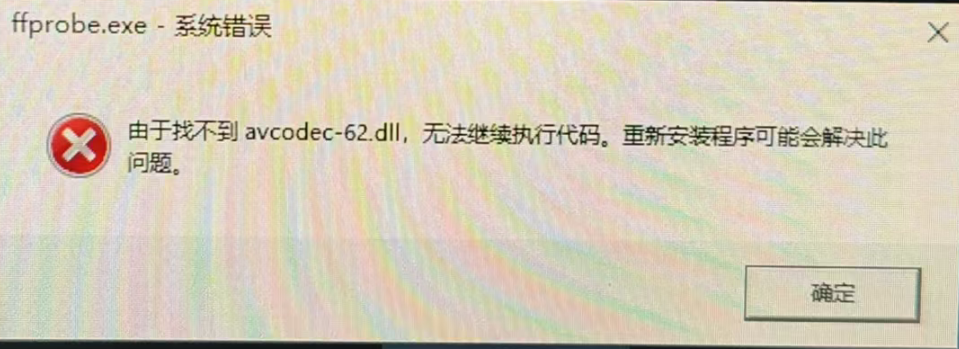
Non-developers should not use this version, otherwise you may encounter errors about missing xxx.dll files.
- Contents:
- Functionally identical to the
fullversion, containing all libraries. - Different structure: This is a "shared" build. It does not compile all libraries into the
.exefile. Instead, these libraries are provided as separate.dllfiles (dynamic link libraries) in thebinfolder.
- Functionally identical to the
- Characteristics:
- The
ffmpeg.exefile itself is very small. - The program requires the
.dllfiles in the same directory to run; you cannot move the.exefile alone. - The total size of the extracted folder is the largest.
- The
- Who it's for:
- Software developers. When you want to call FFmpeg's functions from your own program (e.g., written in C++, Python, C#), you need to link against these
.dlllibrary files. Ordinary command-line users will almost never need this version.
- Software developers. When you want to call FFmpeg's functions from your own program (e.g., written in C++, Python, C#), you need to link against these
Adding FFmpeg to the System Environment Variables
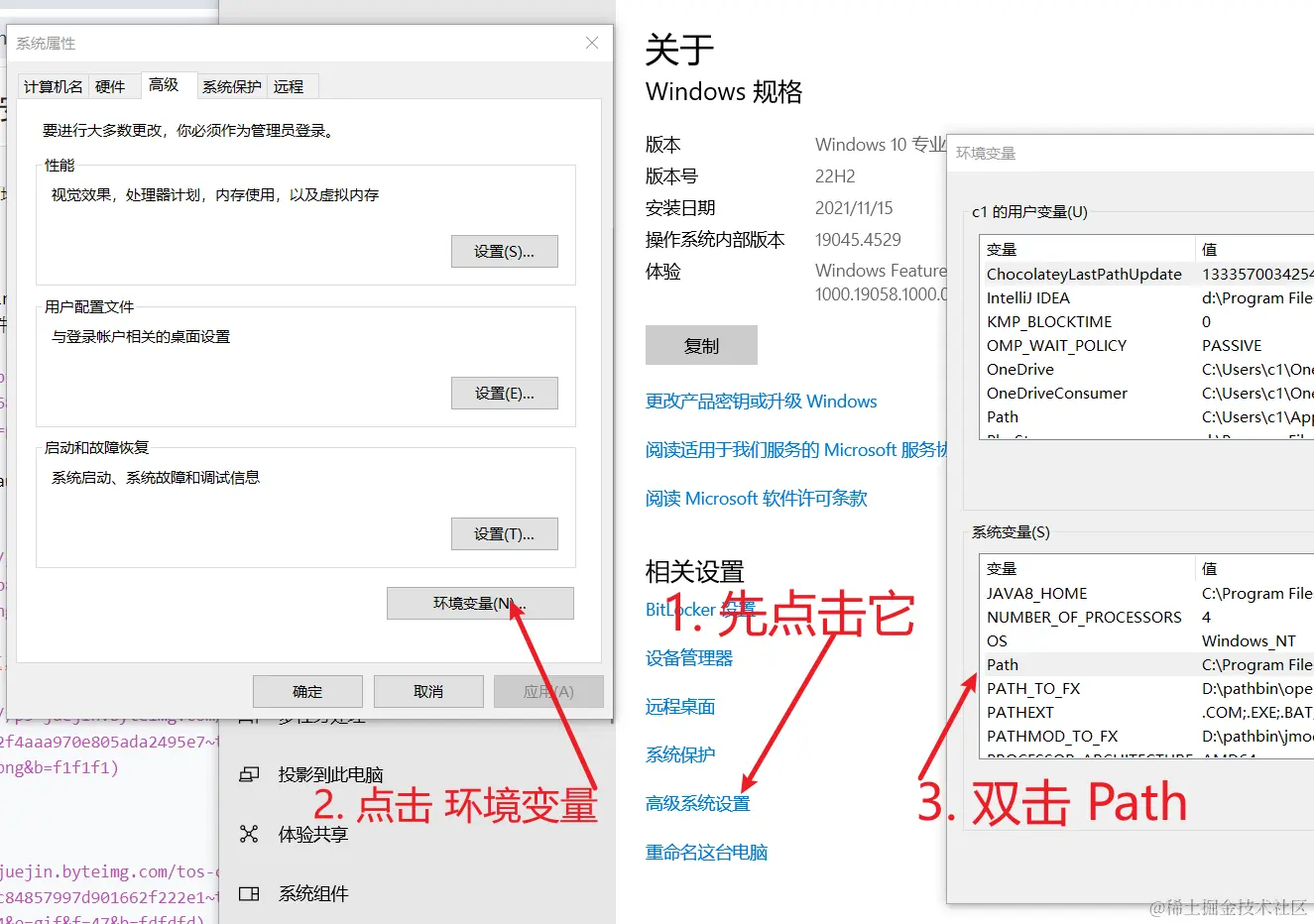
Method to add to the Path environment variable: Press the Win key + Pause key (top right), in the window that opens, click sequentially: Advanced system settings -> Environment Variables -> Under System variables, find the Path line and double-click it.
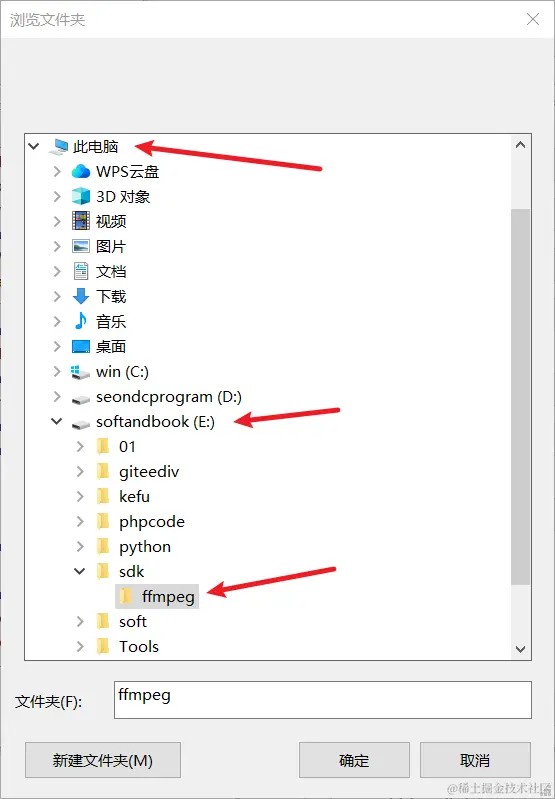
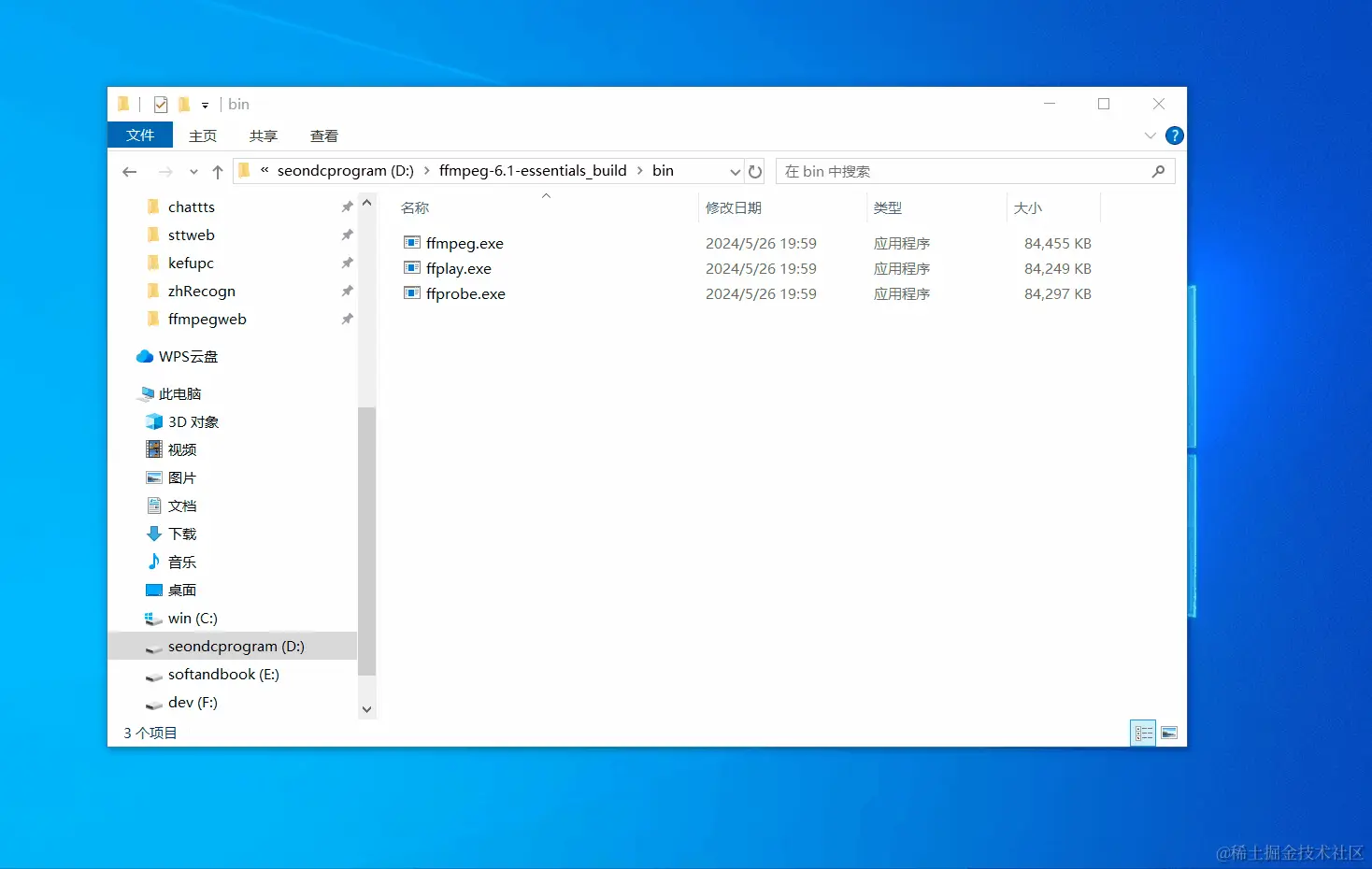
Then click New -> Browse, and find the directory containing the three .exe files.
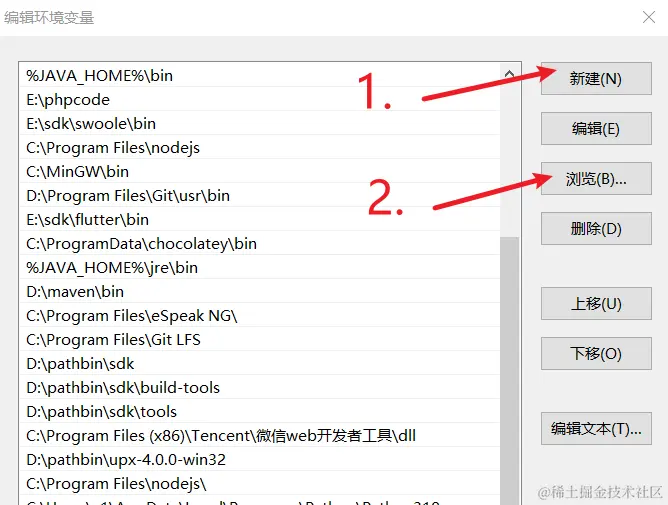
In the browse dialog, find the directory containing the ffmpeg.exe mentioned earlier, then click OK.
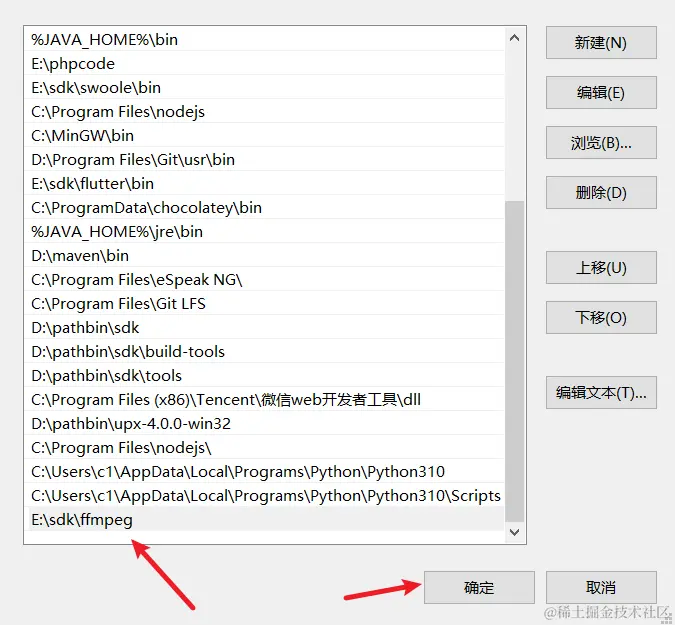
You will then see the newly added path on the left. Click OK to close, and then click OK all the way to close all open dialogs.
Animated Demonstration
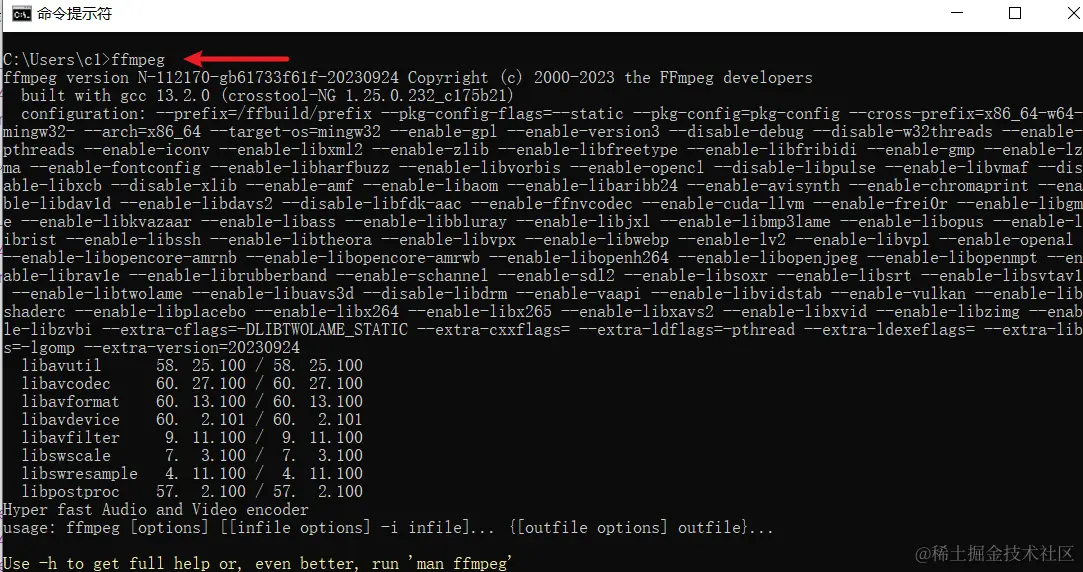
Verify if the environment variable is set successfully
Open any Command Prompt (cmd) window, type ffmpeg and press Enter. If it displays output as shown below, the installation is correct. If it says something like "'ffmpeg' is not recognized as an internal or external command...", it means there was an error configuring the environment variable. Please reconfigure it.
About Compression Formats: .7z vs .zip
ffmpeg-release-essentials.7z(27 MB)ffmpeg-release-essentials.zip(88 MB)
The contents of these two files are identical. The only difference is the compression algorithm.
.7z: Uses the 7-Zip algorithm, which has a higher compression ratio, so the download file is smaller. You need software like 7-Zip or WinRAR to extract it..zip: Windows has built-in support for extracting.zipfiles, offering the best compatibility. However, the compression ratio is lower, so the download file is larger.
Recommendation: If you have 7-Zip or WinRAR installed on your computer, download the .7z version to save download time and bandwidth.
Summary and Selection Advice
| Version Name | Main Characteristics | Target Users | Recommendation |
|---|---|---|---|
ffmpeg-release-essentials | Core features, small size | General users, beginners | ★★★★★ (Most Recommended) |
ffmpeg-release-full | Most comprehensive features, static build, large executable | Advanced users, professionals | ★★★★☆ |
ffmpeg-release-full-shared | Most comprehensive features, dynamic linking, contains many DLL files | Software developers | ★☆☆☆☆ (Do not choose if you are a general user) |
In a nutshell:
- Not sure which one to use? -> Download
ffmpeg-release-essentials.7z. - Getting an error in the
essentialsversion saying a feature is not found? -> Switch toffmpeg-release-full.7z. - Are you a programmer and want to use FFmpeg in your own project? -> Download
ffmpeg-release-full-shared.7z.