
Want to make your text "speak" with natural, lifelike, human-quality voices? Microsoft Edge browser's built-in "Read Aloud" feature can do just that! It supports dozens of languages and various voice styles, and the key point is that it's completely free.
The open-source project edge-tts, based on this feature, is also very popular, and many free text-to-speech tools are developed using it. However, as user numbers have grown, Microsoft has implemented rate limiting on voice synthesis requests. Now, even moderate usage can trigger a 403 error, preventing further speech synthesis.
How to Avoid or Reduce 403 Errors?
Since this is an API service provided by Microsoft, not an open-source project, local deployment is not feasible. Regardless, speech synthesis must connect to Microsoft's servers.
Deploy to Cloudflare: This can reduce the frequency of 403 errors but cannot completely prevent them.
- If you are interested, you can refer to this tutorial: https://pyvideotrans.com/edgettscf
Use Dynamic IP Proxies: Automatically changing the IP every few minutes can effectively avoid 403 errors. Stability depends on the quality of the dynamic IPs. If the dynamic IP reliability is 97%, then the availability of
edge-ttscan also reach 97%.- This seems to be the best solution currently. Of course, high-quality dynamic IP proxy services usually require payment. Free proxies often have poor quality and cannot meet the requirements.
So, how to configure dynamic IP proxies, and which services are worth recommending?
Dynamic IPs cannot guarantee 100% availability; actual availability may only be around 85%-95%.
Here, I will use Proxy302, which I have personally used, as an example. It provides foreign residential IPs, changes approximately every 5 minutes, and charges based on traffic usage ($1.5/GB).
Below are the detailed steps for registration and usage:
1. Register an Account
Visit 302AI to register an account. This account and its balance are shared with Proxy302. The reason for recommending registration via 302AI is that its minimum top-up amount is $5, while Proxy302's minimum is $20. For initial testing, it's advisable to start with a small top-up to minimize risk.
Open this link to register: https://gpt302.saaslink.net/teRK8Y Register using your email and complete email verification.
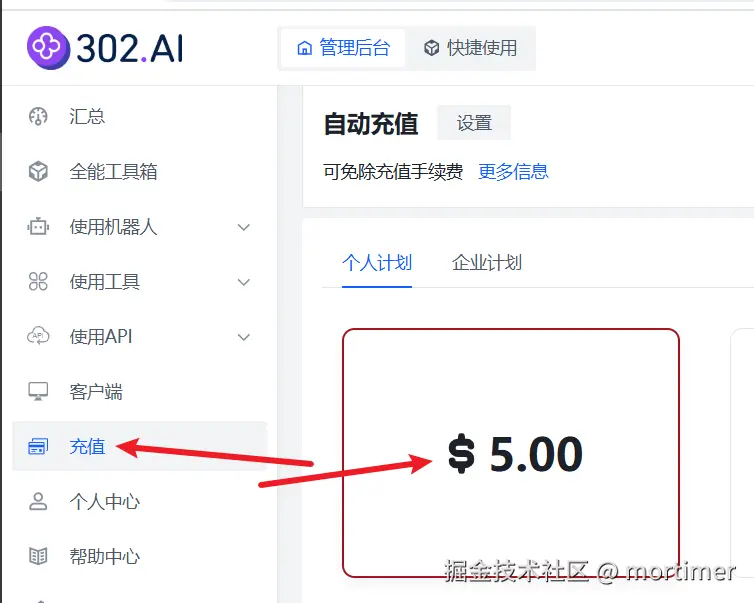
Top up your balance: Follow the illustration below to top up; the minimum top-up is $5.
2. Log in to Proxy302.com
After topping up, log in to https://dash.proxy302.com/login using the same account credentials.
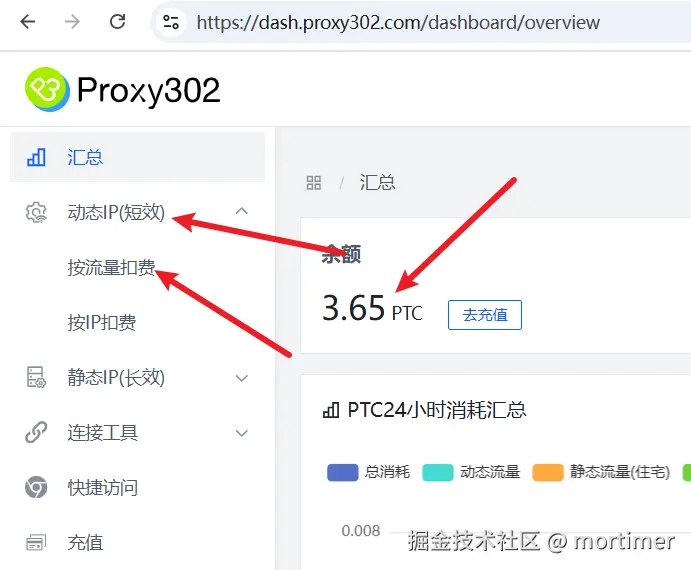
You will see your balance upon login.
3. Create a Dynamic IP Proxy Address
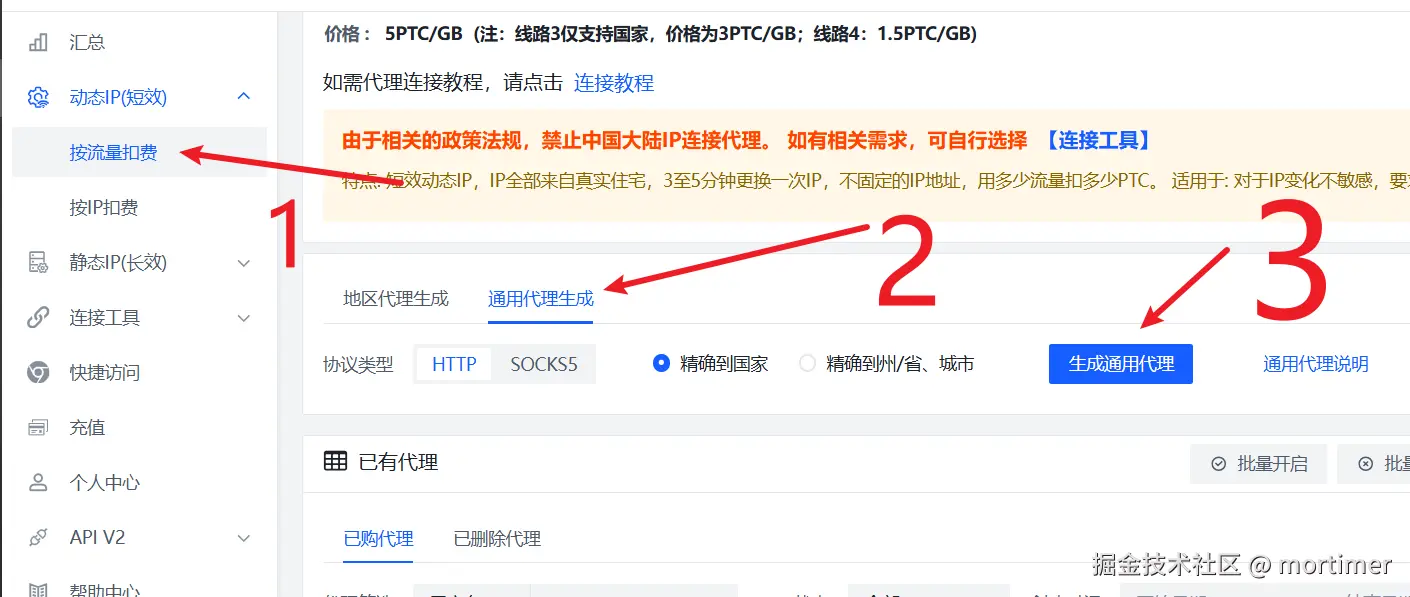
As shown in the image above, click on Dynamic IP (Short-term) --> Pay by Traffic in the left navigation bar.
Then click Generate General Proxy --> Generate General Proxy in sequence, as shown below.
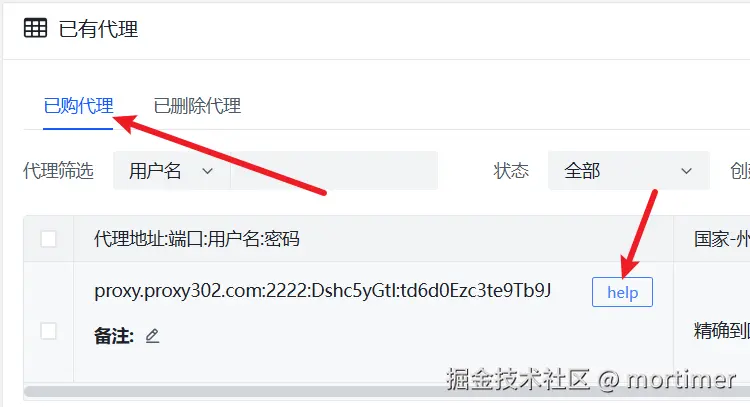
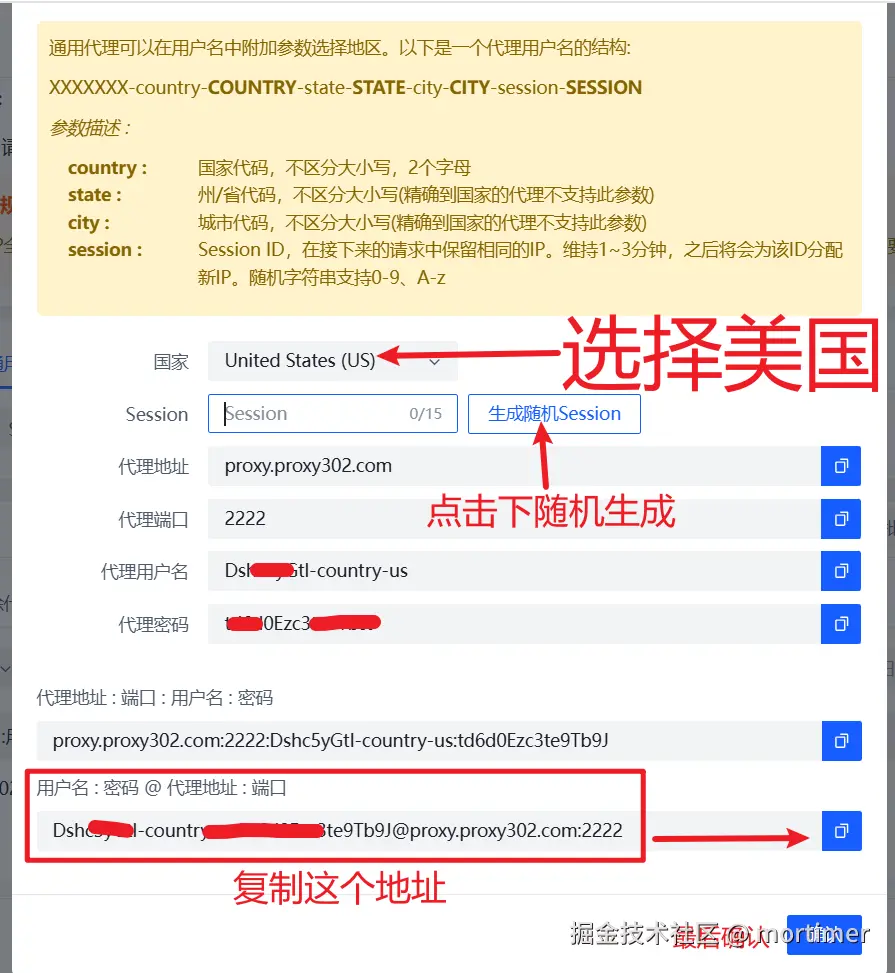
- After generation, you can see the newly generated proxy address under Existing Proxies --> Purchased Proxies. Click the help button next to the address to set the country for the proxy IP and copy the proxy address.
- As shown below, select
United States (US)in the country field, click to generate a randomSession, and copy the address at the very bottom.
Important: Whenever you need to copy the proxy address, be sure to click the
helpbutton and copy from there.
4. Apply the Proxy Address to the Video Translation Software
First, you must upgrade the video translation software to version v3.50.
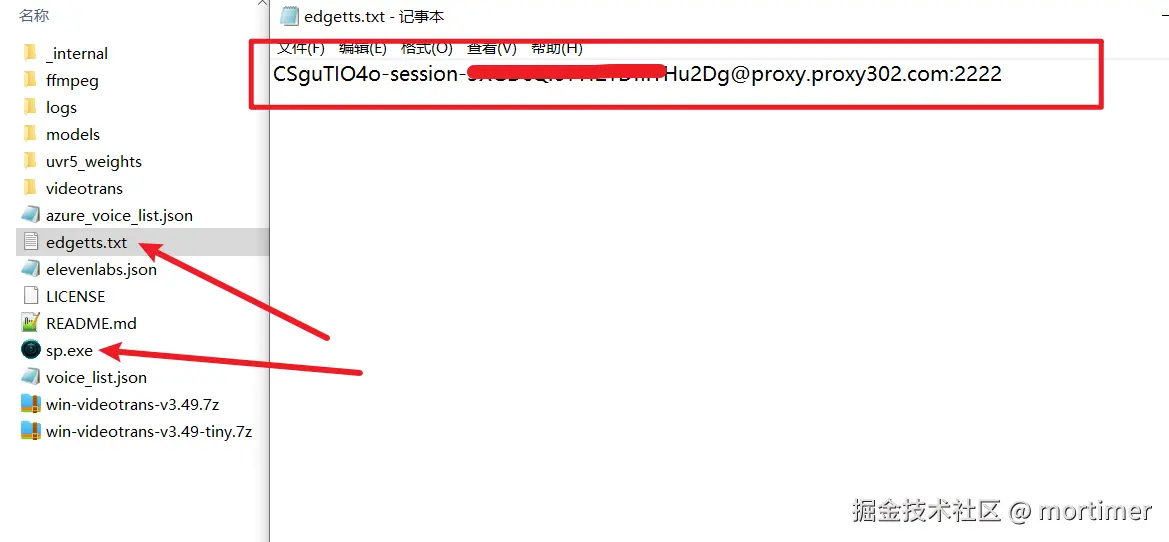
In the same directory as
sp.exefor thepyVideoTransvideo translation software (or the directory containingsp.pyif using source code deployment), create a plain text file namededgetts.txt.Paste the proxy address copied in the previous step into the
edgetts.txtfile and save it, as shown below.
Now, you can try using edge-tts for speech synthesis.
Charged based on traffic, roughly estimated at 1 RMB for about 3-5 hours of synthesized speech (retries due to errors will increase costs; actual costs may vary, please test yourself, this is for reference only).