
TTS Channels: Index-TTS / Spark-TTS / VoxCPM / FireRed3-TTS
Starting from v3.68, these TTS services share the same settings interface. Simply enter the WebUI URL after starting the corresponding TTS service (usually
http://127.0.0.1:7860by default), then select the service from the "TTS Channel" dropdown menu on the main interface.
This document covers the deployment and integration methods for four open-source TTS services. They all provide APIs via Gradio WebUI, and their configuration processes are essentially the same.
1. Overview of Channels
| Channel | Developer | Supported Languages | Default Address | Official Project |
|---|---|---|---|---|
| Index-TTS | Bilibili Open Source | Chinese, English | http://127.0.0.1:7860 | https://github.com/index-tts/index-tts |
| FireRed3-TTS | Xiaohongshu | 24 Languages | http://127.0.0.1:7860 | https://github.com/jianchang512/FireRedTTS3 (Modified version with webui.py added for integration) |
| VoxCPM-TTS | ModelBest | 30+ Languages | http://127.0.0.1:7860 | https://github.com/OpenBMB/VoxCPM |
| Spark-TTS | SparkAudio | Chinese, English | http://127.0.0.1:7860 | https://github.com/SparkAudio/Spark-TTS |
The integration workflow is identical for all channels: Launch WebUI → Enter the address in pyVideoTrans → Select the channel → Configure reference audio → Start using.
2. Prerequisites
Before using these TTS services, please make sure you meet the following requirements:
- pyVideoTrans Version: v3.68 or higher
- Hardware Requirements: An NVIDIA GPU (for GPU acceleration) is recommended. Some services also support running on CPU (though much slower).
- Network Environment: The first run may require downloading models from HuggingFace. Users in certain regions may need a proxy or configured mirror.
- Python Environment: If deploying from source code, Python 3.10+ and Git are required.
Index-TTS
Index-TTS is an open-source TTS service by Bilibili. It supports Chinese and English voice cloning with excellent sound quality.
Windows All-in-One Package
- Baidu Netdisk Download: https://pan.baidu.com/s/1dmLdhJgBC7HlfY-hITMVeg?pwd=1234
- HuggingFace Download: https://huggingface.co/mortimerme/repocollect/resolve/main/indextts2-0529.7z?download=true
Source Code Deployment
Please refer to the official documentation: https://github.com/index-tts/index-tts
Starting WebUI
After launching, the default address is http://127.0.0.1:7860. The configuration process is identical to F5-TTS.
Note: Only the official Index-TTS WebUI is supported. If you use a third-party package, please overwrite the third-party
webui.pywith thewebui.pyfrom the official repository; otherwise, it may fail to work.
FireRed3-TTS (Xiaohongshu TTS3)
Supported Languages: Arabic · Cantonese · Chinese · Czech · Dutch · English · French · German · Greek · Hindi · Indonesian · Italian · Japanese · Korean · Polish · Portuguese · Romanian · Russian · Spanish · Thai · Turkish · Ukrainian · Vietnamese
The official repository does not include a WebUI and cannot be directly integrated. Therefore, a modified version with an added webui.py is provided at: https://github.com/jianchang512/FireRedTTS3
Installation & Deployment:
- Requires an NVIDIA GPU with a configured CUDA 12.9 environment.
git clone https://github.com/jianchang512/FireRedTTS3
cd FireRedTTS3
pip install -r requirements.txt- Start
webui.py:python webui.py. If using Google Colab, add the--shareargument:python webui.py --share - Start
webuiall.py:python webuiall.py. If using Google Colab, add the--shareargument:python webuiall.py --share
After launching, copy the address (default local: http://127.0.0.1:7860) and paste it into pyVideoTrans Menu -> TTS Settings -> Index/VoxCPM/Spark/FireRed3 under FireRed3-TTS URL.
- If local deployment is challenging, you can run it directly on Google Colab (requires a Google account): Click this link to open Colab
- Download Link: https://huggingface.co/mortimerme/repocollect/resolve/main/FireRedTTS3-0817.7z?download=true
VoxCPM-TTS
VoxCPM-TTS is an open-source TTS service by ModelBest. It supports over 30 languages, including multiple Chinese dialects.
Supported Languages
- International Languages (30+): Arabic, Burmese, Chinese, Danish, Dutch, English, Finnish, French, German, Greek, Hebrew, Hindi, Indonesian, Italian, Japanese, Khmer, Korean, Lao, Malay, Norwegian, Polish, Portuguese, Russian, Spanish, Swahili, Swedish, Tagalog, Thai, Turkish, Vietnamese
- Chinese Dialects: Mandarin, Sichuanese, Cantonese, Wu (Shanghainese), Northeastern, Henan, Shaanxi, Shandong, Tianjin, Minnan
Deployment
Deploy from source code following the official project documentation: https://github.com/OpenBMB/VoxCPM
After starting the WebUI, the default address is http://127.0.0.1:7860. The configuration process is identical to F5-TTS.
Spark-TTS
Spark-TTS is an open-source TTS service by SparkAudio, supporting Chinese and English voice cloning.
Deployment
Please deploy from source code following the official project documentation: https://github.com/SparkAudio/Spark-TTS
After starting the WebUI, the default address is http://127.0.0.1:7860. The configuration process is identical to F5-TTS.
Reference Audio Configuration
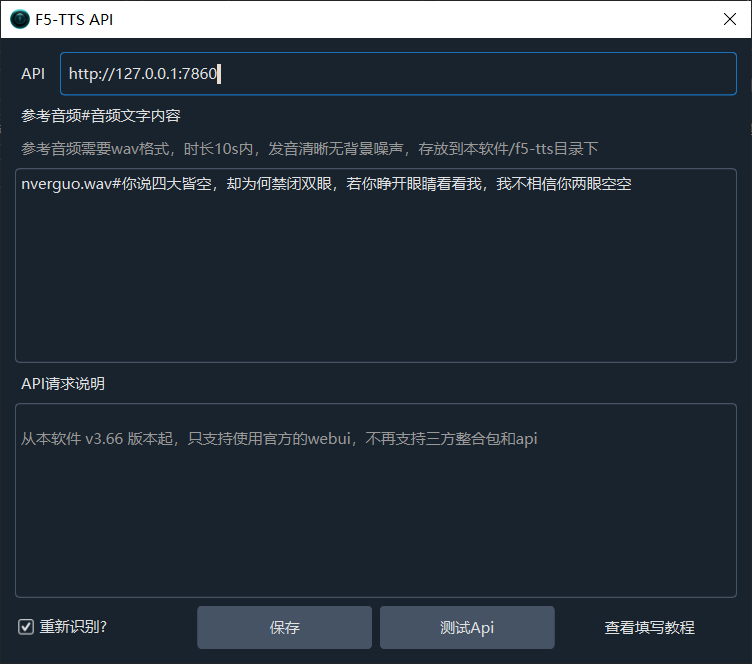
Reference audio is configured under Menu → TTS Settings → Set Reference Audio.
Steps
- Open the "Set Reference Audio" settings window.
- In the "Reference Audio" text box, enter the details in the following format:
AudioFileName#MatchingTextInTheAudio- Place the reference audio file into the
f5-ttsfolder inside the pyVideoTrans installation directory (if the folder does not exist, please create it manually).
Example
Suppose you have an audio file named nverguo.wav, and the spoken words in the audio are "女儿国王说话". You would enter:
nverguo.wav#女儿国王说话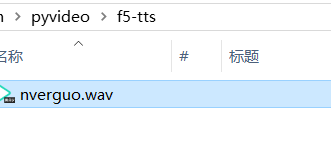
Reference Audio Requirements
| Item | Requirement |
|---|---|
| Format | WAV format (recommended); MP3 and other formats are also supported |
| Duration | 3–12 seconds (F5-TTS maximum is 12 seconds; longer audio will be automatically trimmed) |
| Content | Clear pronunciation without background noise |
| Text | Must match the spoken words in the audio file exactly |
Common Errors and Notes
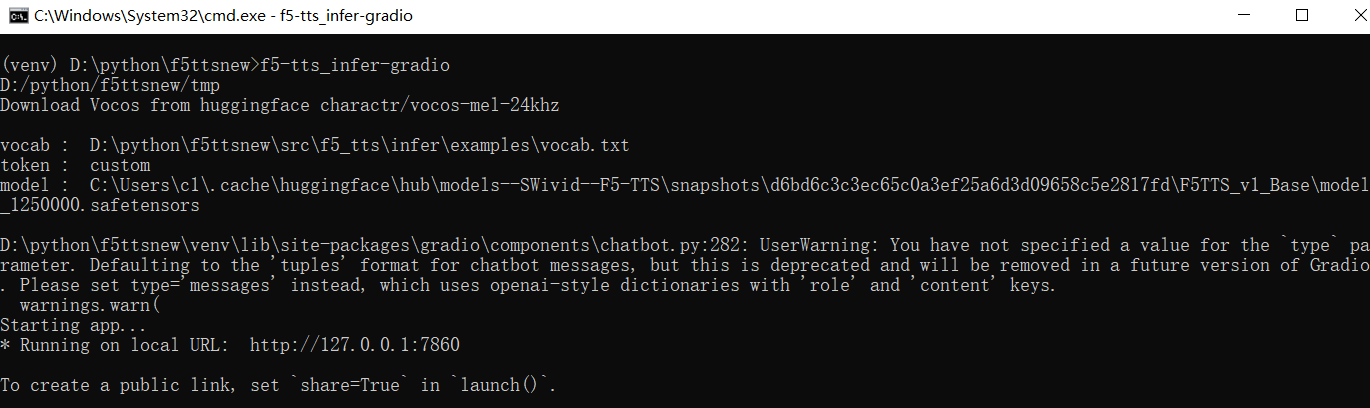
1. Do Not Close the Terminal Window
While using the API, you may close the WebUI page in your browser, but do NOT close the terminal/command prompt window running the TTS service.
2. Cannot Switch Models Dynamically
You cannot switch models on the fly. You must manually modify the code/settings and restart the WebUI.
3. HuggingFace Connection Timeout
If you encounter an error similar to this:
requests.exceptions.ConnectTimeout: HTTPSConnectionPool(host='huggingface.co', port=443): Max retries exceededThis is a network issue. Please check your network environment to ensure you can access huggingface.co properly.
4. Reference Audio Duration Limit
A duration of 3 to 10 seconds is recommended.