
Adding New Models from Huggingface
This documentation applies to the stt speech recognition to text project https://github.com/jianchang512/stt
Starting from version 0.0.94, it is allowed to add models from huggingface.co that are compatible with faster-whisper/ctranslate2, such as models dedicated to specific languages, to compensate for the shortcomings of general-purpose models.
How to Add
Upgrade to version 0.0.94.
Ensure you can access the internet via a proxy (know what a proxy and proxy port are). If this condition is not met, do not proceed, as both accessing the huggingface.co website and downloading models require a proxy connection.
Search for the model you want to use on https://huggingface.co/models. Note that the model must be compatible with faster-whisper/ctranslate2; otherwise, it will not work.
For example, I found this model: https://huggingface.co/zh-plus/faster-whisper-large-v2-japanese-5k-steps
Converted from clu-ling/whisper-large-v2-japanese-5k-steps using CTranslate2.
It is declared to be converted using ctranslate2, so it can be used.
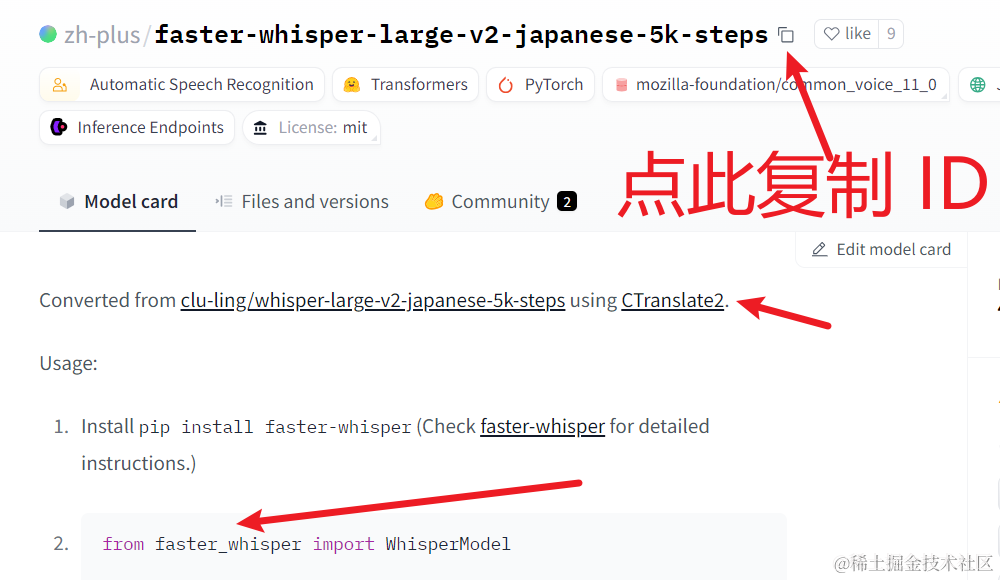
As shown in the image above, click to copy the ID. Then, open the
set.inifile in the software directory, find the linemodel_list=, add an English comma at the end, paste the ID you copied, and save the changes.
Open the software, fill in the network proxy address, select the name you just pasted from the model list, and click Start.
If you are using v2ray-type software, the default proxy address is
http://127.0.0.1:10809. If you are using clash-type software, the default proxy address ishttp://127.0.0.1:7890.Note: The selected video language must match the language supported by the model you added. If you choose a Japanese model but select a Chinese video, you will not get the expected results.
After starting the execution, during the subtitle recognition stage, if the model is not found locally, it will automatically connect to huggingface.co to download. Depending on your proxy, this may take a few minutes to tens of minutes. Please be patient.
As long as no red error message appears, it is downloading. If a red error appears, it is mostly a proxy issue, such as slow proxy speed or unstable connection. The error code usually contains
Connection to huggingface.co timed outor a string of numbers like46573454354indicating incomplete data.Note: If deployed from source code, even if there is a network proxy error, it will only report errors like
No such file xxxx.