
X.AI TTS Voice Channel
What is it?
X.AI TTS is a speech synthesis service from x.ai (Elon Musk's AI company), built on the Grok model. It supports multiple languages and offers distinctive voice styles.
Prerequisites:
- A paid x.ai subscription
- An API Key
- pyVideoTrans v3.98-319+ or later
Step 1: Get an API Key
- Visit: https://console.x.ai
- Click API Keys on the left
- Create and copy your API Key
Step 2: Configure the Software
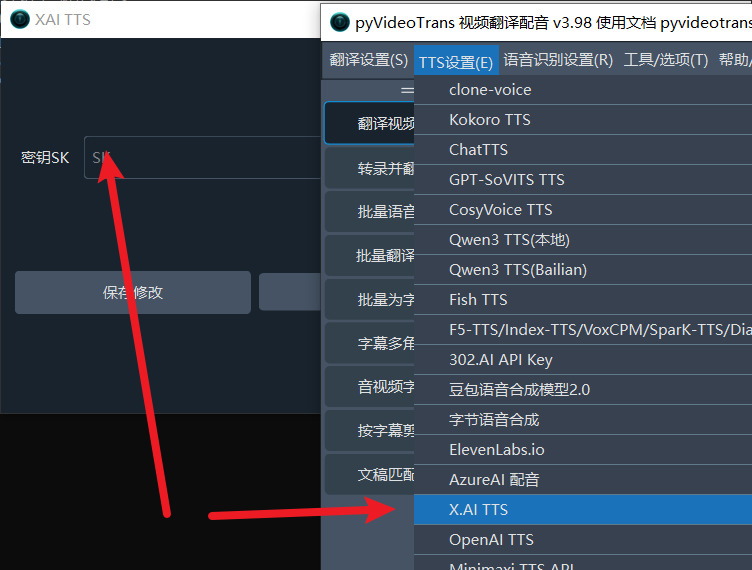
- Open the software and go to Menu → TTS Settings → X.AI TTS
- Paste the API Key
- Click the Test button
- If no errors occur and audio plays, it's working
- Click Save
Step 3: Start Dubbing
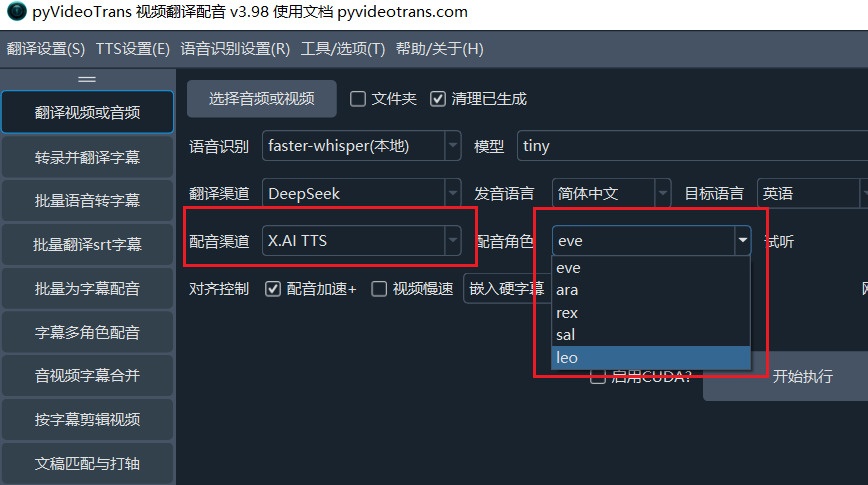
- Return to the main interface
- Select
X.AIfrom the Voice Channel dropdown - Select the target language
- Choose a voice
- Start dubbing
Available Voices
X.AI TTS provides the following 5 voices:
eve- Femaleara- Femalerex- Malesal- Maleleo- Male
Supported Languages
X.AI TTS supports the following 16 languages:
- Chinese, English, French, German
- Italian, Japanese, Korean, Russian
- Spanish, Turkish, Vietnamese
- Hindi, Indonesian, Bengali
- Arabic, Portuguese
Note:
- Arabic is fixed to Saudi Arabic
- Portuguese uses Portuguese (Portugal)
- Spanish is fixed to Spanish (Spain)
Important Notes
- Paid subscription required: You need an active x.ai paid subscription to use this service
- Direct API only: This does not work with relay/proxy APIs — if you're using a relay, configure it under Menu → TTS Settings → OpenAI and Compatible instead
- API address:
https://api.x.ai/v1/tts
Common Errors
| Error | Cause | Solution |
|---|---|---|
| Authentication error | Invalid API Key | Verify the key is correct |
| Payment required | No paid subscription | Activate an x.ai paid account |
| Connection error | Network issue | Check your network connection |
| Unsupported language | Language not in the supported list | Choose a supported language |