
Since v4.05, this TTS service is built-in — no separate deployment or model download needed. The following applies only to versions before v4.05. If the initial model download fails, manually open https://huggingface.co/k2-fsa/OmniVoice/tree/main, download all files, and place them in app_dir/models/models--k2-fsa--OmniVoice/.
TTS Service: OmniVoice-TTS
1. What is OmniVoice
OmniVoice is an advanced zero-shot multilingual TTS model with the following features:
- Ultra-multilingual support: 600+ languages
- High-quality speech: Natural and fluent voice output
- Voice cloning: Clone voice characteristics from reference audio
- Fast inference: Excellent inference speed
Since pyVideoTrans v4.05, OmniVoice is built-in — no additional deployment needed.
OmniVoice open-source repository: https://github.com/k2-fsa/OmniVoice
2. Prerequisites
| Requirement | Details |
|---|---|
| pyVideoTrans version | ≥ v3.98-0403 |
| OS | Windows (package), Linux/macOS (source) |
| Hardware | NVIDIA GPU recommended (GPU acceleration) |
| Network | First launch downloads model from huggingface.co (mirror or VPN needed in China) |
3. Windows Package (Recommended for Beginners)
Download
- Baidu Netdisk: https://pan.baidu.com/s/1e6nHkq69TvUQe5VE02V-eg?pwd=1234
- HuggingFace: https://huggingface.co/mortimerme/repocollect/resolve/main/omnivoice-0528.7z?download=true
Launch
- Download the
.7zfile and extract it - Double-click
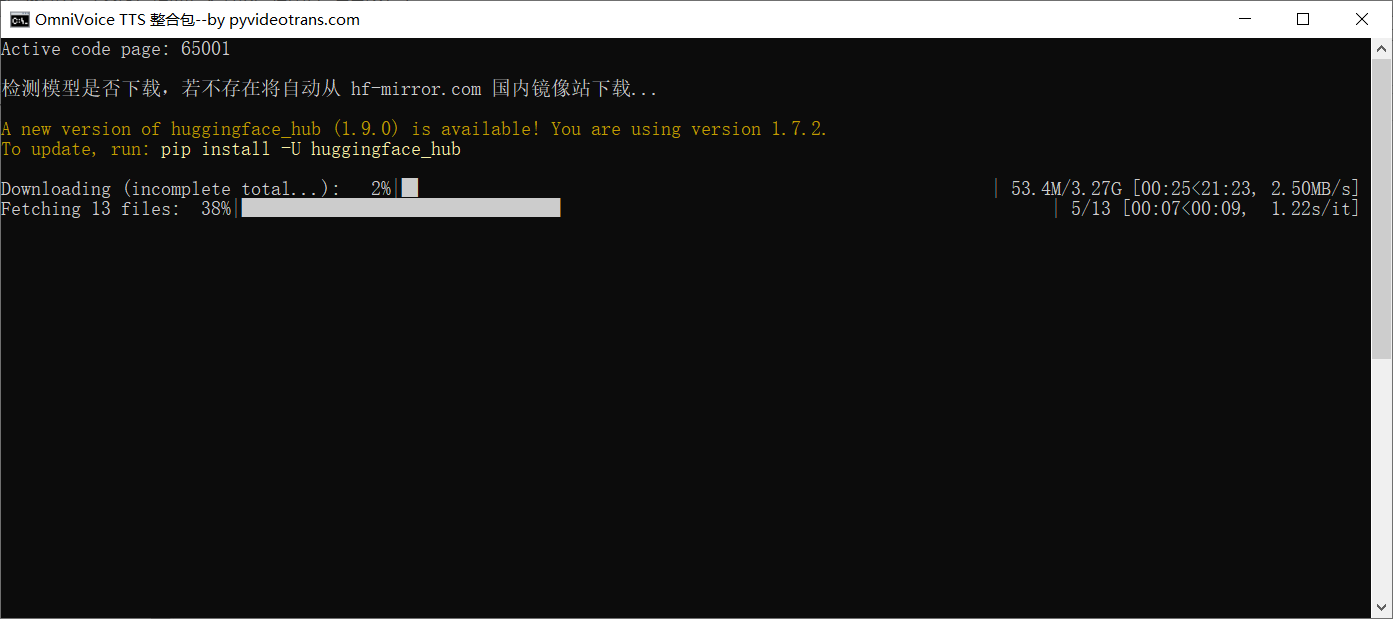
start.bat - Wait for successful startup (confirmed by the following screen):

First launch will download the model from the mirror site https://hf-mirror.com by default. The official huggingface.co is not directly accessible from China — a VPN is needed.
4. macOS/Linux Source Deployment
Step 1: Download Source
- Go to the OmniVoice official repository
- Click the green
<>Codebutton, thenDownload ZIP - Extract and enter the folder containing
pyproject.toml(usually insideOmniVoice-master)
Step 2: Install uv
curl -LsSf https://astral.sh/uv/install.sh | shWindows: Download uv zip, extract and place
uv.exealongsidepyproject.toml.
Step 3: Install Dependencies
In the folder containing pyproject.toml, open a terminal and run:
uv syncIn China, use a mirror:
uv sync --default-index "https://mirrors.aliyun.com/pypi/simple"Step 4: Set Model Download Mirror
The model website huggingface.co cannot be accessed directly from China. Set a mirror:
Windows:
set HF_ENDPOINT=https://hf-mirror.commacOS/Linux:
export HF_ENDPOINT=https://hf-mirror.comStep 5: Launch API
uv run omnivoice-demo --ip 0.0.0.0 --port 80815. Using in pyVideoTrans
Configuration Steps
- Open pyVideoTrans
- Menu → TTS Settings → OmniVoice-URL
- Enter:
http://127.0.0.1:8081 - Below, enter reference audio filenames and their corresponding text
Reference Audio Format
audio_filename.wav#text spoken in the audioExample: If you have nverguo.wav (clean female voice), place it in the f5-tts folder under pyVideoTrans, and enter:
nverguo.wav#enter the spoken text here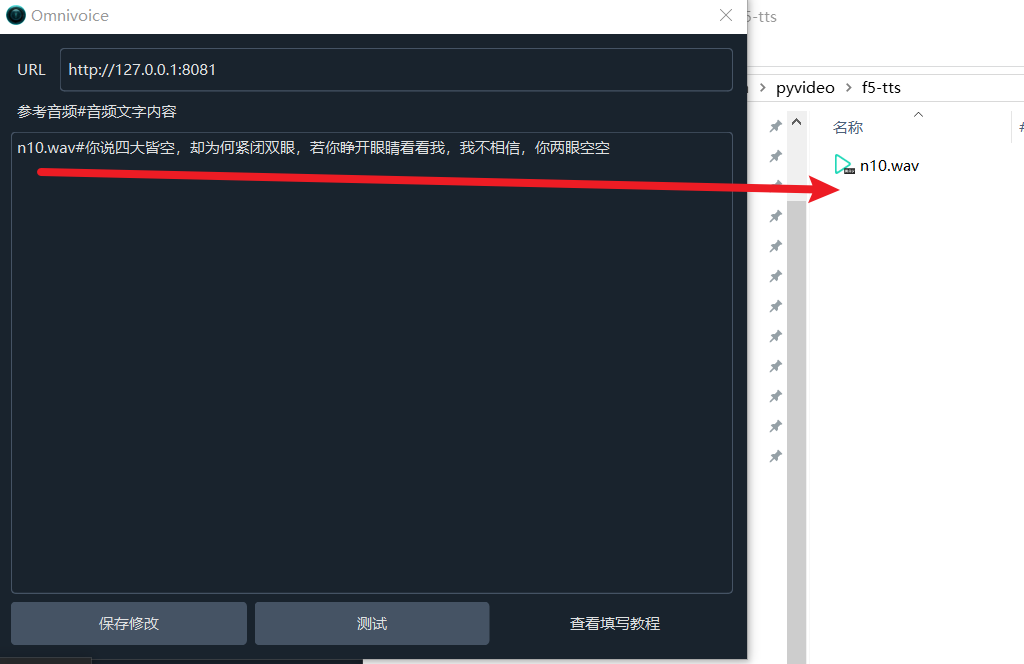
- Click "Test" — if OK, save and use.
6. Using on Google Colab
Open this URL to use OmniVoice on Colab:
- Click "Run All"
- Wait for a URL like
https://xxxxxxxx.gradio.liveto appear in the last cell - Open it in a browser to use
- Copy the URL to pyVideoTrans → Menu → TTS Settings → OmniVoice-URL
7. Reference Audio Requirements
| Item | Requirement |
|---|---|
| Format | WAV (recommended) |
| Duration | 3~10 seconds (optimal) |
| Content | Clear pronunciation, no background noise |
| Location | f5-tts folder under pyVideoTrans root |
Source code reference (
_omnivoice.py): OmniVoice uses the/_clone_fnGradio API endpoint, supports 60+ language code mappings, and has built-in retry mechanism (tenacity). Also supports OmniVoice-Studio (port 3900) via REST API/generateendpoint.
8. FAQ
1. Can't find pyproject.toml after source extraction?
After extraction, there's usually an OmniVoice-master folder. Open it to see pyproject.toml or pyproject. All operations must be done inside this folder.
2. uv is not recognized as an internal or external command?
UV is not installed or not in PATH. Windows: download uv zip, extract and copy uv.exe to the pyproject.toml directory.
3. Model download is very slow and fails?
Default download from huggingface.co fails in China. Set mirror:
Windows: set HF_ENDPOINT=https://hf-mirror.commacOS/Linux: export HF_ENDPOINT=https://hf-mirror.com
4. uv sync fails?
Default installation downloads packages from abroad. Use the Alibaba mirror:
uv sync --default-index "https://mirrors.aliyun.com/pypi/simple"5. Still fails with Alibaba mirror?
MSVC environment may be missing. Install MSVC.
6. How to use OmniVoice directly in a browser for dubbing?
After launching, open http://127.0.0.1:8081 in a browser.
7. How to modify startup port and model mirror in the package?
Open start.bat with a text editor:
- Delete
set "HF_ENDPOINT=https://hf-mirror.com"to stop using the mirror - Change
set "PORT=8081"to your desired port number