
I often need to process a large number of Markdown documents, HTML pages, or SRT subtitle files and translate them between Chinese, English, or other languages. Existing tools on the market are either insufficient in functionality, cumbersome to operate, or too expensive. Therefore, I developed an AI Document Translation Assistant to efficiently and conveniently solve the problem of translating large volumes of files, and I'm sharing it here.
Baidu Netdisk Link: https://pan.baidu.com/s/1-UYnrMrQx7ectCt0rAfblA?pwd=sr1b
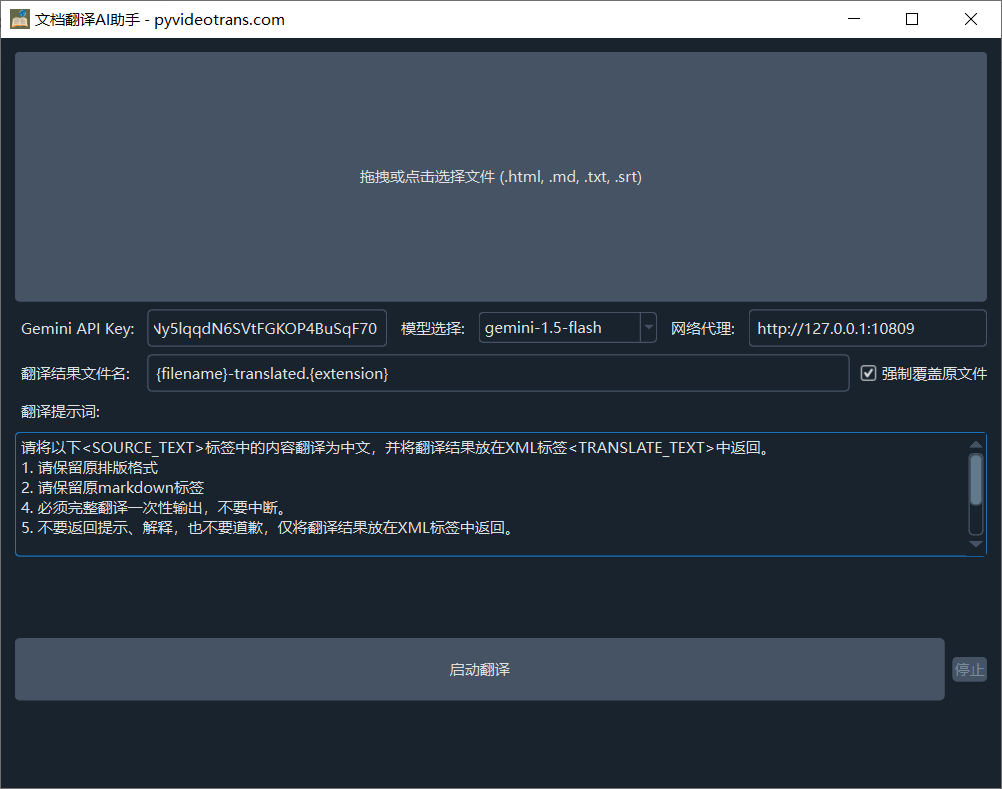
Main Features
- Format Compatibility: Supports translation of four common file formats: Markdown, HTML, TXT, and SRT, while preserving the original file format after translation.
- Batch Processing: Supports batch translation, significantly improving translation efficiency.
- Smart Translation: Utilizes Gemini AI as the translation engine, ensuring translation quality while providing ample free usage quota.
- Customizable Prompts: Allows users to customize prompts to meet personalized translation needs, such as translating into other languages or making adjustments for specific domains.
- Flexible File Naming: Translated files default to having the suffix
-translatedappended to the original filename. You can also choose to directly overwrite the original file.
How to Use
- File Selection: In the top file selection area, you can choose the files you need to translate by clicking or dragging and dropping.
- API Key Configuration: Enter your Gemini API Key. Multiple keys can be separated by English commas to prevent quota issues if a single key reaches its limit during large-volume translation.
- Model Selection: It is recommended to select the
gemini-1.5-flashmodel, which offers a generous free quota. - Network Proxy: Please configure a network proxy to ensure the software can connect to the Gemini service properly (unless you don't need to bypass network restrictions).
- Filename Suffix: You can customize the suffix for the translated result filename. The default suffix is
-translated. - Force Overwrite: If you check the "Force overwrite original file" option, the translation result will directly replace the content of the original file.
- Translation Prompt: Modify the translation prompt in this area to achieve different target languages or make other personalized adjustments.