
pyVideoTrans Technical Architecture and Implementation
pyVideoTrans is a powerful open-source video translation and dubbing tool (v4.03) that can automatically translate videos and add voiceovers in the target language. Its core design philosophy is a modular, multi-threaded pipeline, using flexible flag combinations to support multiple working modes.
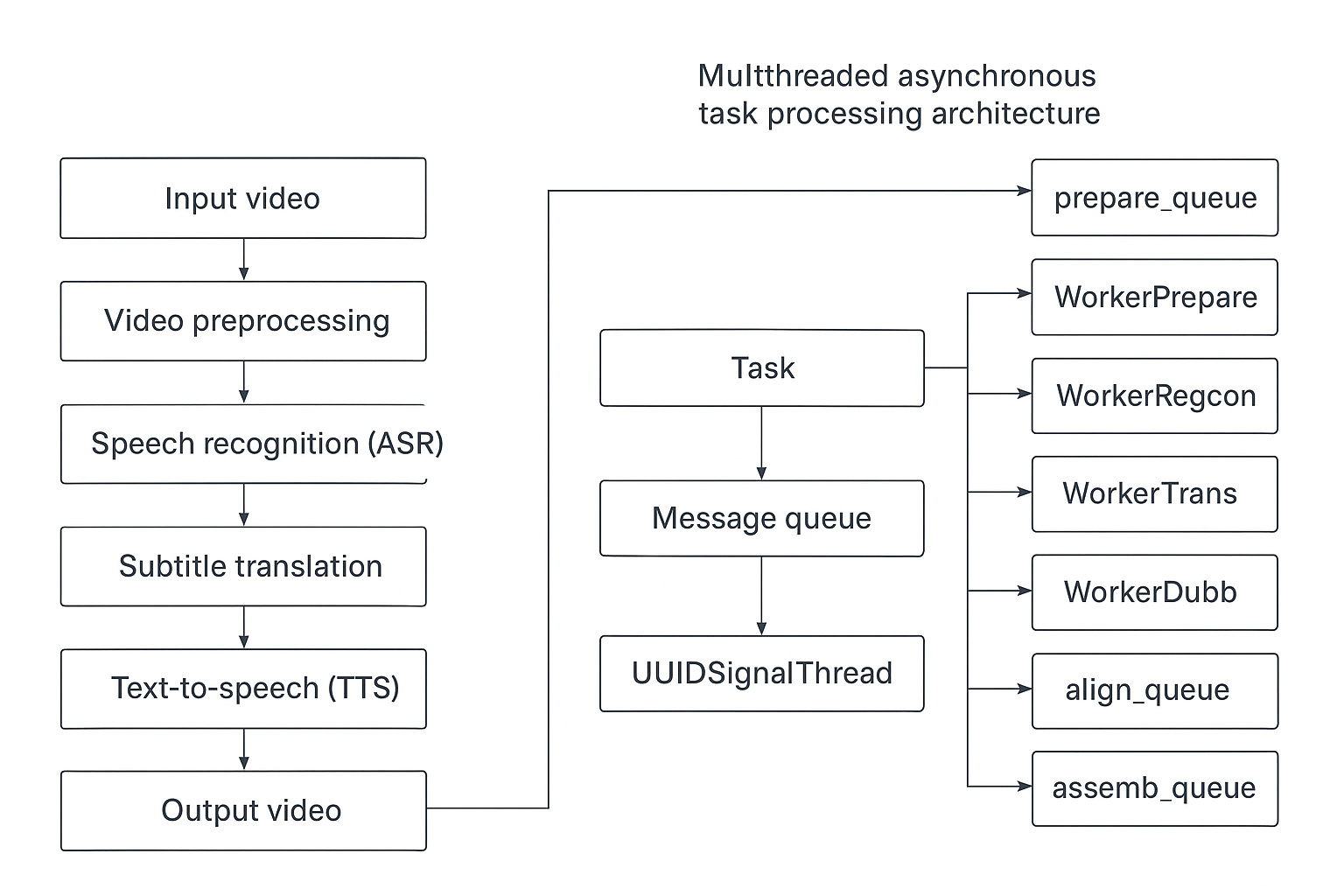
1. Core Processing Pipeline
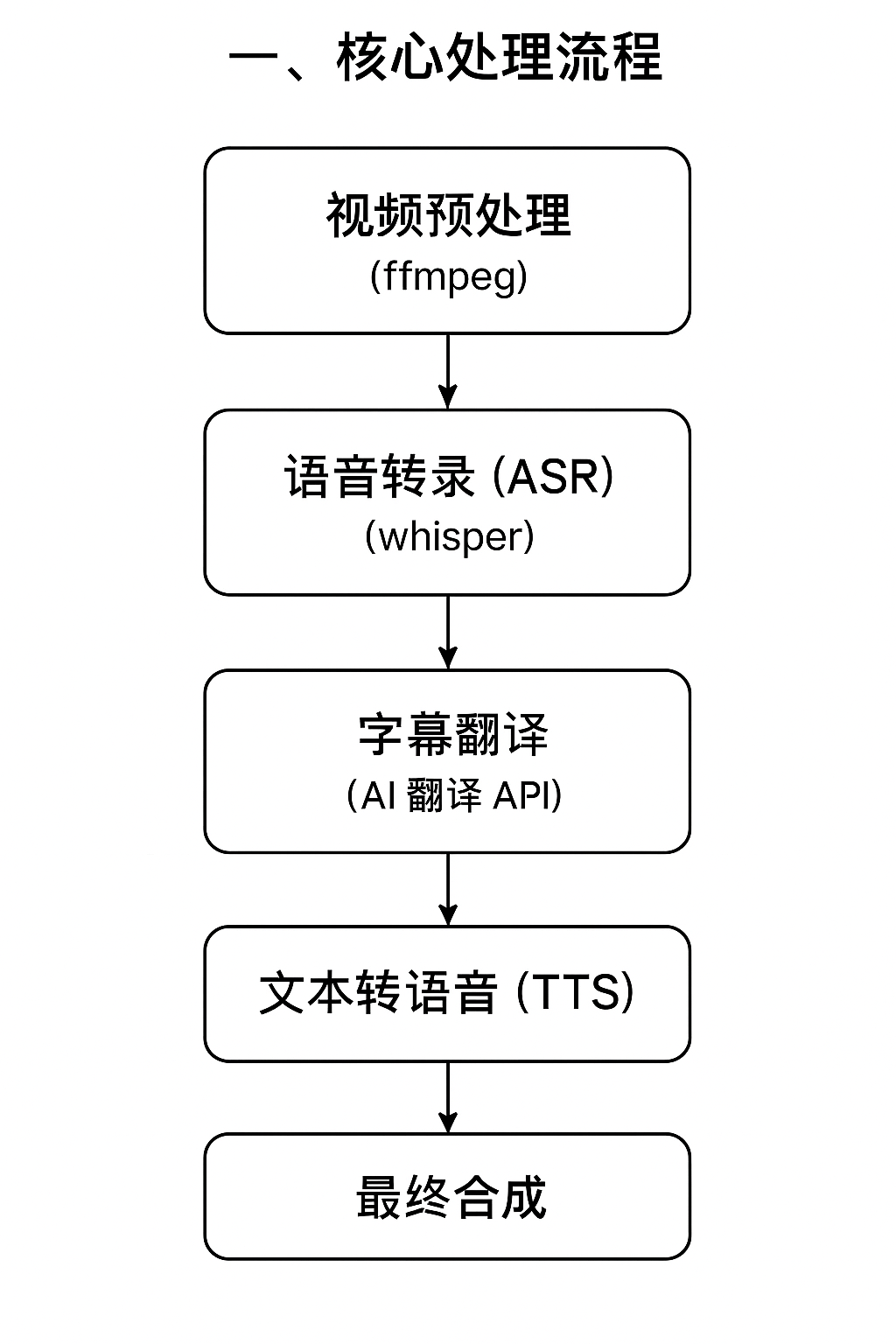
The software decomposes the video translation and dubbing process into 9 independent stages, forming an automated processing pipeline. Each task is controlled by 5 boolean flags (should_recogn, should_trans, should_dubbing, should_hebing, should_separate) that determine which stages to skip, enabling different working modes.
1.1 Nine Processing Stages
| Stage | Method | Responsibility |
|---|---|---|
| ① Preprocessing | prepare() | Separate silent video stream and raw audio from video; optional vocal/background separation (UVR/Spleeter); optional denoising; create cache and output directories |
| ② Speech Recognition | recogn() | Call ASR engine (default Faster-Whisper, supports 22 channels) to transcribe audio into timestamped SRT subtitles; optional punctuation recovery, LLM re-segmentation |
| ③ Speaker Diarization | diariz() | Call speaker diarization model (built, ali_CAM, pyannote, reverb backends) to categorize subtitles by speaker |
| ④ Subtitle Translation | trans() | Translate source language SRT subtitles to target language via translation channels (24 channels); supports bilingual subtitle output |
| ⑤ Dubbing | dubbing() | Based on target language subtitle content and timestamps, call TTS engine (34 channels) to generate dubbed audio line by line; supports voice cloning (extracting reference segments from original audio) |
| ⑥ Audio-Video Alignment | align() | Processed by the SpeedRate class: dubbing speedup, video slowdown, removing silent gaps between subtitles, forced subtitle-audio alignment; optional volume adjustment |
| ⑦ STT Again | recogn2pass() | Perform ASR on the dubbed audio again to generate precise, short-duration subtitles (only executed when dubbing is enabled and not embedding dual subtitles) |
| ⑧ Final Composition | assembling() | Merge silent video stream, dubbed audio, background music, and target language subtitles into the final video file (ffmpeg) |
| ⑨ Cleanup | task_done() | Move output files from the temporary directory to the specified output directory, clean up temporary files, send completion notification |
1.2 Pipeline Control Flags
Defined in videotrans/task/_base.py:20-29. The five flags are automatically computed in TransCreate.__post_init__() based on configuration:
should_recogn: bool    # Whether speech recognition is needed (True if no existing subtitles)
should_trans: bool     # Whether translation is needed (True if source language ≠ target language)
should_dubbing: bool   # Whether dubbing is needed (True if a voice role is selected and not 'No')
should_hebing: bool    # Whether embedding/merging is needed (True if not 'tiqu' mode and has dubbing or subtitle embedding)
should_separate: bool # Whether vocal/background separation is needed1.3 Mode Switching Examples
Different features are achieved through flag combinations:
| Feature | should_recogn | should_trans | should_dubbing | should_hebing |
|---|---|---|---|---|
| Video translation & dubbing (standard mode) | ✓ | ✓ | ✓ | ✓ |
| Video/audio to subtitles (tiqu) | ✓ | optional | ✗ | ✗ |
| Subtitle dubbing | ✗ | ✗ | ✓ | ✓ |
| Translate subtitle files only | ✗ | ✓ | ✗ | ✗ |
1.4 Task Subclass Hierarchy
BaseTask has four concrete subclasses, each corresponding to a different use case:
| Subclass | File | Inherited TaskCfg | Use Case |
|---|---|---|---|
TransCreate | task/trans_create.py | TaskCfgVTT | Full video translation & dubbing (standard / tiqu extraction mode) |
SpeechToText | task/speech2text.py | TaskCfgSTT | Batch speech-to-text |
DubbingSrt | task/dubbing.py | TaskCfgTTS | Batch subtitle dubbing |
TranslateSrt | task/translate_srt.py | TaskCfgSTS | Batch SRT subtitle translation |
2. Task Configuration Dataclass Hierarchy
v4.03 restructured task configuration into a hierarchical @dataclass system (videotrans/task/taskcfg.py, 261 lines):
@dataclass TaskCfgBase              ← Common fields (paths, language codes, cache directories, etc.)
    ├── @dataclass TaskCfgSTT       ← ASR-related fields (recogn_type, model_name, rephrase, etc.)
    ├── @dataclass TaskCfgTTS       ← Dubbing-related fields (tts_type, voice_role, voice_autorate, etc.)
    ├── @dataclass TaskCfgSTS       ← Translation-related fields (translate_type)
└── @dataclass TaskCfgVTT ← Full video translation fields (inherits STT + TTS + STS, adds video-specific fields)Auxiliary dataclasses:
| Dataclass | File | Purpose |
|---|---|---|
InputFile | task/taskcfg.py | Input file metadata (name, dirname, noextname, basename, ext, uuid, target_dir), supports dict-style access |
SignMsg | task/taskcfg.py | Signal message body (type, uuid, text), provides is_stop() and is_error() methods, passed between Worker threads and main thread |
SrtItem | task/taskcfg.py | Single subtitle data (text, start_time, end_time, startraw, endraw, line, time, spk, filename) |
SrtItem supports both attribute access (item.text) and dict access (item['text']), and can be iterated via items().
3. Multi-Threaded Asynchronous Task Processing Architecture
The software uses a multi-threaded, multi-queue architecture based on the "Producer-Consumer" pattern. The MultVideo thread acts as the producer, pushing task objects into the pipeline's first queue; 9 specialized BaseWorker subclasses act as consumers, each monitoring a dedicated queue.
3.1 Queue Pipeline
                     MultVideo (Producer)
                           │
                    app_cfg.prepare_queue
                           ▼
                   WorkerPrepare (×N)
                    ┌────────┼────────┐
                    │ should_recogn ?  │
                    ▼        ▼        ▼
           regcon_queue  trans_queue  dubb_queue / assemb_queue / taskdone_queue
                │
                ▼
          WorkerRegcon (×N)
                │
         diariz_queue
                │
                ▼
          WorkerDiariz (×N)
           ┌────┼────┐
           ▼    ▼    ▼
      trans_queue  dubb_queue  assemb_queue / taskdone_queue
           │
           ▼
     WorkerTrans (×1)
      ┌────┼────┐
      ▼    ▼    ▼
 dubb_queue  assemb_queue  taskdone_queue
      │
      ▼
WorkerDubb (×1)
      │
 align_queue
      │
      ▼
WorkerAlign (×1)
 ┌────┼────┐
 ▼    ▼    ▼
regcon2_queue  assemb_queue  taskdone_queue
 │
 ▼
WorkerRegcon2Pass (×1)
 ┌────┼────┐
 ▼    ▼
assemb_queue  taskdone_queue
 │
 ▼
WorkerAssemb (×N)
 │
taskdone_queue
 │
 ▼
WorkerTaskDone (×1)
 │
(end)3.2 Worker Base Class Design
All worker threads inherit from BaseWorker(QThread) (videotrans/task/job.py:13-66):
class BaseWorker(QThread):
    def __init__(self, name, queue):
        self.name = name
        self.queue = queue

    def run(self):
        while True:
            if app_cfg.exit_soft:          # Global soft exit flag
                return
            try:
                trk = self.queue.get(timeout=1)  # Block for 1 second to get a task
            except Empty:
                continue
            if trk.uuid in app_cfg.stoped_uuid_set:  # Task was stopped
                continue
            try:
                self.process_task(trk)       # Subclass implements specific logic
            except Exception as e:
self.handle_error(e, trk) # Unified error handlingEach subclass overrides the following methods:
| Method | Description |
|---|---|
process_task(trk) | Required — Execute stage logic and route trk to the next queue |
get_error_prefix(trk) | Optional — Return an error prefix string (e.g., "Recognition error [Faster-Whisper]") |
cleanup_on_error(trk) | Optional — Cleanup logic on error |
handle_error() uniformly calls get_msg_from_except() to parse exceptions into user-readable messages, then sends error messages via trk.signal().
3.3 Worker Routing Decision Logic
Each Worker, after completing process_task(trk), decides the next queue based on the task's flags:
WorkerPrepare    →  regcon_queue | trans_queue | dubb_queue | assemb_queue | taskdone_queue
WorkerRegcon     →  diariz_queue  (unconditional)
WorkerDiariz     →  trans_queue | dubb_queue | assemb_queue | taskdone_queue  (diariz exceptions don't block pipeline)
WorkerTrans      →  dubb_queue | assemb_queue | taskdone_queue
WorkerDubb       →  align_queue  (unconditional)
WorkerAlign      →  regcon2_queue | assemb_queue | taskdone_queue  (regcon2 only if recogn2pass attribute exists)
WorkerRegcon2Pass → assemb_queue | taskdone_queue
WorkerAssemb     →  taskdone_queue  (unconditional)
WorkerTaskDone → (terminates)3.4 Dynamic Thread Count Calculation
start_thread() (videotrans/task/job.py:206-245) dynamically determines instance counts for each Worker based on GPU configuration:
| Worker | Instances | Reason |
|---|---|---|
WorkerPrepare | 1–4 | GPU-intensive (video encoding/decoding) |
WorkerRegcon | 1–4 | GPU-intensive (ASR inference) |
WorkerDiariz | 1–4 | GPU-intensive (speaker diarization) |
WorkerTrans | Fixed 1 | API calls, avoid concurrent rate limiting |
WorkerDubb | Fixed 1 | TTS API calls, avoid concurrent rate limiting |
WorkerRegcon2Pass | Fixed 1 | Auxiliary stage |
WorkerAlign | Fixed 1 | Audio-video alignment is single-threaded |
WorkerAssemb | 1–4 | GPU-intensive (ffmpeg encoding) |
WorkerTaskDone | Fixed 1 | File movement / cleanup |
The task_nums calculation logic: Uses settings.process_max_gpu manual override if set; otherwise auto-detects based on multi_gpus + NVIDIA_GPU_NUMS (1 GPU = 1, 2–3 GPUs = 2, ≥4 GPUs = 4, no GPU = 1).
3.5 Batch Task Submission: MultVideo
MultVideo(QThread) (videotrans/task/mult_video.py, 54 lines) is responsible for creating TransCreate objects for each user-selected video file and pushing them into prepare_queue. Supports controlling batch concurrency via the batch_nums parameter:
batch_nums == 0: Push all tasks into the queue at once (maximum concurrency)batch_nums == 1: Push one at a time, waiting for each to complete before the nextbatch_nums > 1: Push N tasks per batch, wait for the entire batch to complete before the next
3.6 Soft Exit Mechanism
When the global flag app_cfg.exit_soft is set to True, all Workers detect it in their next loop iteration and exit safely. app_cfg.stoped_uuid_set tracks UUIDs of manually stopped tasks — Workers skip these tasks after pulling them from the queue.
4. Core Class Design and Inheritance
4.1 Class Hierarchy
@dataclass BaseCon                    ← videotrans/configure/base.py
    │                                  Base attributes and utility methods
    ├── @dataclass BaseTask           ← videotrans/task/_base.py
    │       │                          8 stage empty methods + 5 flags
    │       ├── @dataclass TransCreate ← videotrans/task/trans_create.py (~1678 lines core)
    │       ├── @dataclass SpeechToText ← videotrans/task/speech2text.py (batch speech recognition)
    │       ├── @dataclass DubbingSrt  ← videotrans/task/dubbing.py (batch subtitle dubbing)
    │       └── @dataclass TranslateSrt ← videotrans/task/translate_srt.py (batch subtitle translation)
    │
    ├── @dataclass BaseRecogn         ← videotrans/recognition/_base.py
    │       │                          VAD audio segmentation, subtitle merging, CJK handling
    │       └── 22 subclasses (lazy-loaded)    Individual ASR channel implementations
    │
    ├── @dataclass BaseTrans          ← videotrans/translator/_base.py
    │       │                          MD5 caching, line-by-line / full-text translation dispatch
    │       └── 24 subclasses (lazy-loaded)    Individual translation channel implementations
    │
    └── @dataclass BaseTTS            ← videotrans/tts/_base.py
            │                          Async / multi-threaded concurrent dispatch
└── 34 subclasses (lazy-loaded) Individual TTS channel implementationsAll channel classes use @dataclass with __post_init__ initialization rather than traditional __init__ constructors.
4.2 BaseCon — Top-Level Base Class
videotrans/configure/base.py (296 lines) defines core capabilities shared by all classes:
| Method | Responsibility |
|---|---|
_exit() | Check whether to stop (exit_soft or UUID in stoped_uuid_set) |
signal(**kwargs) | Send messages to UI (via push_queue() → SignalHub. CLI mode prints directly) |
_set_proxy(type) | Set/clear HTTP proxy (operates app_cfg.proxy and environment variables) |
_new_process(callback, title, is_cuda, kwargs) | Execute heavy tasks in a subprocess (returns (data, error) tuple) |
_signal_of_process(logs_file) | Read subprocess progress by polling JSON log file mtime |
convert_to_wav() | Convert audio to 48kHz stereo WAV (optional silence removal) |
_base64_to_audio() / _audio_to_base64() | Base64 audio encode/decode |
_process_callback(data) | Download progress callback (forwards to signal()) |
BaseCon.__post_init__() automatically calls _set_proxy(type='set') during initialization to load proxy configuration.
4.3 BaseTask — Task Base Class
videotrans/task/_base.py:10-167 defines stage empty methods and shared utilities for all task subclasses:
Stage methods (all empty implementations, overridden by subclasses): prepare(), recogn(), diariz(), trans(), dubbing(), align(), assembling(), task_done()
Note:
recogn2pass()is defined inTransCreate, not in theBaseTaskbase class.
Shared methods:
| Method | Responsibility |
|---|---|
_unlink_size0(file) | Delete invalid files with size 0 |
_save_srt_target(srtstr, file) | Format SrtItem list to SRT string and write to file, send replace_subtitle signal |
check_target_sub(source, target) | Validate line count consistency between source and translated subtitles; align by timestamp when mismatched |
set_end(succeed=False) | Mark task completion; send notification and clean up temp folder on success |
_edgetts_single(target_audio, kwargs) | Edge-TTS one-shot async dubbing (with proxy fallback) |
4.4 TransCreate — Video Translation Core Implementation
videotrans/task/trans_create.py (~1678 lines) implements the full 9-stage processing logic. Key internal methods:
| Method | Responsibility |
|---|---|
__post_init__() | Initialize all file paths, compute flags, start progress timer thread |
_split_novoice_byraw() | Separate silent video from original (prioritize hardware decode h264_cuvid, fallback libx264) |
_split_audio_byraw() | Extract 16kHz mono PCM audio from original video + optional vocal/background separation |
_tts() | Build queue_tts list (including clone reference audio segments), call tts.run() |
_create_ref_from_vocal() | Multi-threaded (ThreadPoolExecutor) cutting of original audio segments for voice cloning reference |
_recogn_succeed() | Post-recognition processing (file copying in tiqu mode) |
_back_music() | Mix user-uploaded background music with dubbed audio |
_separate() | Re-embed separated background music into dubbed audio |
_process_subtitles() | Handle soft/hard subtitle embedding logic (single/dual subtitles, style settings) |
4.5 Subprocess Channels
To prevent faster-whisper crashes from taking down the entire application, Faster-Whisper, Faster-Whisper-XXL, Whisper.cpp, and some TTS engines (e.g., QWEN3LOCAL_TTS) are delegated to GlobalProcessManager for execution in isolated subprocesses via BaseCon._new_process().
Subprocesses report progress by writing to JSON log files. BaseCon._signal_of_process() polls these log files in a daemon thread, parsing JSON and reporting via signal() when mtime changes are detected.
5. Configuration System
The software organizes configuration into three layers (videotrans/configure/config.py, 902 lines), all as @dataclass:
| Config Class | Persistence | Purpose | Example Fields |
|---|---|---|---|
AppCfg | In-memory only | Queues, state, thread control, runtime context | prepare_queue, exit_soft, stoped_uuid_set, current_status, line_roles, exec_mode, video_codec, onlyone_source_sub, onlyone_target_sub, proxy, SUPPORT_LANG |
AppSettings | videotrans/cfg.json | Global defaults, model lists | homedir, model_list, vad_type, cuda_com_type |
AppParams | videotrans/params.json | User preferences, API keys | source_language, recogn_type, chatgpt_key, voice_role, app_mode |
Key singleton variables are automatically initialized at module load time:
app_cfg: AppCfg = AppCfg()        # Runtime state (contains 9 Queue instances)
settings: AppSettings = AppSettings()  # Loaded from cfg.json
params: AppParams = AppParams() # Loaded from params.json5.1 AppSettings Features
- Supports dict-style access via
settings['key']andsettings.get('key', default)method get()automatically type-casts numeric fields (int_typeandfloat_typewhitelists)_get_defaults()defines defaults for ~100 configuration items- Supports hyphenated field name mapping (e.g.,
"initial_prompt_zh-cn"→"initial_prompt_zh_cn")
5.2 AppParams Features
_get_defaults()defines defaults for ~100 user parametersgetset_params(update_data)supports batch updates (e.g., collecting all UI control values incheck_start())- API key fields are managed here for
is_input_api()validation
5.3 AppCfg Runtime State
- 9
Queue(maxsize=0)(unlimited capacity):prepare_queue~taskdone_queue queue_novice: Dict— Tracks silent video separation progress (key=uuid, value='ing'|'end')line_roles: Dict— Stores per-line subtitle role assignments in single-video modechild_forms: Dict— Caches open window instances to avoid duplicate creationexec_mode— Execution mode ('gui' or 'cli')video_codec/codec_cache— Video codec cacheonlyone_source_sub/onlyone_target_sub/onlyone_trans— Single-video mode subtitle stateSUPPORT_LANG— Supported language list
5.4 Environment Variable Initialization
_set_env() executes automatically at module load time (videotrans/configure/config.py:44-72), setting:
MODELSCOPE_CACHE/HF_HOME/HF_HUB_CACHE→ROOT_DIR/modelsQT_API = 'pyside6'PATHappends ffmpeg/sox directoriesOMP_NUM_THREADS = 1HF_HUB_DOWNLOAD_TIMEOUT = 3600HF_HUB_DISABLE_XET = 1
6. GlobalProcessManager — Subprocess Pool Management
videotrans/process/signelobj.py (167 lines) implements a class-level singleton GlobalProcessManager:
GlobalProcessManager (class-level singleton)
    ├── _executor_cpu: multiprocessing.Pool
    │       workers = max(min(available_ram/4GB, 8, cpu_count), 1)  ← Based on available RAM
    │       maxtasksperchild = 1  ← Each subprocess restarts after one task to prevent memory leaks
    │
    └── _executor_gpu: multiprocessing.Pool
            workers = GPU count (prioritize settings.process_max_gpu manual setting)
maxtasksperchild = 16.1 CPU Process Pool Size
Uses psutil.virtual_memory().available to get current system available RAM, calculates one process per 4GB, capped at 1–8, and does not exceed os.cpu_count(). Can be manually overridden via settings.process_max.
6.2 GPU Process Pool Size
Prioritizes settings.process_max_gpu manual setting; otherwise auto-determined by multi_gpus and NVIDIA_GPU_NUMS (no GPU = 1, GPU available but multi-GPU not enabled = 1, multi-GPU enabled = min(GPU count, 8, cpu_count)).
6.3 Task Submission Interface
GlobalProcessManager.submit_task_cpu(func, **kwargs)   → AsyncResultFutureWrapper
GlobalProcessManager.submit_task_gpu(func, **kwargs) → AsyncResultFutureWrapperAsyncResultFutureWrapper wraps Pool.apply_async's AsyncResult into a Future-compatible interface (.result(), .done()).
6.4 Usage Scenarios
Unified through BaseCon._new_process() for: ASR inference, TTS synthesis, noise removal, vocal separation, speaker diarization, punctuation recovery (all run in isolated subprocesses — crashes don't affect the main process).
7. SignalHub — Cross-Thread Message Center
videotrans/configure/signal_hub.py (33 lines) implements Qt signal-based singleton message passing:
class SignalHub(QObject):
    _instance = None
    new_message = Signal(str, object)  # (uuid, SignMsg)

    @classmethod
    def instance(cls):
        if cls._instance is None:
            cls._instance = cls()
        return cls._instance

    @Slot(str, object)
    def post(self, uuid=None, data=None):
self.new_message.emit(uuid, data) # Cross-thread automatically uses QueuedConnectionMessage Flow
BaseCon.signal(**kwargs)
    → push_queue(uuid, SignMsg(**kwargs))     [configure/config.py]
        → SignalHub.instance().post(uuid, data)
            → new_message Signal (QueuedConnection)
                → WinAction.update_data(uuid, data)   [mainwin/_actions.py]
                    → Dispatched by type:
                        'logs'|'error'|'succeed'|'set_precent' → set_process_btn_text()
                        'edit_subtitle_source' → Show EditRecognResultDialog
                        'edit_subtitle_target' → Show SpeakerAssignmentDialog
                        'edit_dubbing' → Show EditDubbingResultDialog
                        'replace_subtitle' → Update subtitle editor
'end' → update_status('end')Message Type Enumeration
| Type | Meaning | Processing Logic |
|---|---|---|
logs | Normal log | Update progress bar text |
error | Error | Progress bar turns red, add to retry queue |
succeed | Success | Progress bar turns green, mark complete |
set_precent | Progress percentage | Format: text="elapsed ??? percentage" |
edit_subtitle_source | Show source subtitle edit dialog | Single-video mode pause point ① |
edit_subtitle_target | Show translated subtitle edit dialog | Single-video mode pause point ② |
edit_dubbing | Show dubbing result edit dialog | Single-video mode pause point ③ |
replace_subtitle | Replace subtitle area content | Shared by batch and single-video modes |
subtitle | Append subtitle line | Line-by-line output to editor |
end | Task complete | Triggers update_status('end') |
disabled_edit | Disable subtitle editing | Locks editor in batch mode |
refreshtts | Refresh TTS selection | Re-populate TTS dropdown |
shitingerror | Audition error | Show error dialog |
ffmpeg | ffmpeg status | Update start button text |
8. Dynamic Channel Loading
videotrans/__init__.py (35 lines) provides a generic lazy-loading mechanism:
@dataclass
class ChannelProvider:
    name: str           # Display name in UI
    imp: str            # Module import suffix (e.g., "._whisper" → "videotrans.recognition._whisper")
    key_name: str|None  # Corresponding API key field in params.json (for is_input_api validation)
    win: str|None       # Corresponding settings window name in winform

def get_class(channel_id=0, provider_type=None, _ID_NAME_DICT=None):
    _key = f'{provider_type}-{channel_id}'
    if _key in _loaded_modules:
        return _loaded_modules[_key]
    module = importlib.import_module(f'videotrans.{provider_type}{_module_map.imp}')
    for _, obj in inspect.getmembers(module, inspect.isclass):
        if obj.__module__ == module.__name__:
            _loaded_modules[_key] = obj
return obj_ID_NAME_DICT for each module:
| Module | Channels | Definition |
|---|---|---|
| recognition | 22 | videotrans/recognition/__init__.py:48-79 |
| translator | 24 | videotrans/translator/__init__.py:60-90 |
| tts | 34 | videotrans/tts/__init__.py:75-116 |
8.1 Unified Entry Function
Each module provides a run() entry function that internally uses get_class() to obtain the corresponding channel class and instantiate it:
# recognition/__init__.py
def run(*, recogn_type, detect_language, audio_file, ...) -> List[SrtItem]:
    _cls = get_class(recogn_type, "recognition", _ID_NAME_DICT)
    return _cls(**kwargs).run()

# translator/__init__.py
def run(*, translate_type, text_list, source_code, target_code, ...) -> List[SrtItem]:
    _cls = get_class(translate_type, "translator", _ID_NAME_DICT)
    return _cls(**kwargs).run()

# tts/__init__.py
def run(*, queue_tts, language, tts_type, ...) -> None:
    _cls = get_class(tts_type, "tts", _ID_NAME_DICT)
return _cls(**kwargs).run()8.2 API Key Validation
Each module provides is_input_api(recogn_type/translate_type/tts_type) which checks whether the corresponding channel's key_name is filled in params. If not, it automatically opens the corresponding winform settings window.
8.3 Translation Caching
BaseTrans (videotrans/translator/_base.py) implements MD5-based translation caching:
- Cache key =
md5(channel_name + api_url + model + source_lang + target_lang + text) - Cache files stored in
{TEMP_ROOT}/translate_cache/ - Write interface:
_set_cache(), read interface:_get_cache()
8.4 CJK Special Handling
BaseRecogn (videotrans/recognition/_base.py:58-80) performs special handling for CJK languages in __post_init__:
join_word_flag: CJK languages (zh, ja, ko, yu, th, km, yue) don't add spaces between subtitle words (other languages do)maxlen: CJK languages max characters per line issettings.cjk_len(default 15); other languages usesettings.other_len(default 40)jianfan: For Chinese languages withsettings.zh_hant_s=True, simplified-traditional conversion is enabled
8.5 Translation Dispatch Strategy
BaseTrans.run() selects different strategies based on the aisendsrt flag:
| Mode | Condition | Method | Concurrency |
|---|---|---|---|
| Line-by-line translation | Non-AI channel | _run_text() → _item_task() | settings.trans_thread (default 10) |
| Full-text translation | AI channel + aisendsrt=True | _run_srt() | settings.aitrans_thread (default 50) |
8.6 TTS Dispatch Strategy
BaseTTS.run() selects execution method based on channel type:
| Channel Type | Dispatch Method | Notes |
|---|---|---|
| Edge-TTS | asyncio async | Single-thread async concurrency |
| Other channels | ThreadPoolExecutor | Concurrency controlled by dubbing_thread (default 1) |
Channel subclasses can override _exec() for custom dispatch. BaseTTS defaults to calling __local_mul_thread() → _item_task().
9. Interactive Single-Video Processing Mode
When a user selects 1 video in standard mode (biaozhun), the program uses a different processing model from the batch pipeline.
9.1 Implementation: Worker(QThread)
The Worker class in videotrans/task/only_one.py (148 lines) executes all 9 stages serially within a single QThread, communicating with the main thread via uito = Signal(str, SignMsg):
Worker.run()
    ├── trk = TransCreate(cfg=TaskCfgVTT(**self.cfg | obj))
    ├── trk.prepare()
    ├── trk.recogn()
    ├── trk.diariz()
    ├── [Pause Point ①] → _post(type='edit_subtitle_source')
    │    User reviews source subtitles → clicks "Confirm" or waits for countdown
    ├── trk.trans() (if should_trans)
    ├── [Pause Point ②] → _post(type='edit_subtitle_target')
    │    User reviews translated subtitles + assigns speaker roles → clicks "Confirm"
    ├── trk.dubbing() (if should_dubbing)
    ├── [Pause Point ③] → _post(type='edit_dubbing')
    │    User modifies dubbing results → clicks "Confirm"
    ├── trk.align()
    ├── trk.recogn2pass()
    ├── trk.assembling()
└── trk.task_done()9.2 Key Differences from Batch Mode
| Dimension | Single-Video Mode | Batch Mode |
|---|---|---|
| Execution thread | Worker(QThread) executes directly without queue pipeline | TransCreate pushed into prepare_queue, flows through 9 Worker queues |
| Message channel | uito signal connects directly to WinAction.update_data() | BaseCon.signal() → push_queue() → SignalHub |
| Pause mechanism | Three pause points, user can edit mid-process | No pause/edit support |
| Progress display | Real-time display in subtitle editor | Progress bar + button text |
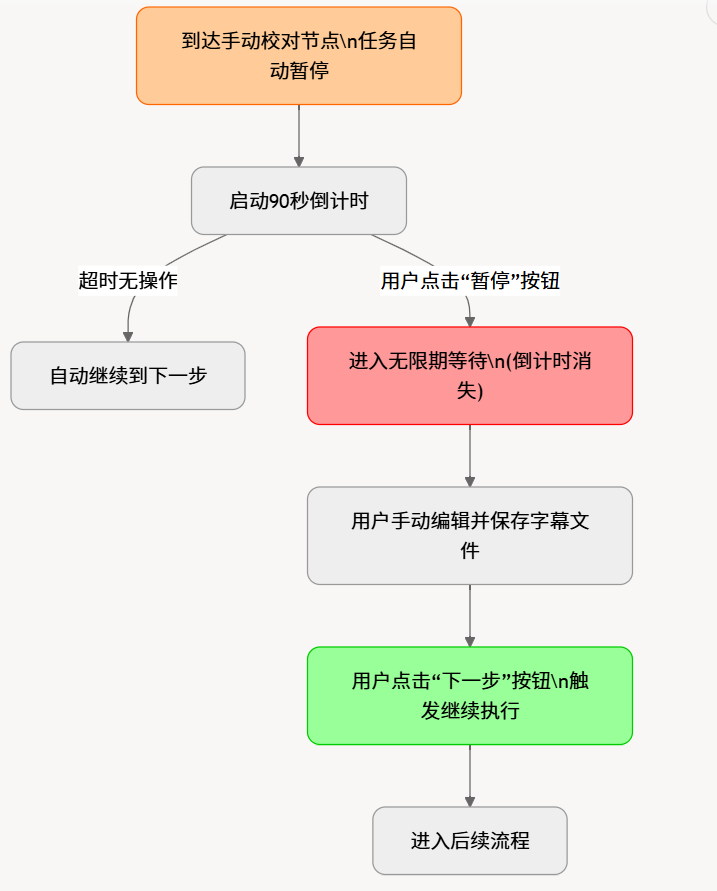
9.3 Countdown and Pause Mechanism
- Auto countdown:
app_cfg.set_countdown(86400)sets the initial value. Worker thread decrements by 1 eachsleep(1). Default countdown controlled bysettings.countdown_sec. - Infinite pause: User clicks the "Stop" button, setting
app_cfg.current_statusto'stop'; Worker's_exit()detects this and exits. Alternatively,set_countdown(-1)hides the countdown. - Manual continue: User clicks "Confirm" in the review dialog,
WinAction.set_djs_timeout()callsapp_cfg.set_countdown(-1)to zero the countdown immediately.
9.4 Review Dialogs
| Dialog | File | Function |
|---|---|---|
EditRecognResultDialog | component/onlyone_set_recogn.py | Source subtitle editing (text + timeline) |
SpeakerAssignmentDialog | component/onlyone_set_role.py | Translated subtitle editing + per-line voice role assignment |
EditDubbingResultDialog | component/onlyone_set_editdubb.py | Dubbing result preview + re-dub individual lines |

10. Audio-Video Alignment Engine (SpeedRate)
videotrans/task/_rate.py (877 lines) implements two alignment engines: SpeedRate and TtsSpeedRate.
10.1 SpeedRate (Video Translation Scenario)
Processing strategy (by priority):
| Condition | Strategy |
|---|---|
| Both audio speedup + video slowdown enabled | Each handles half the time difference (ignoring ratio limits) |
| Only audio speedup enabled | Speed up dubbing to match subtitle duration (capped at max_audio_speed_rate) |
| Only video slowdown enabled | Slow down video to match dubbing duration (capped at max_video_pts_rate) |
| Neither enabled | Concatenate audio segments by subtitle timeline, fill silence/freeze-frame for duration differences |
Additional processing:
remove_silent_mid: Remove silent intervals between subtitlesalign_sub_audio: Force-align subtitle timeline to actual dubbing positions- Trailing silence removal
10.2 TtsSpeedRate (Dubbing-Only Scenario)
Simplified alignment engine responsible only for audio concatenation and speedup, with no video slowdown logic.
11. Software Startup and UI Implementation
11.1 Startup Flow
sp.py is the sole entry point (221 lines). Startup process:
sp.py (if __name__ == "__main__")
  │
  ├── 1. multiprocessing.freeze_support() / set_start_method('spawn')
  ├── 2. qInstallMessageHandler() suppress Qt warnings
  ├── 3. atexit.register(cleanup) register exit cleanup
  ├── 4. QApplication.setHighDpiScaleFactorRoundingPolicy(PassThrough)
  ├── 5. Create QApplication
  ├── 6. Detect if running inside archive (PyInstaller packaged version)
  ├── 7. Create StartWindow (splash screen, borderless transparent)
  │       └── QTimer.singleShot(100ms) → initialize_full_app()
  │           ├── Redirect sys.stdout/stderr to log file
  │           ├── Set global exception hook show_global_error_dialog
  │           ├── Parse --lang CLI argument
  │           ├── Import darkstyle_rc (compiled QRC resources)
  │           ├── Load QSS stylesheet (videotrans/styles/style.qss)
  │           ├── Restore last window size (QSettings)
  │           └── Instantiate MainWindow → uito connects to splash.update_lable
  │               └── MainWindow.__init__()
  │                   ├── setupUi() → Populate dropdowns (translation/recognition/TTS channels, language lists)
  │                   ├── AiLoaderThread starts → Detect GPU → Callback _start_workers()
  │                   ├── _start_workers() → start_thread() launches 9 Worker threads
  │                   ├── _set_default() → Restore last user selections
  │                   ├── _bind_signal() → Bind ~60 control events
  │                   ├── SignalHub.new_message.connect(win_action.update_data)
  │                   └── uito.emit('end') → splash closes
└── 8. app.exec() → Qt event loop11.2 Exit Mechanism
When the user clicks the close button:
- Set
app_cfg.exit_soft = True,app_cfg.current_status = 'stop' - Main window immediately hides (
hide()) - Save window size to
QSettings - Hide/close all child windows
- Wait ~4 seconds for all Workers to complete current work and exit safely
- Clean up temporary directory
TEMP_ROOT atexitcleanup callback executes → program terminates- If in restart mode, start new process then
os._exit(0)
11.3 UI Architecture Layers
UI Definition Layer       videotrans/ui/         ← PySide6 UI layout files (~75), dark/ resource files
    ↓
UI Logic Layer            videotrans/component/   ← Common components: progress bar, settings forms, subtitle editor, real-time STT, video clipper, text matching
    ↓
Window Management Layer   videotrans/winform/     ← Lazy-loaded ~65 settings/feature window modules
    ↓
Main Window Layer         videotrans/mainwin/
    ├── main_win.py                      ← MainWindow(QMainWindow): UI init, signal binding, Worker startup, window lifecycle (528 lines)
    ├── _actions.py                      ← WinAction: Core business logic → parameter collection → task startup → status dispatch (798 lines)
    └── _actions_base.py                ← WinActionBase: Proxy management, mode switching, file selection, CUDA detection, audition (590 lines)
    ↓
Task Layer videotrans/task/ ← TransCreate, SpeechToText, DubbingSrt, TranslateSrt, Worker threads, SpeedRate11.4 MainWindow — Main Window
videotrans/mainwin/main_win.py (528 lines) responsibilities:
setupUi(): Load UI layout, populate dropdowns (translation channels, recognition channels, TTS channels, languages, subtitle types)_bind_signal(): Bind approximately 60 control events toWinActionmethods_start_workers(status): Launch 9 Worker background threads after GPU detection completesopen_winform(name): Unified window opening entry point (prioritize cachedapp_cfg.child_forms, otherwise callwinform.get_win(name).openwin())closeEvent(): Safe shutdown flow (mark exit → hide window → stop threads → clean up temp files)restart_app(): Prompt confirmation then triggercloseEvent()and start new process
11.5 WinAction — Core Controller
WinAction inherits from WinActionBase (both @dataclass), serving as the key hub connecting UI and background tasks:
WinActionBase (mainwin/_actions_base.py, 590 lines) provides:
- File selection (
get_mp4()) — single file / folder mode - Output directory setup (
get_save_dir()) - Proxy configuration (
change_proxy(),check_proxy(),proxy_alert()) - Mode switching (
set_biaozhun(),set_tiquzimu()) — controls UI element visibility - CUDA detection (
check_cuda(),cuda_isok()) - Audition feature (
listen_voice_fun()) — createsListenVoicethread - Voice role list updates (
tts_type_change(),set_voice_role()) - Advanced options collapse (
toggle_adv()) - UI enable/disable controls (
disabled_widget(),_disabled_button())
WinAction (mainwin/_actions.py, 798 lines) provides:
check_start(): Collect all UI control values → buildcfgdictionary → parameter validation → callcreate_btns()create_btns(): Format input file paths → create progress bar → startWorkerfor single video,MultVideofor batchupdate_data(uuid, SignMsg): ConnectsSignalHub.new_messagesignal → dispatch by message typeupdate_status(type): Switch betweening/stop/endstates, control buttons and progress barset_process_btn_text(d): Update progress bar text/percentage/colorretry(): Re-process failed tasks_check_all_done(): Detect whether all tasks are complete
12. Exception Hierarchy
videotrans/configure/excepts.py (376 lines) defines a layered exception system:
VideoTransError (base class)
    ├── TranslateSrtError       # Translation errors
    ├── DubbingSrtError         # Dubbing errors
    ├── SpeechToTextError       # Speech recognition errors
    ├── LLMSegmentError         # LLM re-segmentation errors
    ├── FFmpegError             # FFmpeg operation errors
    ├── DownloadModelsError     # Model download errors
    ├── SttTimeoutError         # STT subprocess timeout
    ├── StopTask                # Task exception requiring immediate stop
└── StopRetry # Non-retryable errorThe get_msg_from_except(e) function maps dozens of third-party library exceptions to user-readable Chinese/English error messages (covering httpx, openai, requests, deepgram, elevenlabs, tenacity, etc.).
The NO_RETRY_EXCEPT tuple defines non-recoverable exception types that translation/dubbing modules immediately give up on when encountered in retry loops.
13. Code Structure Overview
/
├── sp.py                       # ★ Main entry point (221 lines)
├── cli.py                      # ★ CLI command-line entry
├── models/                     # Local AI model files (ONNX, etc.)
├── logs/                       # Log file directory (YYYYMMDD.log)
├── ffmpeg/                     # ffmpeg and sox binaries
├── f5-tts/                     # Voice cloning reference audio directory
├── docs/                       # Documentation
├── tmp/                        # Temporary file root
│   ├── _temp/                  # Process-level temp directory
│   └── translate_cache/        # Translation MD5 cache directory
│
└── videotrans/                 # Core business logic code
    │   __init__.py             # ★ VERSION, ChannelProvider definition, get_class() lazy loading
    │   cfg.json                # settings persistence file
    │   params.json             # params persistence file
    │   codec.json              # Video codec cache
    │
    ├── codes/
    │   └── model.py            # Model-related definitions
    │
    ├── configure/              # Global config, queue definitions, top-level base class
    │   ├── config.py           # ★ AppCfg / AppSettings / AppParams / logger / queue definitions / tr() / push_queue() (902 lines)
    │   ├── base.py             # ★ BaseCon base class (_new_process, signal, _exit, convert_to_wav, etc.) (296 lines)
    │   ├── contants.py         # ★ Global constants (model lists, language test text, punctuation, proxy whitelist, etc.)
    │   ├── excepts.py          # ★ Exception hierarchy + get_msg_from_except() (376 lines)
    │   ├── signal_hub.py       # ★ SignalHub singleton (cross-thread Qt signals) (33 lines)
    │   └── whispernet_config.py # Whisper.NET configuration
    │
    ├── task/                   # Task processing logic and background threads
    │   ├── _base.py            # ★ BaseTask base class (8 stage empty methods + 5 flags + shared utilities) (167 lines)
    │   ├── taskcfg.py          # ★ TaskCfgBase/VTT/STT/TTS/STS + InputFile + SignMsg + SrtItem (261 lines)
    │   ├── trans_create.py     # ★ TransCreate full implementation (~1678 lines, video translation core)
    │   ├── speech2text.py      # ★ SpeechToText (batch speech-to-text)
    │   ├── dubbing.py          # ★ DubbingSrt (batch subtitle dubbing)
    │   ├── translate_srt.py    # ★ TranslateSrt (batch SRT translation)
    │   ├── job.py              # ★ 9 BaseWorker subclasses + start_thread() entry (245 lines)
    │   ├── only_one.py         # ★ Single-video interactive Worker(QThread) + uito signal (148 lines)
    │   ├── mult_video.py       # ★ Multi-video batch submission MultVideo(QThread) (54 lines)
    │   ├── _rate.py            # SpeedRate / TtsSpeedRate audio-video alignment engine (877 lines)
    │   ├── separate_worker.py  # SeparateWorker independent vocal separation QThread
    │   ├── simple_runnable_qt.py # QRunnable thread pool utility
    │   ├── child_win_sign.py   # Child window signal handling
    │   └── update_ffmpeg.py    # ffmpeg update management
    │
    ├── recognition/            # Speech Recognition (ASR) module (22 channels)
    │   ├── __init__.py         # ★ Channel constant IDs, _ID_NAME_DICT, run(), is_allow_lang(), is_input_api()
    │   ├── _base.py            # ★ BaseRecogn (VAD segmentation, CJK handling, subtitle merging, 400 lines)
    │   └── _*.py               # 22 channel implementations (_whisper, _whisperx, _whispernet, _qwenasrlocal, _qwen3asr, _funasr, etc.)
    │
    ├── translator/             # Subtitle Translation module (24 channels)
    │   ├── __init__.py         # ★ Channel constants, _ID_NAME_DICT, LANG_CODE, run(), is_allow_translate() (860 lines)
    │   ├── _base.py            # ★ BaseTrans (MD5 caching, line-by-line / full-text translation dispatch, 176 lines)
    │   └── _*.py               # 24 channel implementations (_google, _chatgpt, _deepseek, _gemini, _deepl, _baidu, etc.)
    │
    ├── tts/                    # Text-to-Speech (TTS) module (34 channels)
    │   ├── __init__.py         # ★ Channel constant IDs, _ID_NAME_DICT, SUPPORT_CLONE, CHANGE_BY_LANGUAGE, run() (192 lines)
    │   ├── _base.py            # ★ BaseTTS (async / multi-threaded concurrent dispatch, 304 lines)
    │   └── _*.py               # 34 channel implementations (_edgetts, _openaitts, _azuretts, _gptsovits, _cosyvoice, etc.)
    │
    ├── process/                # Isolated subprocess implementations
    │   ├── __init__.py         # Subprocess function exports
    │   ├── signelobj.py        # ★ GlobalProcessManager (CPU/GPU dual process pools, 167 lines)
    │   ├── prepare_audio.py    # Vocal separation, denoising, punctuation recovery, speaker diarization (4 backends)
    │   ├── stt_fun.py          # ASR subprocess entry (openai_whisper, faster_whisper, paraformer, funasr_mlt, qwen3asr_fun, etc.)
    │   ├── tts_fun.py          # TTS subprocess entry (qwen3tts_fun)
    │   └── vad.py              # VAD Voice Activity Detection (Silero VAD)
    │
    ├── mainwin/                # Main window UI and business logic
    │   ├── main_win.py         # ★ MainWindow(QMainWindow) initialization, signal binding, thread startup (528 lines)
    │   ├── _actions.py         # ★ WinAction core controller (check, start, status update, 798 lines)
    │   └── _actions_base.py    # ★ WinActionBase base class (proxy, mode switching, CUDA, file selection, 590 lines)
    │
    ├── component/              # UI common components
    │   ├── progressbar.py      # Clickable progress bar
    │   ├── set_form.py         # General settings form / About page
    │   ├── onlyone_set_recogn.py    # Single-video mode: source subtitle edit dialog
    │   ├── onlyone_set_role.py      # Single-video mode: speaker role assignment dialog
    │   ├── onlyone_set_editdubb.py  # Single-video mode: dubbing result edit dialog
    │   ├── clip_video.py       # Video clipper component
    │   ├── realtime_stt.py     # Real-time speech recognition window
    │   ├── textmatching.py     # Text comparison window
    │   ├── set_proxy.py        # Proxy settings dialog
    │   ├── set_ass.py          # ASS subtitle style settings
    │   ├── set_cpp.py          # Whisper.cpp path settings
    │   ├── set_xxl.py          # Faster-Whisper-XXL path settings
    │   ├── set_subtitles_length.py # Subtitle length settings
    │   ├── set_threads.py      # Thread count settings
    │   └── controlobj.py       # Control object management
    │
    ├── ui/                     # PySide6 UI definition files (~75 .py files)
    │   ├── en.py               # ★ Main window UI layout definition
    │   ├── chatgpt.py, deepseek.py, gemini.py, ...    # Channel settings dialog layouts
    │   ├── videoandaudio.py, separate.py, peiyin.py, ... # Feature window layouts
    │   └── dark/               # Dark theme resources (darkstyle_rc.py, palette.py)
    │
    ├── winform/                # Channel settings window lazy-loading management (~65 modules)
    │   ├── __init__.py         # ★ get_win() lazy-loading entry + _module_map (91 lines)
    │   ├── chatgpt.py, azure.py, baidu.py, ...  # ~50 channel settings windows (openwin())
    │   └── fn_*.py             # ~10 independent feature windows (batch STT, batch dubbing, batch SRT translation, etc.)
    │
    ├── styles/                 # UI styles and media resources
    │   ├── style.qss           # Qt stylesheet
    │   ├── logo.png            # Splash screen logo
    │   ├── icon.ico            # Application icon
    │   ├── simhei.ttf          # SimHei Chinese font
    │   ├── preview.png         # Preview image
    │   ├── no-remove.mp4       # Placeholder video to prevent cleanup
    │   └── no-remove.wav       # Placeholder audio to prevent cleanup
    │
    ├── util/                   # General utility functions (18 files)
    │   ├── tools.py            # ★ Core utilities (ffmpeg wrappers, subtitle parsing/formatting, file operations, system notifications, model downloads)
    │   ├── gpus.py             # GPU detection and allocation (get_cudaX for available GPU index)
    │   ├── checkgpu.py         # GPU detection thread (AiLoaderThread)
    │   ├── ListenVoice.py      # Voice audition (ListenVioce QThread)
    │   ├── req_fac.py          # HuggingFace custom session factory
    │   ├── cn_tn.py            # Chinese text normalization
    │   ├── en_tn.py            # English text normalization
    │   ├── help_down.py        # Download utility functions
    │   ├── help_ffmpeg.py      # ffmpeg video codec detection
    │   ├── help_misc.py        # Miscellaneous utilities
    │   ├── help_role.py        # Voice role utilities
    │   ├── help_srt.py         # Subtitle file utilities
    │   ├── helper_supertonic.py # Supertonic TTS helper
    │   ├── TestSrtTrans.py     # Translation test utility
    │   └── TestSTT.py          # STT test utility
    │
    ├── language/               # UI multilingual JSON files
    │   ├── en.json
    │   ├── zh.json
    │   └── ...                 # 30+ languages
    │
    ├── prompts/                # AI translation prompt templates (31 files)
    │   ├── srt/                # SRT format translation prompts (chatgpt.txt, deepseek.txt, etc. — 13 files)
    │   ├── text/               # Plain text translation prompts (same 13 files)
    │   ├── recogn/             # Speech recognition prompts (gemini_recogn.txt)
    │   └── recharge/           # LLM re-segmentation prompts (recharge-llm.txt)
    │
    └── voicejson/              # TTS voice configuration files (14 JSON files)
        ├── edge_tts.json       # Edge-TTS voice lists by language
        ├── azure_voice_list.json # Azure TTS voice list
        ├── qwen3tts.json       # Qwen3-TTS voices
└── ... # Other channel voice configurations14. Extension Development Guide
14.1 Adding a New Translation Channel
Assume we want to add a translation channel MyTranslator:
Step 1: Create the channel implementation file
Create _mytranslator.py in videotrans/translator/:
from dataclasses import dataclass
from videotrans.translator._base import BaseTrans

@dataclass
class MyTranslator(BaseTrans):
    def __post_init__(self):
        super().__post_init__()
        self.api_url = 'https://api.example.com/translate'

    def _item_task(self, data: dict) -> str:
        text = data['text']
        source = data['source_code']
        target = data['target_code']
        result = call_my_api(text, source, target)
return resultStep 2: Assign a channel ID and register
In videotrans/translator/__init__.py:
MYTRANSLATOR_INDEX = 24   # Assign a unique integer ID

# Add to the end of _ID_NAME_DICT:
_ID_NAME_DICT[MYTRANSLATOR_INDEX] = ChannelProvider(
    "My Translator",
    imp="._mytranslator",
    key_name="mytranslator_key",
    win="mytranslator"
)Step 3: Add user configuration fields
In videotrans/configure/config.py's AppParams._get_defaults():
"mytranslator_key": "",
"mytranslator_model": "model-v1",Step 4: Create the settings window
Create mytranslator.py in videotrans/winform/, implementing the openwin() function. Register it in videotrans/winform/__init__.py's _module_map:
"mytranslator": ".mytranslator",Step 5: Optional extensions
- Add language compatibility checks in
is_allow_translate() - Add UI files in the
ui/directory - Add corresponding Actions in
ui/en.py
14.2 Adding a New TTS Channel
Steps are similar to adding a translation channel:
- Create
videotrans/tts/_mytts.py, inheriting fromBaseTTS - In
videotrans/tts/__init__.py, assign an ID and register in_ID_NAME_DICT - If voice cloning support is needed, add the ID to the
SUPPORT_CLONElist - If language-dependent role changes are needed, add the ID to the
CHANGE_BY_LANGUAGElist - Add corresponding API Key / URL configuration fields in
AppParams._get_defaults() - Register the settings window in
videotrans/winform/and_module_map
14.3 Adding a New ASR Channel
Steps are the same as for translation/TTS channels. The channel implementation class inherits from BaseRecogn and must implement the .run() method returning List[SrtItem].
14.4 General Conventions
- All channel classes use
@dataclass+__post_init__ - Lazy loading via
get_class(channel_id, "recognition/translator/tts", _ID_NAME_DICT) - API key validation relies on
is_input_api()function +key_name/winfields in_ID_NAME_DICT - Translation/dubbing engine internal concurrency is controlled by corresponding fields in
settings
Version: v4.03 (VERSION_NUM=403) Homepage: https://github.com/jianchang512/pyvideotransDocumentation: https://pyvideotrans.comBBS: https://bbs.pyvideotrans.com