
Making JavaScript "Sleep" for a While
In many programming languages, like Python, we can easily pause a program for 3 seconds using time.sleep(3). But in JavaScript, it's not that simple. If we use a "busy waiting" loop to block the main thread, the entire browser page will freeze, which is absolutely unacceptable.
Our goal is to implement a non-blocking sleep function that can "pause" the execution of a piece of code without freezing the entire program.
Let's look at our final implementation code, which is also the core of our discussion today:
function sleep(ms) {
    return new Promise(resolve => setTimeout(resolve, ms));
}

/**
 * Main business logic: an asynchronous function
 */
async function run() {
    console.log('B: The run function starts executing, ready to serve the 1st guest.');
    let i = 0;
    while (i < 5) {
        i += 1;
        console.log(`C: [Loop ${i}] Order taking begins. Hand the order to the chef and tell him to notify me when it's ready.`);

        // await will pause the run function, but the JS engine will leave here to execute other synchronous code
        await sleep(3000);

        // After 3 seconds, the JS engine will return here to continue execution
        console.log(`E: [Loop ${i}] The dish is ready! The waiter returns and serves the dish to the guest.`);
    }

    console.log(`F: All 5 guests have been served, the run function has completely finished executing.`);
}

// --- Script Main Line (Global Scope) ---
console.log('A: The waiter (JS main thread) starts the day\'s work.');
run();
console.log('D: The waiter has handed the 1st guest\'s order to the kitchen. Now he immediately returns to continue handling the main line tasks, instead of waiting foolishly. Main line tasks are complete.');The first time you run this code, its output order might confuse beginners:
A -> B -> C (Loop 1) -> D -> (Wait 3 seconds) -> E (Loop 1) -> C (Loop 2) -> (Wait 3 seconds) -> E (Loop 2) -> C (Loop 3) -> (Wait 3 seconds) -> E (Loop 3) ... -> F
Why does D cut in line before E? Shouldn't the run() function finish executing before the code after it runs? To understand all this, we need to introduce JavaScript's core execution model.
JS is Single-Threaded, Like a Server Restaurant
Imagine the world of JavaScript as an efficiently run single-threaded restaurant:
- Waiter (JavaScript Main Thread / Call Stack): There is only one waiter in the restaurant. He is extremely fast but can only handle one thing at a time. His "order pad" is the Call Stack, which records the tasks currently being executed.
- Kitchen (Web APIs): An independent department with many chefs. They specialize in handling time-consuming tasks, such as network requests, file I/O, and our protagonist—the
setTimeouttimer. The kitchen's work does not occupy the waiter's time. - Pickup Counter (Task Queue / Callback Queue): Dishes prepared by the kitchen (callback functions after asynchronous tasks complete) are placed here, waiting for the waiter to pick them up.
- Waiter's Work Rules (Event Loop):
- Clear Current Work: The waiter prioritizes finishing all synchronous tasks on his "order pad."
- Check the Pickup Counter: When the "order pad" is empty, the waiter glances at the "pickup counter."
- Serve New Dish: If there is a dish at the pickup counter, he takes one (a callback task) and places it on his "order pad" to start serving.
- Repeat: The waiter never rests, continuously repeating steps 2 and 3. This is the famous Event Loop.
The Foundation of async/await: Understanding Promise
The example code above contains the keywords async and await. What are they, and why use them?
Before we delve into the magic of async/await, we must first understand its foundation—Promise. async/await is just "syntactic sugar" that makes using Promise more comfortable.
1. What is a Promise? — A Promise for the Future
Imagine you go to a fast-food restaurant to order. The waiter won't make you wait at the counter for the burger to be made. He gives you a receipt and says: "I promise (Promise), when the burger is ready, come get it with this receipt."
This receipt is a Promise. It represents an asynchronous operation whose result will be available in the future. It has three states:
- Pending: You just got the receipt; the burger is still being made. This is the initial state.
- Fulfilled: The burger is ready! You can pick it up with the receipt. The promise has been fulfilled.
- Rejected: The kitchen found out there's no bread; they can't make the burger. The promise has been rejected.
2. How to Use a Promise? — .then() and .catch()
After getting the receipt, you don't just stand there; you can go play on your phone. But you need to know what to do next:
.then(onFulfilled): You tell yourself, "Then (then), if the burger is ready (fulfilled), I'll go pick it up and eat it.".catch(onRejected): You also prepare for the worst, "In case (catch) they tell me they can't make it (rejected), I'll go complain."
In code, it looks like this:
// This is an asynchronous operation simulating "making a burger." It returns a Promise.
function makeBurger() {
    return new Promise((resolve, reject) => {
        console.log('Kitchen starts making the burger...');
        // Simulate taking 2 seconds
        setTimeout(() => {
            if (Math.random() > 0.2) { // 80% success rate
                resolve('A delicious burger'); // Success! Call resolve
            } else {
                reject('No bread!');   // Failure! Call reject
            }
        }, 2000);
    });
}

// Place the order and handle the follow-up
makeBurger()
    .then(burger => {
        console.log('Successfully got:', burger);
    })
    .catch(error => {
        console.error('Error:', error);
    });

console.log('I got the receipt, I\'ll go play on my phone first~');Running this code, you'll find "I got the receipt..." prints immediately, and the burger result prints 2 seconds later. This is asynchronicity!
3. The Relationship Between Promise and the sleep Function
Now, looking back at our sleep function, it becomes clear:
function sleep(ms) {
    // 1. new Promise: Returns a "promise receipt"
    return new Promise(resolve => {
        // 2. setTimeout: Hands an asynchronous task to the kitchen (Web APIs)
        //    The task is: call resolve() after ms milliseconds
        setTimeout(resolve, ms);
    });
}sleep(3000) is making a promise: "I promise that after 3000 milliseconds, this promise will become fulfilled." It has no failure (reject) case; it's a simple promise that only succeeds.
4. Evolution from .then() to await
Using .then() chaining to handle multiple asynchronous tasks can lead to "callback hell" when logic becomes complex, making code readability poor.
// Callback hell style
sleep(1000)
    .then(() => {
        console.log('1 second passed');
        return sleep(1000); // Return a new Promise
    })
    .then(() => {
        console.log('Another second passed');
        return sleep(1000);
    })
    .then(() => {
        console.log('Total of 3 seconds passed');
});async/await emerged to solve this problem. await is like a magical button that helps you automatically "pause" and "wait" for that Promise receipt to be fulfilled, then automatically execute the next line of code, making the asynchronous flow look as clear as synchronous code:
async function doSomething() {
    await sleep(1000);
    console.log('1 second passed');

    await sleep(1000);
    console.log('Another second passed');

    await sleep(1000);
    console.log('Total of 3 seconds passed');
}Deepening Knowledge
Promise is the core object for handling asynchronous operations in JavaScript; it represents a promise. async/await is an elegant syntax for controlling Promise flow. Now, with a deep understanding of Promise, looking back at the "restaurant waiter model," everything falls into place. await is precisely waiting for that Promise receipt to change from "pending" to "fulfilled."
Panoramic View of Code Execution: Step-by-Step Tracking of the Waiter's Footsteps
Now, let's follow the waiter step by step through the code execution flow.
async function run() {
    console.log('B: The run function starts executing, ready to serve the 1st guest.');
    let i = 0;
    while (i < 5) {
        i += 1;
        console.log(`C: [Loop ${i}] Order taking begins. Hand the order to the chef and tell him to notify me when it's ready.`);

        // await will pause the run function, but the JS engine will leave here to execute other synchronous code
        await sleep(3000);

        // After 3 seconds, the JS engine will return here to continue execution
        console.log(`E: [Loop ${i}] The dish is ready! The waiter returns and serves the dish to the guest.`);
    }

    console.log(`F: All 5 guests have been served, the run function has completely finished executing.`);
}

// --- Script Main Line (Global Scope) ---
console.log('A: The waiter (JS main thread) starts the day\'s work.');
run();
console.log('D: The waiter has handed the 1st guest\'s order to the kitchen. Now he immediately returns to continue handling the main line tasks, instead of waiting foolishly. Main line tasks are complete.');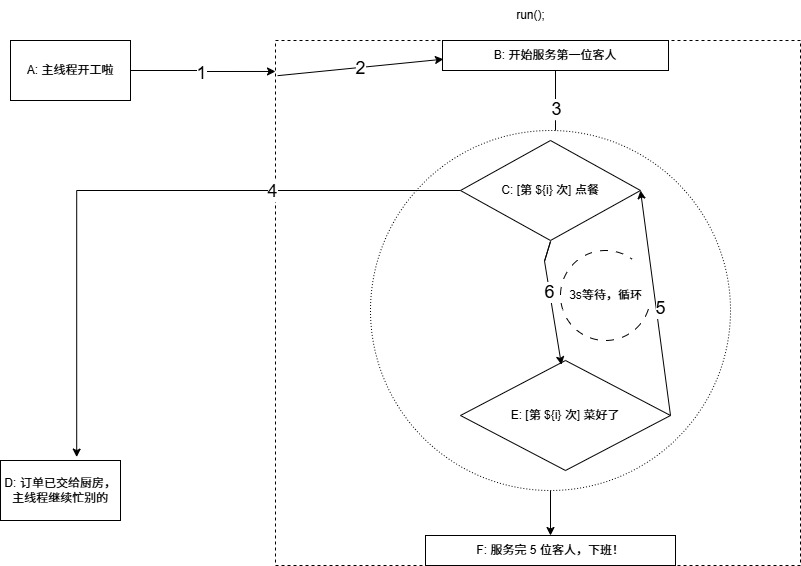
Phase One: Rapid Processing of Main Line Tasks (T ≈ 0 seconds)
console.log('A: ...'):- The waiter receives the first task: print log
A. This is a synchronous task; he completes it immediately. - Console Output:
A: The waiter (JS main thread) starts the day's work.
- The waiter receives the first task: print log
run():- The waiter receives the second task: execute the
runfunction. He immediately enters therunfunction.
- The waiter receives the second task: execute the
console.log('B: ...'):- Inside the
runfunction, the waiter executes the first line of code, printing logB. - Console Output:
B: The run function starts executing, ready to serve the 1st guest.
- Inside the
whileLoop (1st iteration) &console.log('C: ...'):- The waiter enters the loop and prints log
C. - Console Output:
C: [Loop 1] Order taking begins. Hand the order to the chef...
- The waiter enters the loop and prints log
await sleep(3000)- The Critical Turning Point!:- The waiter encounters
await. He does two things: a. Executessleep(3000): This is equivalent to handing an order "remind me after 3 seconds" to the kitchen (Web APIs). The kitchen's timer starts counting; it's no longer the waiter's concern. b. Theawaitkeyword tells the waiter: "Pause therunfunction task for now, you can leave!" - Result: The waiter "suspends" the
runfunction and immediately disengages, returning to the main line tasks to see if there's anything else on his "order pad."
- The waiter encounters
console.log('D: ...'):- The waiter finds there's still one last line of code in the main line tasks not executed! He handles it immediately.
- Console Output:
D: The waiter has handed the 1st guest's order to the kitchen... - This explains why
Dprints early.awaitdoes not block everything; it only pauses theasyncfunction it's in and returns control to the caller.
Phase Two: Waiting and Awakening (T = 0 to 3 seconds)
- At this point, all main line synchronous code has been executed. The waiter's "order pad" is empty.
- According to the work rules, he begins constantly polling the "pickup counter" (Task Queue).
- The kitchen is timing the first
sleeporder; the pickup counter is empty. The waiter is in an "idle but alert" waiting state.
Phase Three: Callback of Asynchronous Tasks and Loop (T ≥ 3 seconds)
At T=3 seconds,
setTimeoutcompletes:- The kitchen timer rings! The chef places a notification "can continue executing the
runfunction" (i.e., theresolvefunction) into the pickup counter (Task Queue).
- The kitchen timer rings! The chef places a notification "can continue executing the
Event Loop Response:
- The waiter immediately notices a new task at the pickup counter! He retrieves this task and returns to where the
runfunction was paused.
- The waiter immediately notices a new task at the pickup counter! He retrieves this task and returns to where the
runFunction Resumes Execution:console.log('E: ...'): The waiter continues working from the line afterawait, printing logE.- Console Output:
E: [Loop 1] The dish is ready!...
whileLoop (2nd iteration):- The loop continues; the waiter prints the next log
C. await sleep(3000)(2nd time): History repeats! The waiter hands a new order to the kitchen and is again "kicked out" of therunfunction byawait.
- The loop continues; the waiter prints the next log
What does the waiter do during the second pause?
- He returns to the main line again. But the main line tasks were completed long ago.
- He checks the pickup counter again. The kitchen just received a new order, so the pickup counter is also empty.
- Therefore, from T=3.01 seconds to T=6 seconds, the waiter enters the "idle waiting" state again, waiting for the next
setTimeoutto complete.
This cycle of "execute -> await -> pause -> wait -> awaken -> continue execution" repeats until the while loop ends.
- Loop Ends,
console.log('F: ...'):- After all 5 loops are completed, the
runfunction continues downward, printing the final logF. - At this point, the
asyncfunctionrunis considered truly finished executing.
- After all 5 loops are completed, the
Deepening Knowledge Points
asyncKeyword:- It marks a regular function as an asynchronous function.
- Calling an
asyncfunction immediately returns a Promise object, without waiting for all code inside the function to finish executing.
awaitKeyword:- Can only be used inside an
asyncfunction. - It pauses the execution of the current
asyncfunction, waiting for the expression following it (usually a Promise) to becomefulfilled. awaitis syntactic sugar for asynchronous flow control. It makes asynchronous code look as intuitive as synchronous code, but its underlying mechanism is still based on Promise and the event loop.
- Can only be used inside an
The Essence of Non-Blocking: JavaScript's single-threaded nature, through the event loop mechanism, achieves a "non-blocking" concurrency model. When encountering I/O operations or timers and other time-consuming tasks, the main thread hands them off to other modules (like Web APIs) for processing, while itself continues executing subsequent code, thereby ensuring UI smoothness and program responsiveness.
async/awaitis the superstructure of this model.Execution Timing Analysis:
- Code outside an
asyncfunction will immediately get executed after that function firstawaits and yields control. - Code inside an
asyncfunction that comes after anawaitmust wait for theawaited Promise to complete and, through the scheduling of the event loop, be placed back onto the main thread for execution.
- Code outside an