
Building Speaker-Aware Subtitles with ModelScope cam++ and Paraformer: A Complete Journey of Pitfalls and Practice
If you've ever worked with multimedia content, you know that adding subtitles to videos is a basic task. But if you want to go further and automatically label who said each line in the subtitles, the challenge begins.
This article is my complete record of a hands-on project. Starting from a simple idea, I used open-source models from ModelScope to build, debug, and ultimately create a tool that automatically identifies speakers and generates SRT subtitles. The pitfalls I encountered, the problem-solving process, and reflections on technical boundaries during this journey might be more valuable than the final code itself.
The Initial Blueprint: Two Models, Each with a Role
The goal was clear: input an audio clip of a multi-person conversation and output SRT subtitles with speaker labels like [spk_0], [spk_1].
To achieve this, a single model isn't enough; it requires a combination:
Speaker Diarization
- Task: Find out "who spoke when." It acts like a detective, scanning the entire audio to segment speech periods from different people, but it doesn't care what they said.
- Chosen Model:
iic/speech_campplus_speaker-diarization_common, a seasoned and capable model in the speaker recognition field. - Model URL: https://www.modelscope.cn/models/iic/speech_campplus_speaker-diarization_common
Automatic Speech Recognition (ASR)
- Task: Handle "what was said." It's responsible for converting speech signals into timestamped text.
- Chosen Model:
iic/speech_paraformer-large-vad-punc_asr_nat-zh-cn-16k-common-vocab8404-pytorch, the Paraformer model from the FunASR ecosystem, known for its accuracy and efficiency in Chinese recognition. - Model URL: https://www.modelscope.cn/models/iic/speech_paraformer-large-vad-punc_asr_nat-zh-cn-16k-common-vocab8404-pytorch
Result Fusion
- Task: This is our own "glue" code. Its job is to take the results from the first two steps and, like a director, precisely assign each line of dialogue (text + timestamps) to the corresponding actor (speaker), ultimately generating the desired SRT subtitles with speaker labels.
The blueprint was beautiful, but the real challenges surfaced when construction began.
The Debugging Journey: Moving Forward Amidst "Surprises"
The First Hurdle: The "Guessing Game" of API Parameters
Rolling up my sleeves to start, the initial code kept hitting walls, with TypeError becoming a regular occurrence. The error logs were like impatient guides, repeatedly hinting: "Wrong parameter name!" Through repeated attempts and comparing documentation, I discovered that even within the ModelScope ecosystem, different models have different "tastes":
- The speaker diarization
diarization_pipelinerequires the audio parameter namedaudio. - The speech recognition
asr_model.generateinsists oninput.
A small difference in parameter names became the first step of a long journey.
The Second Hurdle: The "Mystery Box" of Model Outputs
I naively assumed the speaker diarization model would politely return a file path in a standard format (like RTTM). However, reality gave me a list directly in memory. What's more, the format of this list changed several times, from the initial "list of lists" to the final minimalist [[start_seconds, end_seconds, speaker_id]] format, which was truly baffling.
This reminded me not to code based on assumptions; I must print and understand the actual output of the model at every step.
The Third Hurdle: How to "Segment Sentences" Elegantly?
The ASR model gave us a whole paragraph of punctuated text and a list of timestamps precise to the "character" level, but it didn't provide ready-made sentence-segmented results. This was another puzzle.
Initial Attempt: Clumsy but Effective I hand-wrote a
reconstruct_sentences_from_asrfunction, using regular expressions to "crudely" split sentences based on punctuation like periods and question marks, then accumulating timestamps based on the word count of each split sentence. This method worked but felt "un-AI" and awkward.Final Optimization: Discovering the "Hidden Switch" After in-depth research, I found that the FunASR model itself integrates Voice Activity Detection (VAD) functionality, which is inherently used for sentence segmentation. By simply adding a
sentence_timestamp=Trueparameter when callingmodel.generate, I could directly obtain a field namedsentence_info. This field contains perfectly segmented sentences with timestamps, achieving the goal in one step.
The Final Confusion: The Code is Correct, Why is the Result Wrong?
When all the code logic was straightened out, I tested it with an audio clip containing clear male and female dialogue. The result showed that all speech came from the same person. This was the most confusing moment: the code logic was flawless, why was the result completely off?
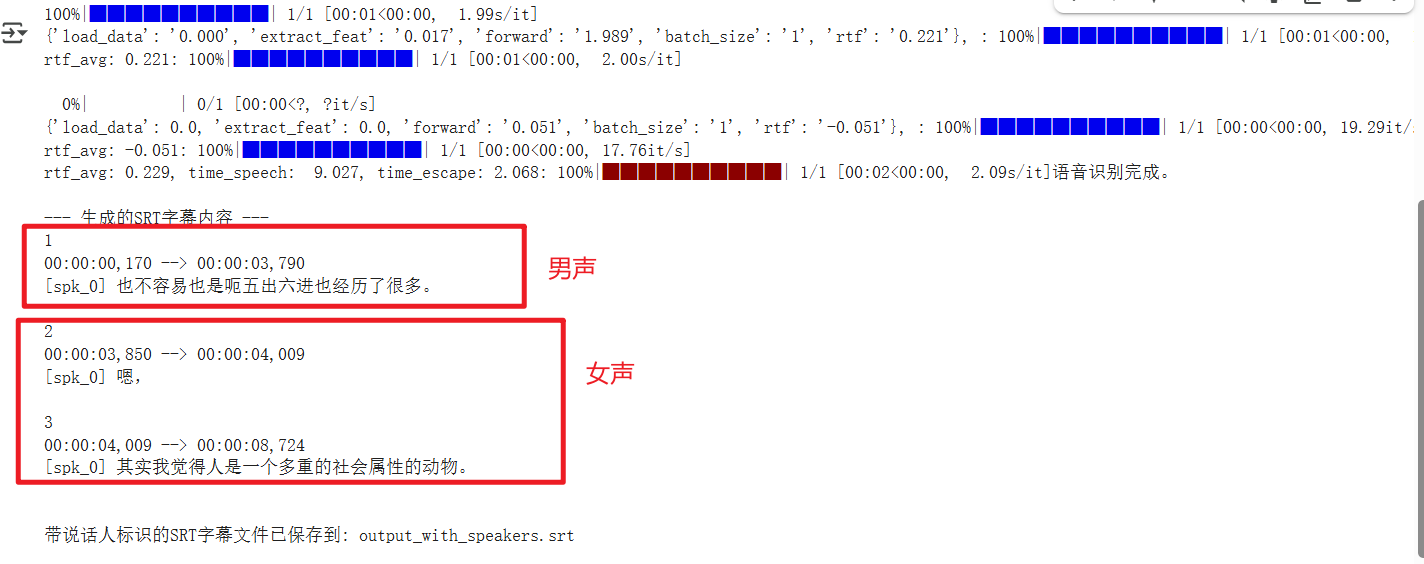 As shown in the runtime result above, the first sentence is male, the second is female, but they were not successfully distinguished.
I cross-verified using the official example audio and finally confirmed a harsh reality: My code logic was completely correct, but my test audio was too challenging for the cam++ model. Even though I explicitly told the model there were two people present via the oracle_num=2 parameter, it still failed to distinguish them.
The Final Code and the Gap with Reality
This code incorporates all the optimizations mentioned above. It's logically clear and maximizes the use of the models' own capabilities.
import os
import re
from funasr import AutoModel
from modelscope.pipelines import pipeline
from modelscope.utils.constant import Tasks
import soundfile


audio_file = 'he.wav'

try:
    data, sample_rate = soundfile.read(audio_file)
    if sample_rate != 16000:
        print(f"Warning: Audio sample rate is {sample_rate}Hz. For best results, audio with a 16kHz sample rate is recommended.")
except Exception as e:
    print(f"Error: Unable to read audio file {audio_file}. Please ensure the file exists and the format is correct. Error: {e}")
    exit()

# === Speaker Diarization Model ===
print("Initializing Speaker Diarization Model (cam++)...")
diarization_pipeline = pipeline(
    task=Tasks.speaker_diarization,
    model='iic/speech_campplus_speaker-diarization_common',
    model_revision='v1.0.0'
)

# === Speech Recognition Model ===
print("Initializing Speech Recognition Model (paraformer-zh)...")
asr_model = AutoModel(model="iic/speech_paraformer-large-vad-punc_asr_nat-zh-cn-16k-common-vocab8404-pytorch",
                      vad_model="fsmn-vad",
                      punc_model="ct-punc-c")


# --- 2. Execute Model Pipeline ---

print(f"Starting to process audio file: {audio_file}")
print("Starting speaker diarization...")

# If you can determine the number of speakers, adding this parameter can improve accuracy
num_speakers = 2
diarization_result = diarization_pipeline(audio_file, oracle_num=num_speakers)
diarization_output = diarization_result['text']
print(f"Speaker diarization complete.")
print(f"--- Raw Speaker Diarization Model Output ---\n{diarization_output}\n---------------------------------")


print("Starting speech recognition...")
# Use the model's built-in VAD for intelligent sentence segmentation to directly get sentence list
res = asr_model.generate(input=audio_file, sentence_timestamp=True)
print("Speech recognition complete.")


# --- 3. Merge and Process ---

def parse_diarization_result(diarization_segments):
    """Parse the [[start, end, id]] format list returned by the speaker diarization model."""
    speaker_segments = []
    if not isinstance(diarization_segments, list): return []
    for segment in diarization_segments:
        if isinstance(segment, list) and len(segment) == 3:
            try:
                start_sec, end_sec = float(segment[0]), float(segment[1])
                speaker_id = f"spk_{segment[2]}"
                speaker_segments.append({'speaker': speaker_id, 'start': start_sec, 'end': end_sec})
            except (ValueError, TypeError) as e: print(f"Warning: Skipping malformed diarization segment: {segment}. Error: {e}")
    return speaker_segments

def merge_results(asr_sentences, speaker_segments):
    """Merge ASR results and speaker diarization results"""
    merged_sentences = []
    if not speaker_segments:
        # If speaker diarization fails, mark all sentences as unknown
        for sentence in asr_sentences:
            sentence['speaker'] = "spk_unknown"
            merged_sentences.append(sentence)
        return merged_sentences

    for sentence in asr_sentences:
        sentence_start_sec, sentence_end_sec = sentence['start'] / 1000.0, sentence['end'] / 1000.0
        found_speaker, best_overlap = "spk_unknown", 0

        # Find the speaker segment with the longest time overlap with the current sentence
        for seg in speaker_segments:
            overlap_start = max(sentence_start_sec, seg['start'])
            overlap_end = min(sentence_end_sec, seg['end'])
            overlap_duration = max(0, overlap_end - overlap_start)

            if overlap_duration > best_overlap:
                best_overlap = overlap_duration
                found_speaker = seg['speaker']

        sentence['speaker'] = found_speaker
        merged_sentences.append(sentence)
    return merged_sentences

def format_time(milliseconds):
    """Convert milliseconds to SRT time format (HH:MM:SS,ms)"""
    seconds = milliseconds / 1000.0
    h = int(seconds // 3600)
    m = int((seconds % 3600) // 60)
    s = int(seconds % 60)
    ms = int((seconds - int(seconds)) * 1000)
    return f"{h:02d}:{m:02d}:{s:02d},{ms:03d}"

def to_srt(sentences):
    """Convert merged results to SRT format with speaker IDs"""
    srt_content = ""
    for i, sentence in enumerate(sentences):
        if 'start' not in sentence or 'end' not in sentence: continue
        start_time = format_time(sentence['start'])
        end_time = format_time(sentence['end'])
        speaker_id = sentence.get('speaker', 'spk_unknown')
        text = sentence.get('text', '')
        srt_content += f"{i + 1}\n{start_time} --> {end_time}\n[{speaker_id}] {text}\n\n"
    return srt_content

# --- 4. Generate Final SRT Subtitles ---
speaker_info = parse_diarization_result(diarization_output)

sentence_list = []
if res and 'sentence_info' in res[0]:
    sentence_list = res[0]['sentence_info']
else:
    print("Error or Warning: Could not get 'sentence_info' from ASR results.")

final_sentences = merge_results(sentence_list, speaker_info)
srt_output = to_srt(final_sentences)

print("\n--- Generated SRT Subtitle Content ---")
if srt_output:
    print(srt_output)
    output_srt_file = 'output_with_speakers.srt'
    with open(output_srt_file, 'w', encoding='utf-8') as f: f.write(srt_output)
    print(f"SRT subtitle file with speaker labels saved to: {output_srt_file}")
else:
print("Failed to generate SRT content.")Environment Setup Tips
- Install Dependencies:
pip install -U modelscope funasr addict - Version Compatibility Issues: If errors occur after installation, try downgrading the
numpyanddatasetspackages. This often resolves common compatibility issues:pip install --force-reinstall numpy==1.26.4 datasets==3.0.0
Execution Results on Google Colab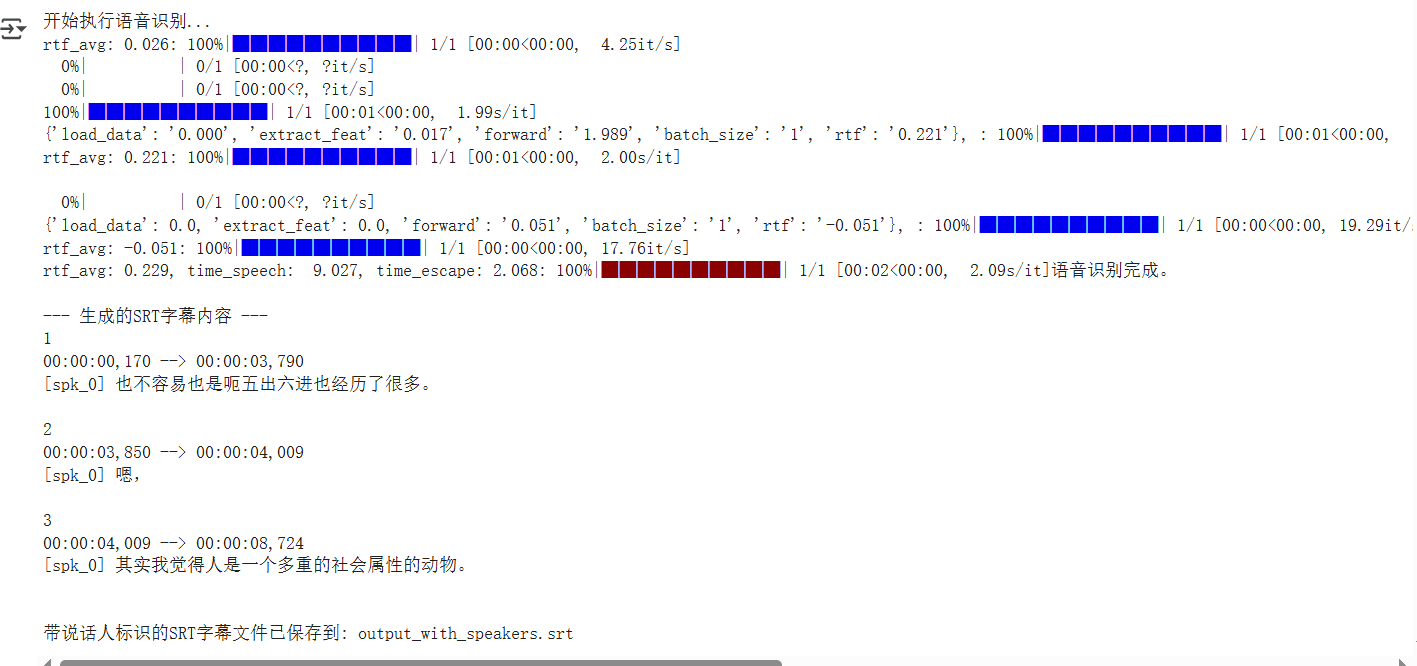
How Far Are Open-Source Speaker Diarization Models from Production?
This practice proves that it's entirely feasible to build a "handcrafted" speaker-aware pipeline technically. However, this solution also has its clear limitations:
The Diarization Model is the Bottleneck: This cannot be overemphasized. The
cam++model is the weak link in the entire workflow. If it can't "hear" multiple people in your audio, the subsequent code, no matter how well written, is powerless. Its performance is unsatisfactory when dealing with complex scenarios like background noise, accents, and speech rate variations.Fear of "Overlap" and "Interruption": Our merging logic is "winner takes all"; a sentence is completely assigned to the speaker with the longest overlapping time. It cannot handle complex situations where two people speak simultaneously or dialogue overlaps.
So, looking at the industry, how do other players do it?
| Solution Type | Representative Tool/Service | Advantages | Disadvantages | One-Liner Review |
|---|---|---|---|---|
| Open-Source Integrated Pipeline | WhisperX, Pyannote.audio | Top-tier performance, active community, represents the highest level in academia and open-source. | Complex configuration, high resource consumption, not very friendly to beginners. | Suitable for tech enthusiasts who love tinkering and pursue ultimate performance. Beginners, run. |
| Commercial Cloud Service API | Google STT, AWS Transcribe, iFlyTek | Simple and easy to use, stable and reliable, basically no need to worry about underlying details. | Pay-as-you-go, high cost, data needs to be uploaded to the cloud. | The choice of "money power," suitable for rapid development and enterprises with ample budgets. |
| This Project's Solution | ModelScope + FunASR | Free and open-source, flexible and controllable, models can be freely combined and modified. | Requires hands-on debugging and integration, current performance is unstable. | Suitable for learning, experimentation, and scenarios with low performance requirements. |
My initial goal was to test the effectiveness of this solution. If it was good enough, I planned to integrate it into my other project, pyVideoTrans. However, based on the actual test results, its performance, especially for long audio, is far from production-ready. And top-tier open-source solutions like Pyannote.audio indeed have daunting deployment and integration complexity.
Therefore, this exploration ends here for now. Although the final product's performance was subpar, the entire process remains a valuable learning experience.