
Just yesterday, I encountered a textbook database problem. I needed to delete an index on a large table with 60 million rows. I thought a simple ALTER TABLE command would do the trick, but little did I know it would kick off a heart-stopping, hours-long journey of troubleshooting and repair.
The entire process involved a series of issues: DDL hanging, fatal flaws of the table engine, table corruption and repair, abnormal index statistics, and more. I'm documenting the entire process here as a reminder to my future self and to help anyone who might face a similar predicament.
The protagonist of the story: A table named wa_xinghao, with over 60 million rows.
Act 1: Undercurrents in Calm Waters – Why Did ALTER TABLE Hang?
It all started with this command:
ALTER TABLE `wa_xinghao` DROP INDEX `product_id-s1`;After execution, the terminal hung without any response. At the same time, I noticed all queries related to this table in the application became extremely slow, even timing out. My first thought: It's locked!
I immediately opened a new database connection and executed SHOW FULL PROCESSLIST; for diagnosis.
Typically, the most common reason for an ALTER hanging is Waiting for table metadata lock, meaning another long transaction or query is holding the table's metadata lock. But this time, the State I saw was:
copy to tmp table
This state made my heart sink. It meant MySQL was performing the most primitive and time-consuming table rebuild operation: creating a temporary table with the new structure (without that index) and then copying all 60 million rows over one by one. During this time, the original table would be locked for a long period. For 60 million rows, this was undoubtedly a disaster.
Act 2: Digging Deeper – Why COPY and Not INPLACE?
I was using MySQL 5.7, which has long supported Online DDL (INPLACE algorithm) for DROP INDEX. It shouldn't have degraded to COPY. To verify, I tried forcing the algorithm:
ALTER TABLE `wa_xinghao` DROP INDEX `product_id-s1`, ALGORITHM=INPLACE, LOCK=NONE;The result: MySQL mercilessly gave me an error: ERROR 1845 (0A000): ALGORITHM=INPLACE is not supported for this operation. Try ALGORITHM=COPY.
Now the problem was clear: For some reason, MySQL deemed INPLACE operations impossible on this table. I immediately executed SHOW CREATE TABLE wa_xinghao; to check the table structure, and the truth was revealed:
) ENGINE=MyISAM ...The root cause was found! It was the MyISAM storage engine. I had always assumed it was InnoDB because at a glance, the entire database seemed to be InnoDB!
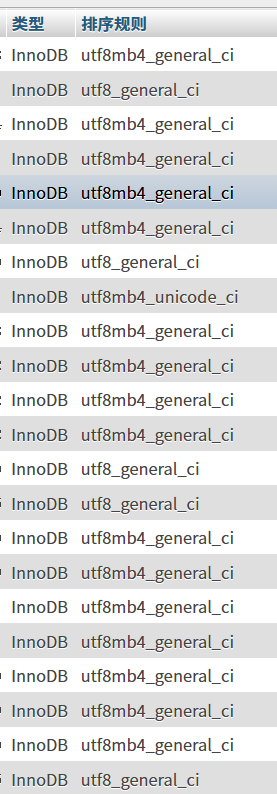
MyISAM is an ancient, non-transactional engine with many fatal flaws, one of which is very weak support for DDL operations. It hardly has a concept of "online" operations; most ALTER operations lead to table locking and rebuild.
Act 3: One Problem After Another – Table Corruption and the Long Repair
After identifying the problem, I couldn't tolerate the long table lock, so I made a decision that, in hindsight, was very dangerous: I KILLed the ALTER process that was in copy to tmp table.
After a brief calm, a new nightmare arrived. When I tried to perform any operation on this table (even SELECT), I received a new error:
ERROR 1194 (HY000): Table 'wa_xinghao' is marked as crashed and should be repaired
Yes, by forcibly interrupting the modification of the underlying files, the MyISAM table "lived up to expectations" and became corrupted. This is a typical manifestation of MyISAM's non-crash-safe nature.
The only way out was to repair it:
REPAIR TABLE `wa_xinghao`;Then, I entered another round of long waiting. Through SHOW PROCESSLIST;, I saw the state changed to:
Repair by sorting
This state indicated MySQL was rebuilding the index file (.MYI) by sorting. For 60 million rows and multiple indexes, this was an extremely CPU and I/O intensive process. All I could do was wait patiently and pray the server wouldn't be overwhelmed. This time, I absolutely dared not KILL it again.
Act 4: A "Little Easter Egg" After the Storm – Bizarre Index Cardinality
After hours of agony, the table was finally repaired successfully!
While checking the table structure, I accidentally discovered an interesting phenomenon:

As shown in the image above, the cardinality of the sn and sn2 indexes was actually larger than that of the primary key PRIMARY! This is logically impossible because the primary key is absolutely unique, and its cardinality should equal the total number of rows.
Reasons Revealed:
- Cardinality is an estimate: For performance, MySQL estimates cardinality through random sampling, which inherently has errors.
- Outdated statistics: The main reason is that after the chaotic process of "crash-repair," the table's statistics were not updated in time, resulting in stale and inaccurate data.
The solution was simple: manually force an update of the statistics:
ANALYZE TABLE `wa_xinghao`;After execution, the cardinality returned to normal.
Final Chapter: Reborn from the Ashes – Embracing InnoDB
This heart-stopping experience made me determined to bid farewell to MyISAM for good. My ultimate goal was: While deleting the redundant index, convert the table engine to InnoDB.
Directly executing ALTER TABLE ... ENGINE=InnoDB would also trigger a table rebuild with locking, which was not acceptable. There are two best practices:
Option 1: The King of Online Operations – pt-online-schema-change
This tool from Percona Toolkit is the industry standard for handling large table DDL. By creating a "ghost table" and using triggers to synchronize incremental data, it can complete table structure changes with minimal locking and minimal impact on business.
# One command to accomplish both "delete index" and "convert engine" tasks
pt-online-schema-change \
  --alter "DROP INDEX `product_id-s1`, ENGINE=InnoDB" \
  h=your_host,D=your_database,t=wa_xinghao,u=your_user,p=your_password \
--executeOption 2: Manual Offline Operation (Requires a Maintenance Window)
If the business allows a brief maintenance window, you can adopt the approach of "migrate data first, build indexes later," which is extremely fast.
- Create a new InnoDB table
wa_xinghao_newwithout indexes. - Quickly export data to a file:
SELECT ... INTO OUTFILE ... FROM wa_xinghao; - Quickly load data into the new table:
LOAD DATA INFILE ... INTO TABLE wa_xinghao_new; - Create required indexes online on the new table:
ALTER TABLE wa_xinghao_new ADD INDEX ...; - During the maintenance window, perform an atomic rename:
RENAME TABLE wa_xinghao TO wa_xinghao_old, wa_xinghao_new TO wa_xinghao;
Reflection
Although the journey was bumpy, the gains were immense. I've summarized the following key lessons:
- Engine is fundamental: Before performing any operation on a large table, check the
ENGINEfirst! Different engines behave vastly differently. - Bid farewell to
MyISAM: For any business with write, update, and high availability requirements, immediately migrateMyISAMtoInnoDB.MyISAM's non-crash-safe nature and table-level locks are ticking time bombs buried in the system. - Respect the
KILLcommand: Do not easilyKILLa DDL process performing write operations on aMyISAMtable, or you will most likely end up with a corrupted table. - Utilize professional tools: For large table DDL,
pt-online-schema-changeorgh-ostare not "options" but "necessities." - Understand status information: The
StateinSHOW PROCESSLISTis a golden key for troubleshooting. Bothcopy to tmp tableandRepair by sortingtell us what's happening at the underlying level.