
F5-TTS-api
Project source code: https://github.com/jianchang512/f5-tts-api
This is the API and webui for the F5-TTS project.
F5-TTS is an advanced text-to-speech system that uses deep learning technology to generate realistic, high-quality human voices. It can clone your voice using just a 10-second audio sample. F5-TTS accurately reproduces speech and imbues it with rich emotional expression.
Original voice sample (Daughter Country King)
Cloned audio
Windows Integrated Package (Includes F5-TTS Model & Runtime Environment)
123 Pan Download: https://www.123684.com/s/03Sxjv-okTJ3
Huggingface Download: https://huggingface.co/spaces/mortimerme/s4/resolve/main/f5-tts-api-v0.3.7z?download=true
Compatible Systems: Windows 10/11 (Ready to use after extraction)
Usage Instructions:
Start API Service: Double-click the run-api.bat file. The API address will be http://127.0.0.1:5010/api. 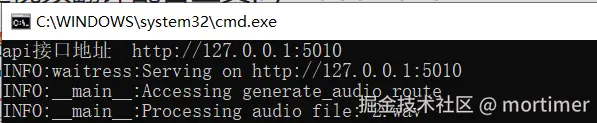
The API service must be started to use it within translation software.
The integrated package uses CUDA 11.8 by default. If you have an NVIDIA GPU and have configured the CUDA/cuDNN environment, the system will automatically use GPU acceleration. To use a higher CUDA version, e.g., 12.4, follow these steps:
Navigate to the folder containing
api.py. Typecmdin the folder address bar and press Enter. Then, execute the following commands in the opened terminal:
.\runtime\python -m pip uninstall -y torch torchaudio
.\runtime\python -m pip install torch torchaudio --index-url https://download.pytorch.org/whl/cu124
The advantages of F5-TTS lie in its efficiency and high-quality voice output. Compared to similar technologies requiring longer audio samples, F5-TTS needs only a very short sample to generate high-fidelity speech and can effectively convey emotion, enhancing the listening experience—a feat many existing technologies struggle to achieve.
Currently, F5-TTS supports both English and Chinese languages.
Important Note: Proxy/VPN
The model needs to be downloaded from the huggingface.co website. Since this site is inaccessible within mainland China, please set up a system proxy or global VPN in advance; otherwise, the model download will fail.
The integrated package includes most required models, but it may check for updates or download other small dependency models. Therefore, if you encounter an
HTTPSConnecterror in the terminal, you still need to configure a system proxy.
Using in Video Translation Software
Start the API service. The API service must be started to use it within translation software.
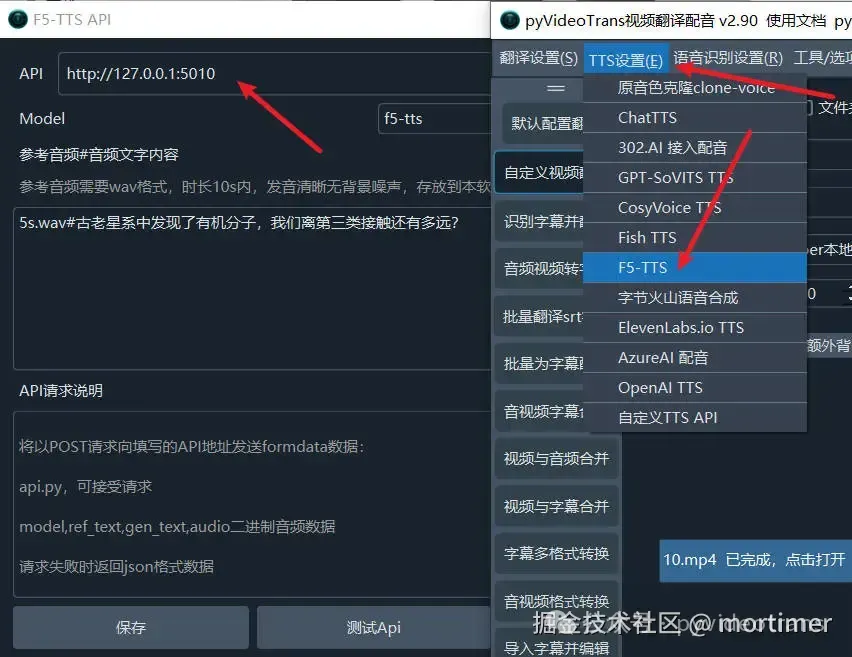
Open the video translation software, locate the TTS settings, select F5-TTS, and enter the API address (default is http://127.0.0.1:5010).
Enter the reference audio and its corresponding text.
It is recommended to select the
f5-ttsModel for better generation quality.
Using api.py within Third-Party Integrated Packages
- Copy the
api.pyfile and theconfigsfolder to the root directory of the third-party integrated package. - Check the path of the
python.exeintegrated within the third-party package. For example, if it's inside apy311folder, typecmdin the root directory's address bar, press Enter, and then execute the command:.\py311\python api.py. If you get an error likemodule flask not found, first execute.\py311\python -m pip install waitress flask.
Using api.py after Deploying the Official F5-TTS Project from Source
- Copy the
api.pyfile and theconfigsfolder into the project folder. - Install the required modules:
pip install flask waitress - Execute
python api.py
API Usage Example
import requests

res=requests.post('http://127.0.0.1:5010/api',data={
    "ref_text": 'Enter the text content corresponding to 1.wav here',
    "gen_text": '''Enter the text to be generated here.''',
    "model": 'f5-tts'
},files={"audio":open('./1.wav','rb')})

if res.status_code!=200:
    print(res.text)
    exit()

with open("ceshi.wav",'wb') as f:
f.write(res.content)Compatible with OpenAI TTS Interface
The voice parameter must separate the reference audio file and its corresponding text with three hash symbols (###). For example:
1.wav###你说四大皆空,却为何紧闭双眼,若你睁开眼睛看看我,我不相信你,两眼空空。 This indicates the reference audio is 1.wav (located in the same directory as api.py), and the text content within 1.wav is "你说四大皆空,却为何紧闭双眼,若你睁开眼睛看看我,我不相信你,两眼空空."
The returned data is fixed as WAV audio data.
import requests
import json
import os
import base64
import struct


from openai import OpenAI

client = OpenAI(api_key='12314', base_url='http://127.0.0.1:5010/v1')
with  client.audio.speech.with_streaming_response.create(
                    model='f5-tts',
                    voice='1.wav###你说四大皆空,却为何紧闭双眼,若你睁开眼睛看看我,我不相信你,两眼空空。',
                    input='你好啊,亲爱的朋友们',
                    speed=1.0
                ) as response:
    with open('./test.wav', 'wb') as f:
       for chunk in response.iter_bytes():
            f.write(chunk)