
GeminiAI Compatible with OpenAI
GeminiAI is a developer-friendly large language model. It features a beautiful interface, powerful capabilities, and offers a generous daily free quota sufficient for everyday needs.
However, it also has some inconveniences, such as always requiring a proxy to access and its API not being compatible with the OpenAI SDK.
To solve these issues and achieve compatibility with OpenAI, I wrote a piece of JavaScript code and deployed it on Cloudflare, binding it to my own domain. This allows using Gemini in China without a proxy while maintaining OpenAI compatibility. In any tool that uses OpenAI, you simply need to replace the API endpoint and the secret key (SK).
Creating a Worker on Cloudflare
If you don't have a Cloudflare account yet, please register one first (it's free). The registration address is: https://dash.cloudflare.com/ After logging in, remember to bind your own domain; otherwise, you won't be able to access it without a proxy.
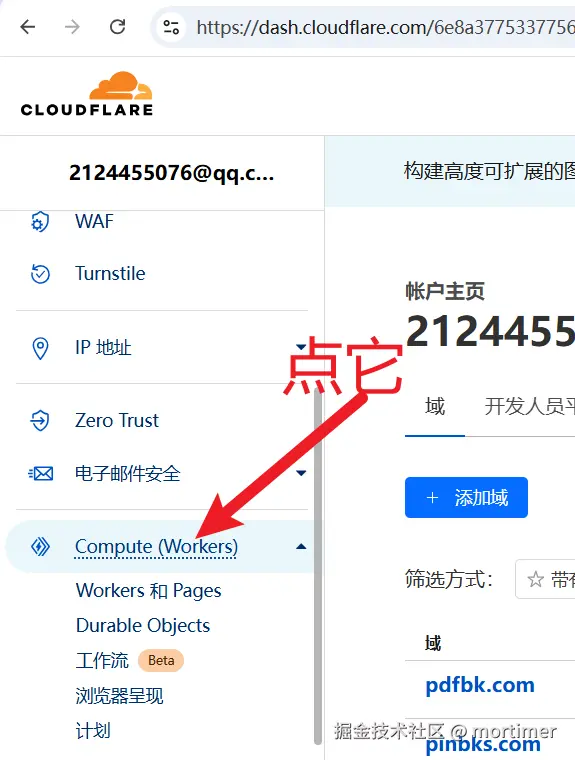
After logging in, find Compute (Workers) in the left sidebar and click on it, then click the Create button.
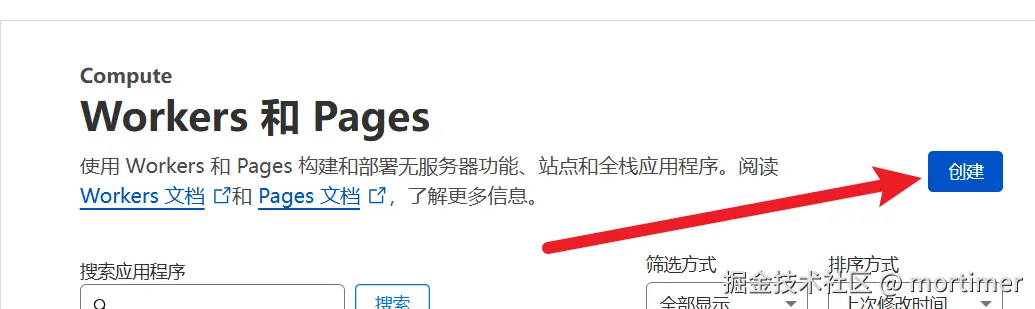
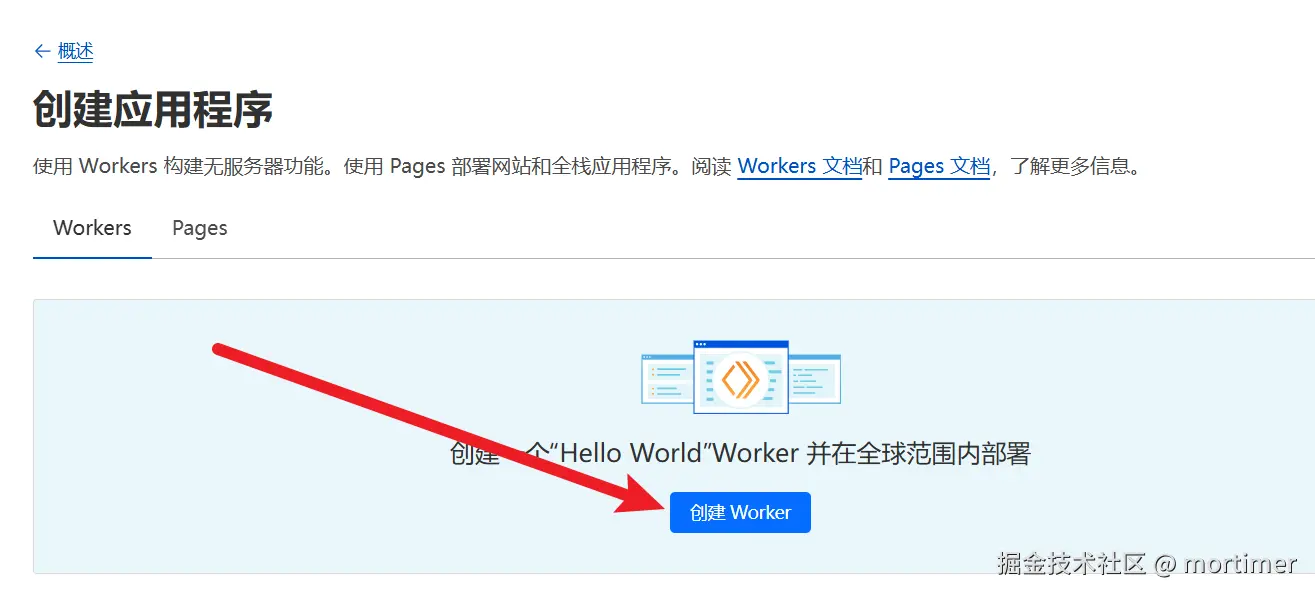
On the page that appears, click Create Worker.
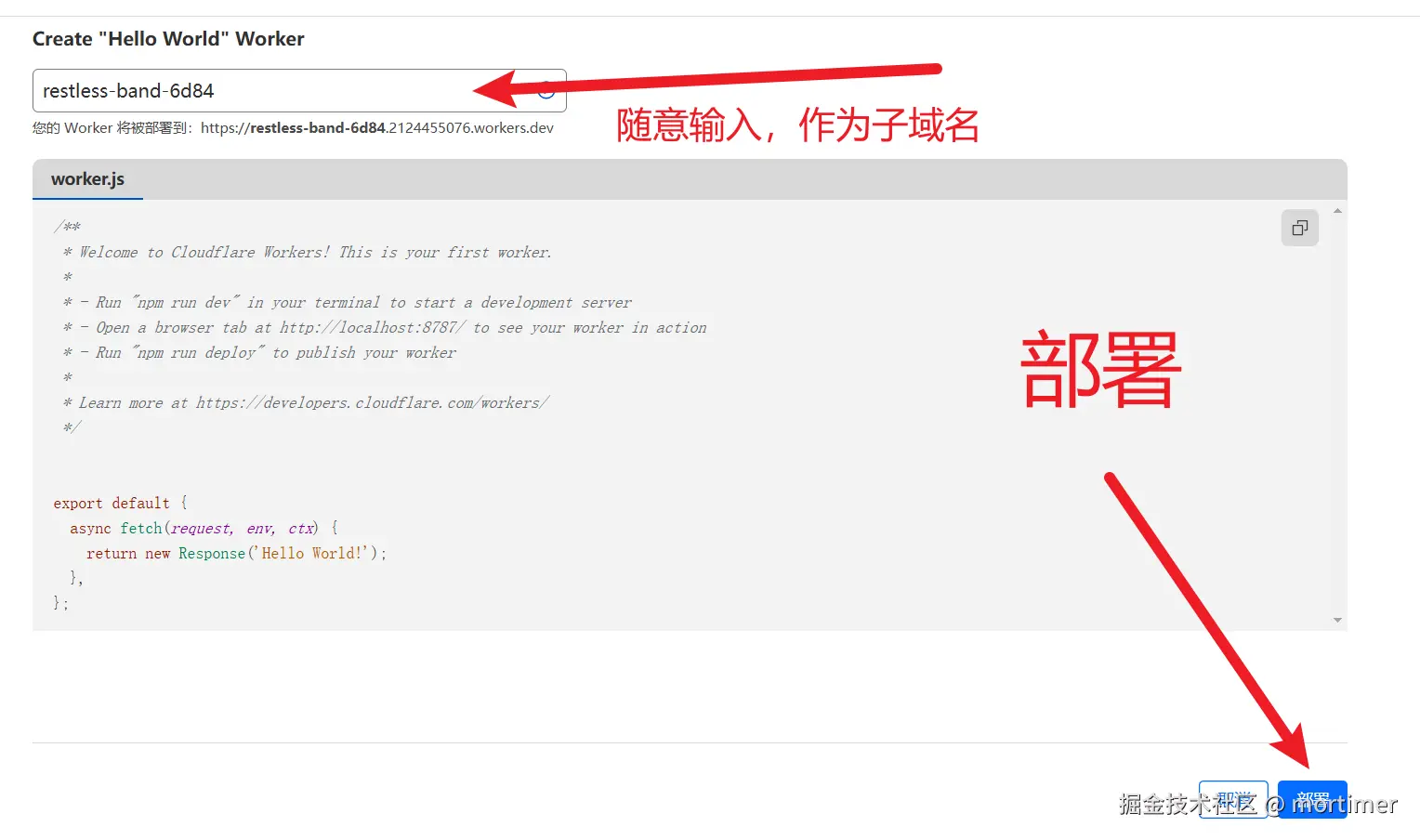
Then click Deploy in the bottom right corner. This completes the Worker creation.
Editing the Code
The code below is key to achieving OpenAI compatibility. Please copy it and replace the default generated code in the Worker.
On the page that appears after deployment, click Edit code.

Delete all the code on the left, then copy the code below and paste it in. Finally, click Deploy in the top right corner.
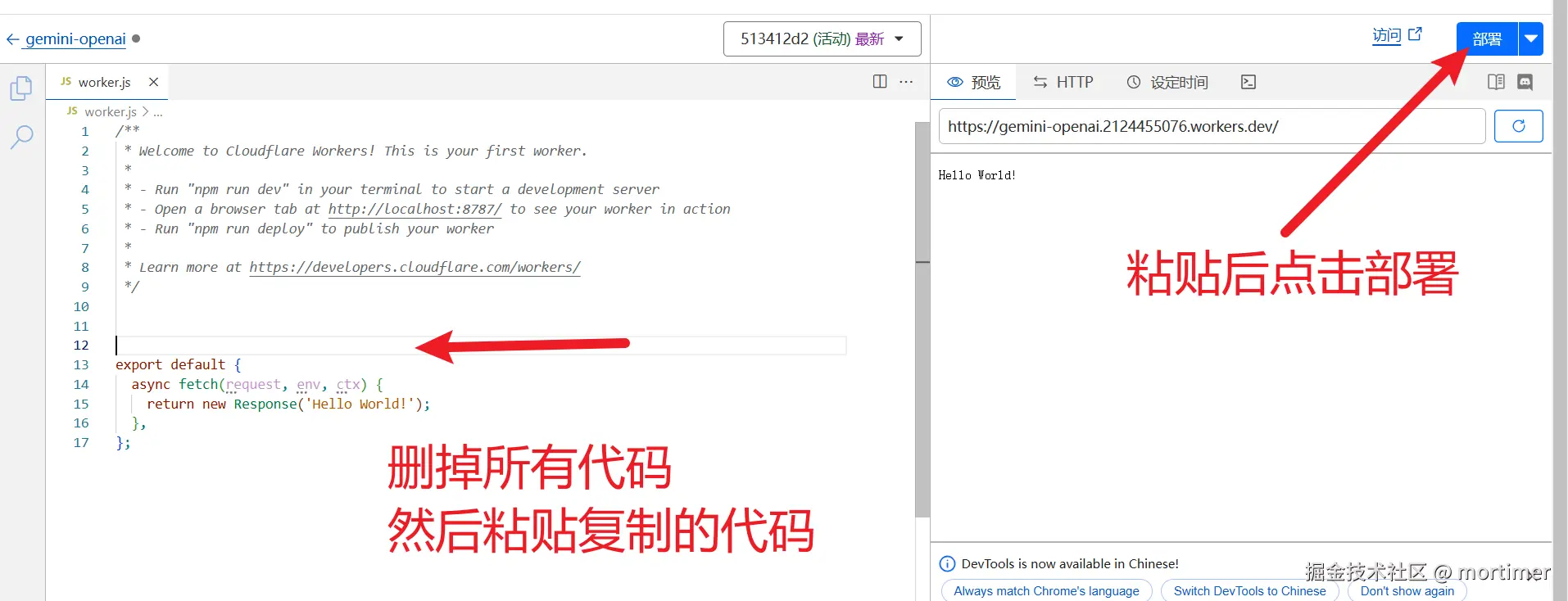
Copy the following code
export default {
  async fetch (request) {
    if (request.method === "OPTIONS") {
      return handleOPTIONS();
    }
    const errHandler = (err) => {
      console.error(err);
      return new Response(err.message, fixCors({ status: err.status ?? 500 }));
    };
    try {
      const auth = request.headers.get("Authorization");
      const apiKey = auth?.split(" ")[1];
      const assert = (success) => {
        if (!success) {
          throw new HttpError("The specified HTTP method is not allowed for the requested resource", 400);
        }
      };
      const { pathname } = new URL(request.url);
	  if(!pathname.endsWith("/chat/completions")){
		  return new Response("hello")
	  }
        assert(request.method === "POST");
        return handleCompletions(await request.json(), apiKey).catch(errHandler);
    } catch (err) {
      return errHandler(err);
    }
  }
};

class HttpError extends Error {
  constructor(message, status) {
    super(message);
    this.name = this.constructor.name;
    this.status = status;
  }
}

const fixCors = ({ headers, status, statusText }) => {
  headers = new Headers(headers);
  headers.set("Access-Control-Allow-Origin", "*");
  return { headers, status, statusText };
};

const handleOPTIONS = async () => {
  return new Response(null, {
    headers: {
      "Access-Control-Allow-Origin": "*",
      "Access-Control-Allow-Methods": "*",
      "Access-Control-Allow-Headers": "*",
    }
  });
};

const BASE_URL = "https://generativelanguage.googleapis.com";
const API_VERSION = "v1beta";

// https://github.com/google-gemini/generative-ai-js/blob/cf223ff4a1ee5a2d944c53cddb8976136382bee6/src/requests/request.ts#L71
const API_CLIENT = "genai-js/0.21.0"; // npm view @google/generative-ai version
const makeHeaders = (apiKey, more) => ({
  "x-goog-api-client": API_CLIENT,
  ...(apiKey && { "x-goog-api-key": apiKey }),
  ...more
});

const DEFAULT_MODEL = "gemini-2.0-flash-exp";
async function handleCompletions (req, apiKey) {
  let model = DEFAULT_MODEL;
  if(req.model.startsWith("gemini-")) {
      model = req.model;
  }
  const TASK = "generateContent";
  let url = `${BASE_URL}/${API_VERSION}/models/${model}:${TASK}`;

  const response = await fetch(url, {
    method: "POST",
    headers: makeHeaders(apiKey, { "Content-Type": "application/json" }),
    body: JSON.stringify(await transformRequest(req)), // try
  });

  let body = response.body;
  if (response.ok) {
    let id = generateChatcmplId();
      body = await response.text();
      body = processCompletionsResponse(JSON.parse(body), model, id);
  }
  return new Response(body, fixCors(response));
}

const harmCategory = [
  "HARM_CATEGORY_HATE_SPEECH",
  "HARM_CATEGORY_SEXUALLY_EXPLICIT",
  "HARM_CATEGORY_DANGEROUS_CONTENT",
  "HARM_CATEGORY_HARASSMENT",
  "HARM_CATEGORY_CIVIC_INTEGRITY",
];
const safetySettings = harmCategory.map(category => ({
  category,
  threshold: "BLOCK_NONE",
}));
const fieldsMap = {
  stop: "stopSequences",
  n: "candidateCount",
  max_tokens: "maxOutputTokens",
  max_completion_tokens: "maxOutputTokens",
  temperature: "temperature",
  top_p: "topP",
  top_k: "topK",
  frequency_penalty: "frequencyPenalty",
  presence_penalty: "presencePenalty",
};
const transformConfig = (req) => {
  let cfg = {};

  for (let key in req) {
    const matchedKey = fieldsMap[key];
    if (matchedKey) {
      cfg[matchedKey] = req[key];
    }
  }
  cfg.responseMimeType = "text/plain";
  return cfg;
};


const transformMsg = async ({ role, content }) => {
  const parts = [];
  if (!Array.isArray(content)) {

    parts.push({ text: content });
    return { role, parts };
  }

  for (const item of content) {
    switch (item.type) {
      case "text":
        parts.push({ text: item.text });
        break;

      case "input_audio":
        parts.push({
          inlineData: {
            mimeType: "audio/" + item.input_audio.format,
            data: item.input_audio.data,
          }
        });
        break;
      default:
        throw new TypeError(`Unknown "content" item type: "${item.type}"`);
    }
  }
  if (content.every(item => item.type === "image_url")) {
    parts.push({ text: "" });
  }
  return { role, parts };
};

const transformMessages = async (messages) => {
  if (!messages) { return; }
  const contents = [];
  let system_instruction;
  for (const item of messages) {
    if (item.role === "system") {
      delete item.role;
      system_instruction = await transformMsg(item);
    } else {
      item.role = item.role === "assistant" ? "model" : "user";
      contents.push(await transformMsg(item));
    }
  }
  if (system_instruction && contents.length === 0) {
    contents.push({ role: "model", parts: { text: " " } });
  }
  return { system_instruction, contents };
};

const transformRequest = async (req) => ({
  ...await transformMessages(req.messages),
  safetySettings,
  generationConfig: transformConfig(req),
});

const generateChatcmplId = () => {
  const characters = "ABCDEFGHIJKLMNOPQRSTUVWXYZabcdefghijklmnopqrstuvwxyz0123456789";
  const randomChar = () => characters[Math.floor(Math.random() * characters.length)];
  return "chatcmpl-" + Array.from({ length: 29 }, randomChar).join("");
};

const reasonsMap = {
  "STOP": "stop",
  "MAX_TOKENS": "length",
  "SAFETY": "content_filter",
  "RECITATION": "content_filter"
};
const SEP = "\n\n|>";
const transformCandidates = (key, cand) => ({
  index: cand.index || 0,
  [key]: {
    role: "assistant",
    content: cand.content?.parts.map(p => p.text).join(SEP) },
  logprobs: null,
  finish_reason: reasonsMap[cand.finishReason] || cand.finishReason,
});
const transformCandidatesMessage = transformCandidates.bind(null, "message");
const transformCandidatesDelta = transformCandidates.bind(null, "delta");

const transformUsage = (data) => ({
  completion_tokens: data.candidatesTokenCount,
  prompt_tokens: data.promptTokenCount,
  total_tokens: data.totalTokenCount
});

const processCompletionsResponse = (data, model, id) => {
  return JSON.stringify({
    id,
    choices: data.candidates.map(transformCandidatesMessage),
    created: Math.floor(Date.now()/1000),
    model,
    object: "chat.completion",
    usage: transformUsage(data.usageMetadata),
  });
};Binding a Domain
After deployment, you will have a secondary subdomain provided by Cloudflare. However, this domain cannot be accessed normally within China, so you need to bind your own domain to achieve proxy-free access.
After deployment, click Back on the left.

Then find Settings -> Domains and Routes, and click Add.
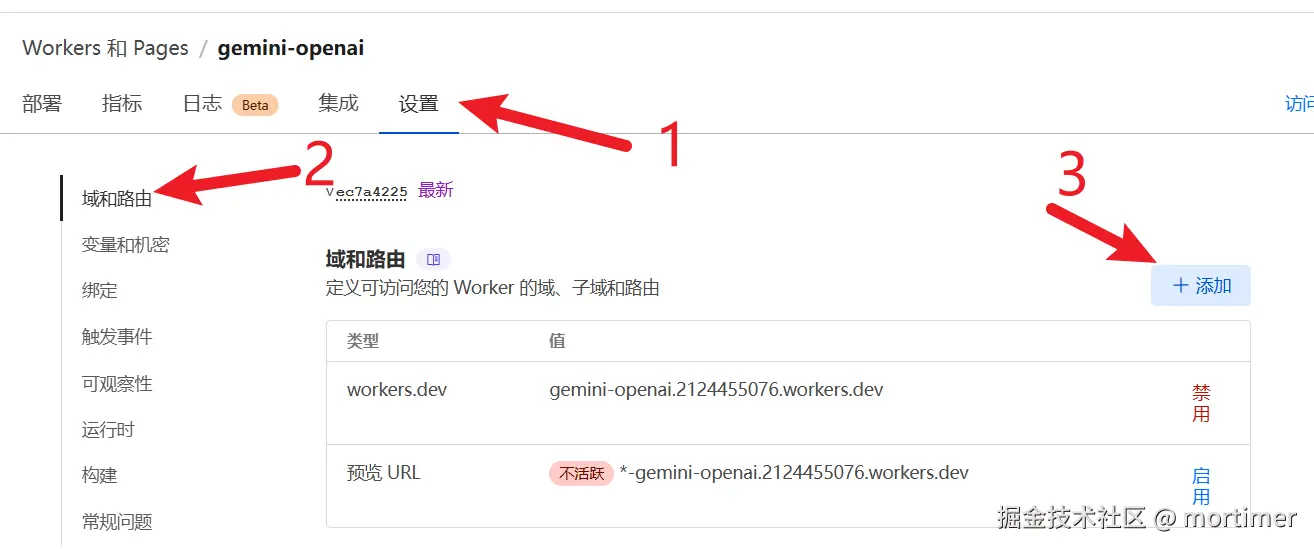
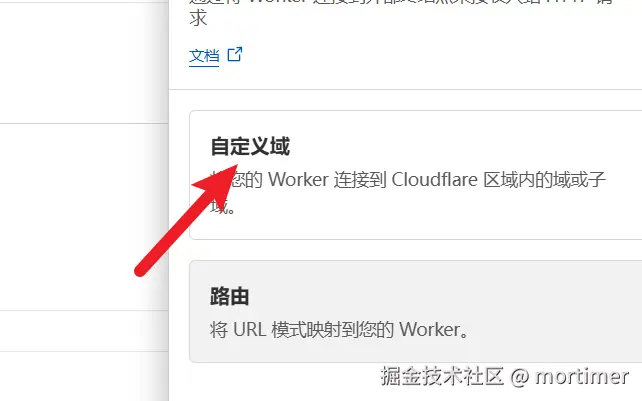
As shown in the image below, add the domain you have already hosted on Cloudflare.
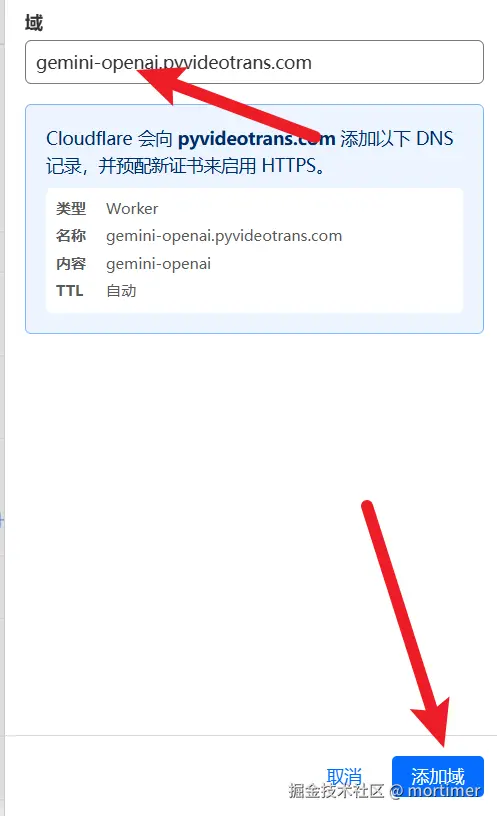
Once completed, you can use this domain to access Gemini.
Using the OpenAI SDK to Access Gemini
from openai import OpenAI, APIConnectionError
model = OpenAI(api_key='Your Gemini API Key', base_url='https://your-custom-domain.com')
response = model.chat.completions.create(
        model='gemini-2.0-flash-exp',
        messages=[
            {
                'role': 'user',
                'content': 'Who are you?'},
        ]
    )

print(response.choices[0])Returns the following:
Choice(finish_reason='stop', index=0, logprobs=None, message=ChatCompletionMessage(content='I am a large language model trained by Google.\n', refusal=None, role='assistant', audio=None, function_call=None, tool_calls=None))Using It in Other OpenAI-Compatible Tools
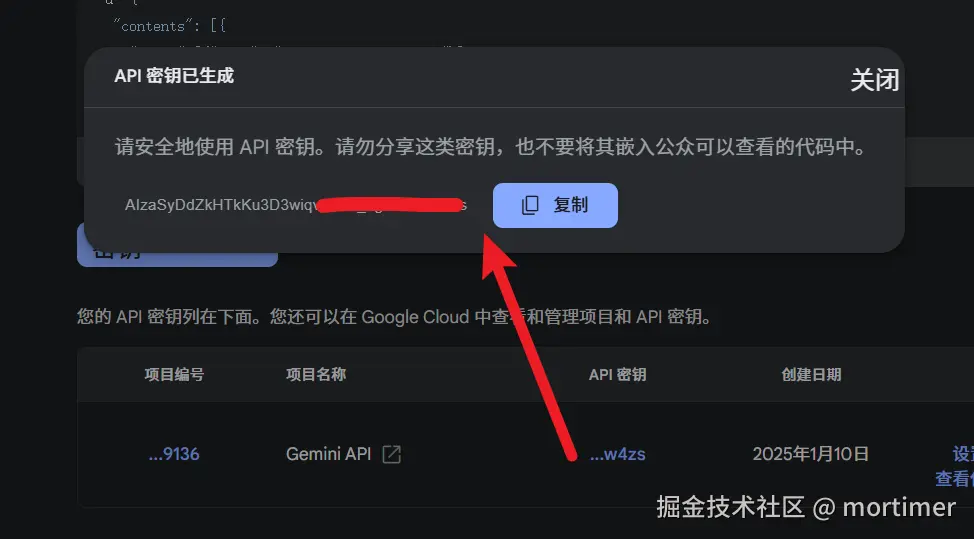
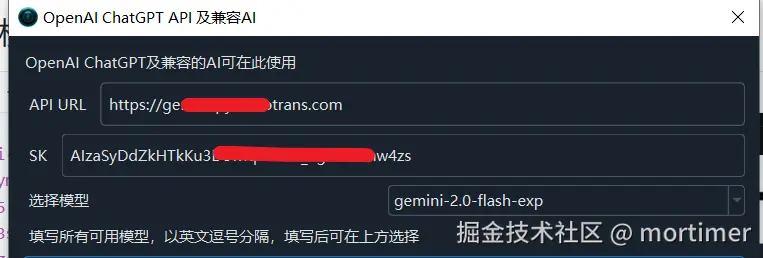
Find the location in the tool where OpenAI information is configured. Change the API address to your custom domain added on Cloudflare, change the SK to your Gemini API Key, and fill in the model as gemini-2.0-flash-exp.
Direct Access Using Requests
If you are not using the OpenAI SDK, you can also access it directly using the requests library.
import requests

payload={
    "model":"gemini-1.5-flash",
    "messages":[{
        "role":"user",
        "content":[{"type":"text","text":"Who are you?"}]
    }]
}

res=requests.post('https://xxxx.com/chat/completions',headers={"Authorization":"Bearer Your Gemini API Key","Content-Type":"application:/json"},json=payload)

print(res.json())Output as follows:

Related Resources
- The source code is modified from the project PublicAffairs/openai-gemini
- GeminiAI Documentation