Qwen-ASR Local Speech Recognition Model
What is this?
Qwen-ASR is a local speech recognition model developed by Alibaba's Tongyi Qianwen (Qwen) team. It can convert speech in audio to text without requiring an internet connection. The model runs entirely locally, protecting your privacy while delivering high-accuracy speech recognition.
In pyVideoTrans, select Qwen-ASR (Local) from the speech recognition channel to use this model.
Version Requirement
You must upgrade to v3.97+ to use the Qwen-ASR local model.
Model Selection
Qwen-ASR offers two model sizes, each with different tradeoffs:
| Model | Parameters | Accuracy | Resource Usage | Recommended For |
|---|---|---|---|---|
| 0.6B | 600 million | High | Low | Limited VRAM, speed-focused |
| 1.7B | 1.7 billion | Higher | Higher | Accuracy-focused, sufficient VRAM |
- 0.6B model: Smaller footprint, faster inference, lower VRAM requirements — suitable for average-spec machines
- 1.7B model: Higher recognition accuracy, but requires more VRAM and compute — for users seeking the best results
Model Download
Automatic Download (Recommended)
On first use, the software automatically downloads the required model from the model repository. The Chinese interface defaults to downloading from ModelScope (a Chinese model hosting platform).
Manual Download
If automatic download fails or is too slow, you can download the model manually.
Step 1: Verify Directory Structure
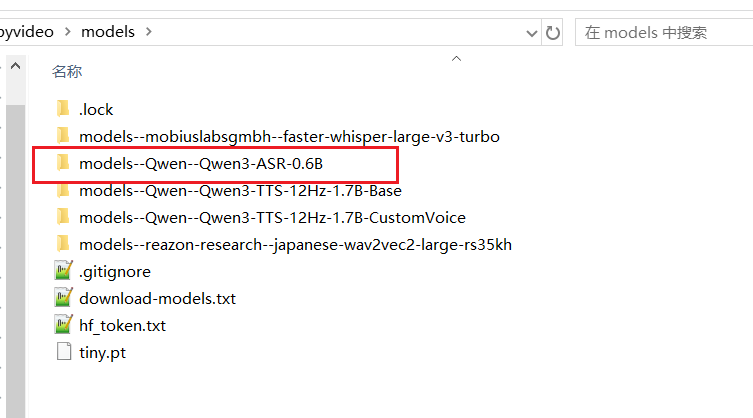
Check that the following model folders exist in the software directory. If not, create them manually:
software_directory/
└── models/
├── models--Qwen--Qwen3-ASR-0.6B/ (0.6B model directory)
└── models--Qwen--Qwen3-ASR-1.7B/ (1.7B model directory)Step 2: Download the 1.7B Model
- Open the HuggingFace download page: https://huggingface.co/Qwen/Qwen3-ASR-1.7B/tree/main
- Download all files from the page
- Place all downloaded files into the
models/models--Qwen--Qwen3-ASR-1.7Bfolder
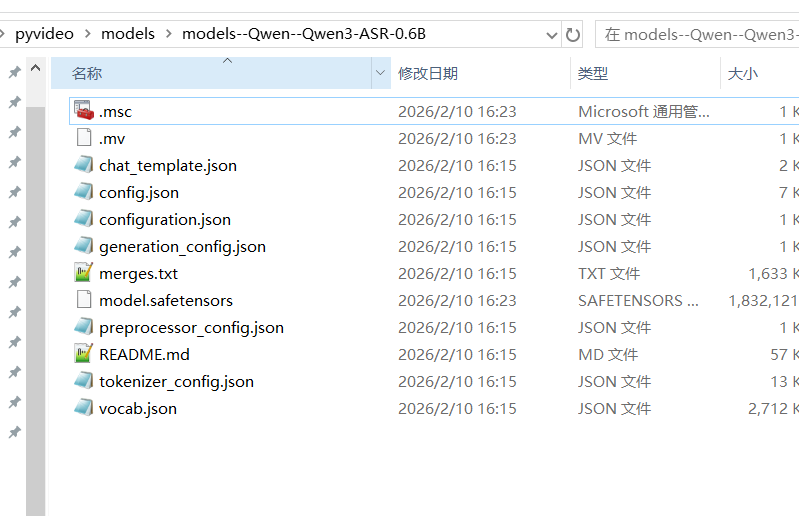
Step 3: Download the 0.6B Model
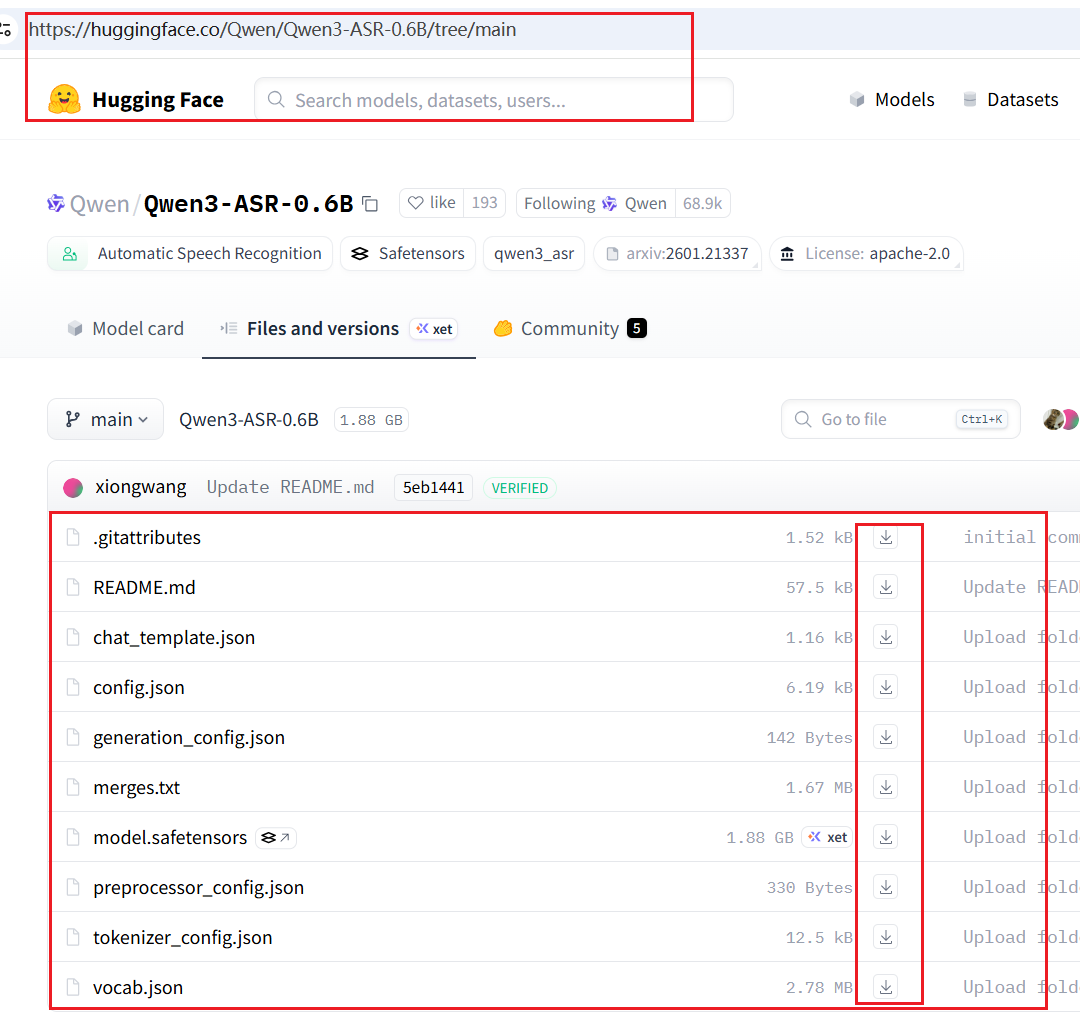
- Open the HuggingFace download page: https://huggingface.co/Qwen/Qwen3-ASR-0.6B/tree/main
- Download all files from the page
- Place all downloaded files into the
models/models--Qwen--Qwen3-ASR-0.6Bfolder
Step 4: Select the Model
In the software interface's speech recognition settings, select either 0.6B or 1.7B as needed.


How It Works
The Qwen-ASR local model uses VAD (Voice Activity Detection) for audio preprocessing:
- The
ten-vadmodel intelligently segments the audio into short clips - Clips are processed in batches of 8 for inference
- Recognition results from all segments are merged together
This approach results in low VRAM usage and fast inference, making it well-suited for processing long audio files.
Advanced Configuration: Using ForcedAligner for Alignment
What is ForcedAligner?
Qwen provides the Qwen/Qwen3-ForcedAligner-0.6B model for precise timeline alignment. Unlike the default VAD approach, ForcedAligner can process complete long audio directly and provides more accurate word-level timestamps.
Why it is Disabled by Default
- Very high VRAM consumption
- Slower inference speed
- Cannot show real-time transcription progress — the interface becomes unresponsive during long audio processing
Manually Enabling ForcedAligner
If you need higher segmentation accuracy, follow these steps to manually enable ForcedAligner:
Prerequisite: pyVideoTrans must be deployed from source code.
Step 1: Modify stt_fun.py
Open videotrans/process/stt_fun.py and make the following changes:
- Rename the original
qwen3asr_funfunction toqwen3asr_fun_bak:
# Before
def qwen3asr_fun(
cut_audio_list=None,
ROOT_DIR=None,
logs_file=None,
defaulelang="en",
is_cuda=False,
audio_file=None,
TEMP_ROOT=None,
model_name="1.7B",
device_index=0
):
...
# After
def qwen3asr_fun_bak(
cut_audio_list=None,
ROOT_DIR=None,
logs_file=None,
defaulelang="en",
is_cuda=False,
audio_file=None,
TEMP_ROOT=None,
model_name="1.7B",
device_index=0
):
...- Rename the original
qwen3asr_fun0function toqwen3asr_fun:
# Before
def qwen3asr_fun0(
ROOT_DIR=None,
logs_file=None,
defaulelang="en",
is_cuda=False,
audio_file=None,
TEMP_ROOT=None,
model_name="1.7B",
device_index=0
):
...
# After
def qwen3asr_fun(
ROOT_DIR=None,
logs_file=None,
defaulelang="en",
is_cuda=False,
audio_file=None,
TEMP_ROOT=None,
model_name="1.7B",
device_index=0
):
...Step 2: Modify _qwenasrlocal.py
Open videotrans/recognition/_qwenasrlocal.py:
- Uncomment the following two lines to enable automatic download of the alignment model:
# Uncomment ModelScope download (recommended for Chinese environment)
tools.check_and_down_ms('Qwen/Qwen3-ForcedAligner-0.6B',callback=self._process_callback,local_dir=f'{config.ROOT_DIR}/models/models--Qwen--Qwen3-ForcedAligner-0.6B')
# Or uncomment HuggingFace download
tools.check_and_down_hf(model_id='Qwen3-ForcedAligner-0.6B',repo_id='Qwen/Qwen3-ForcedAligner-0.6B',local_dir=f'{config.ROOT_DIR}/models/models--Qwen--Qwen3-ForcedAligner-0.6B',callback=self._process_callback)Manual download option: You can also download the ForcedAligner model manually from https://huggingface.co/Qwen/Qwen3-ForcedAligner-0.6B/tree/main and place all files into the
models/models--Qwen--Qwen3-ForcedAligner-0.6Bfolder.
- In the same file, change the code:
return jsdata#self.segmentation_asr_data(jsdata)to:
return self.segmentation_asr_data(jsdata)Step 3: Restart the Software
After all modifications are complete, restart pyVideoTrans.
Common Issues
| Issue | Possible Cause | Solution |
|---|---|---|
| Model download failed | Network issues or HuggingFace blocked | Use ModelScope mirror download, or download model files manually |
| Empty recognition results | Unsupported audio format | Ensure audio is a common format (wav/mp3/aac); converting to wav first is recommended |
| Insufficient VRAM error | GPU VRAM not enough | Use the smaller 0.6B model, or close other programs using VRAM |
| Very slow recognition | No GPU acceleration | Check that the CUDA environment is correctly configured |
| Software interface freezes | Long audio processing time | This is normal — be patient, or use shorter audio segments |