
SenseVoice is an open-source speech recognition foundation model from Alibaba. It supports recognizing speech in Chinese, Japanese, Korean, and English. Compared to some previous models, it features faster recognition speed and higher accuracy.
However, the officially released version has not included timestamp output by default, which is inconvenient for subtitle creation. Currently, this API project was created by using other VAD models for pre-segmentation and then recognizing with SenseVoice. It has been integrated into video translation software for easier use.
SenseVoice Official Repository
This API Project https://github.com/jianchang512/sense-api
Purpose of This Project
- Replace the official
api.pyfile to enable SRT subtitle output with timestamps. - Connect for use with video translation and dubbing software.
- Includes a Windows integrated package. You can start the API by double-clicking
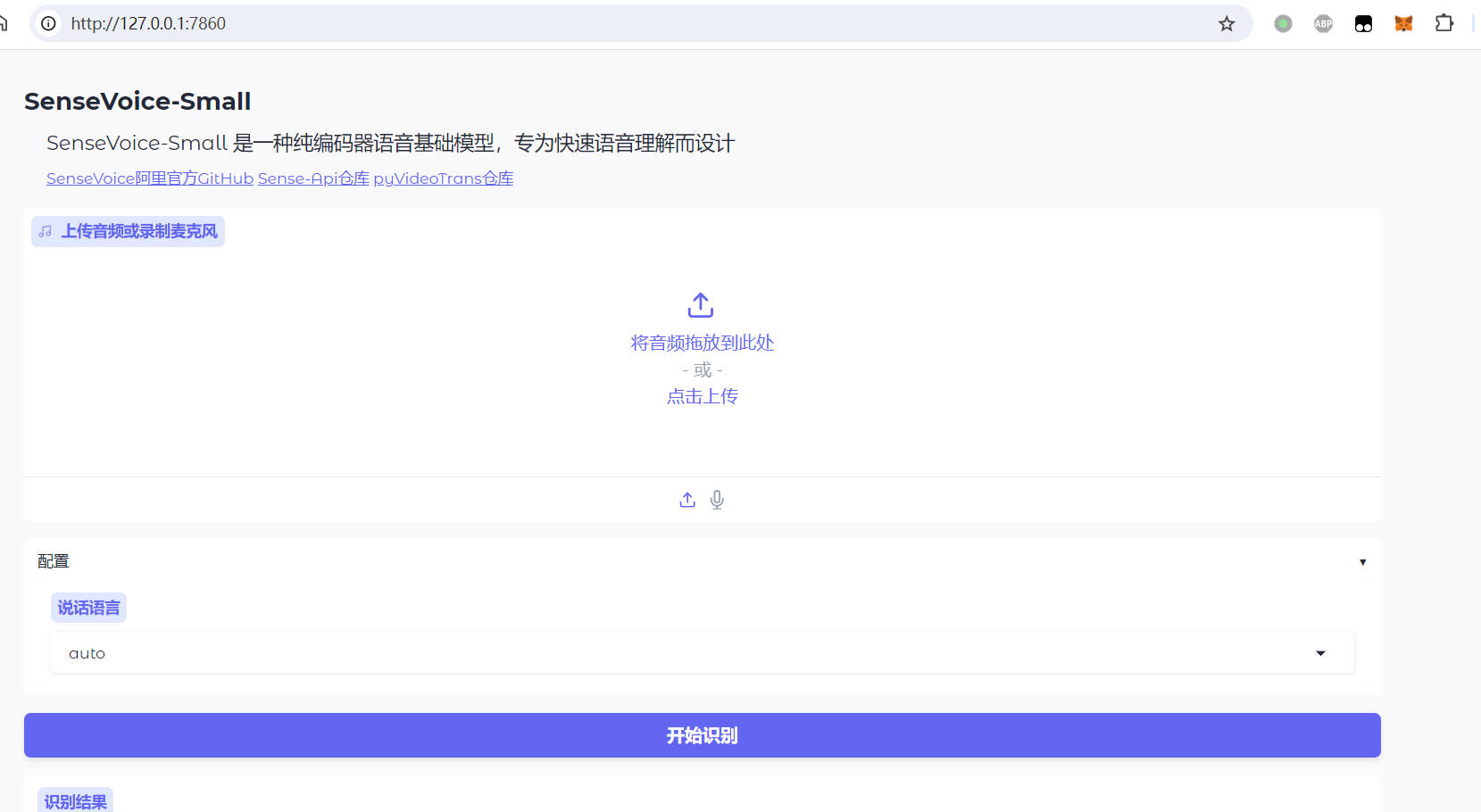
run-api.bat, or launch the browser interface by double-clickingrun-webui.bat.
This
api.pyignores emotion recognition processing and only supports speech recognition for Chinese, Japanese, Korean, and English.
First, Deploy the SenseVoice Project
Deploy using the official source code method, which supports deployment on Windows/Linux/MacOSX. For specific tutorials, please refer to the SenseVoice project homepage: https://github.com/FunAudioLLM/SenseVoice. After deployment, download the
api.pyfile from this project and overwrite theapi.pyfile that comes with the official package (If you want to use it in video translation software, you must overwrite it; otherwise, you cannot get subtitles with timestamps).Deploy using the Windows integrated package, which only supports deployment on Windows 10/11. Download the compressed package from the right side of this page: https://github.com/jianchang512/sense-api/releases. After extracting, double-click
run-api.batto use theAPI, or double-clickrun-webui.batto open the web interface.
Using the API
The default API address is http://127.0.0.1:5000/asr
You can open the api.py file to modify:
HOST='127.0.0.1'
PORT=5000- If deployed via official source code, remember to overwrite the
api.pyfile, then executepython api.py. - If using the Windows integrated package, simply double-click
run-api.bat. - Wait until the terminal displays
http://127.0.0.1:5000, which indicates a successful startup and it's ready to use.
Note: The first time you use it, it will download the model from ModelScope online, which may take a longer time.
Using in Video Translation and Dubbing Tools
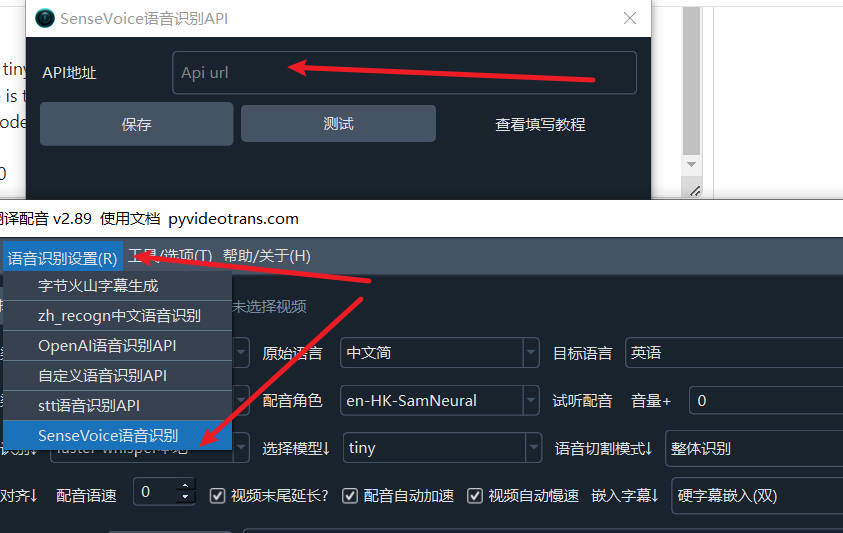
Fill in the API address in the menu -> Speech Recognition Settings -> SenseVoice Speech Recognition window's API Address field.
Calling the API from Source Code
- API Address: Assuming the default API address is http://127.0.0.1:5000
- Call Method: POST
- Request Parameters
- lang: String type. Can pass one of zh | ja | ko | en.
- file: The audio binary data to be recognized, in WAV format.
- Response
- Recognition Success Returns:
{code:0, msg:ok, data:"Complete SRT subtitle format string"} - Recognition Failure Returns:
{code:1, msg:"Error reason"} - Other Internal Errors Return:
{detail:"Error message"}
- Recognition Success Returns:
Example: To recognize the audio file 10.wav, where the spoken language is Chinese.
import requests
res = requests.post(f"http://127.0.0.1:5000/asr", files={"file": open("c:/users/c1/videos/10s.wav", 'rb')}, data={"lang":"zh"}, timeout=7200)
print(res.json())Using the WebUI in a Browser
- If using the official package deployed from source, execute
python webui.py. Wait until the terminal showshttp://127.0.0.1:7860, then enter this address in your browser to use it. - If using the Windows integrated package, double-click
run-webui.bat. After successful startup, the browser will open automatically.