
Using zh_recogn for Chinese Speech Recognition
This recognition method only supports Chinese speech. It uses the Alibaba ModelScope community model, which provides good support for Chinese and can compensate for the insufficient Chinese support of foreign models.
How to Use
First, deploy the zh_recogn project.
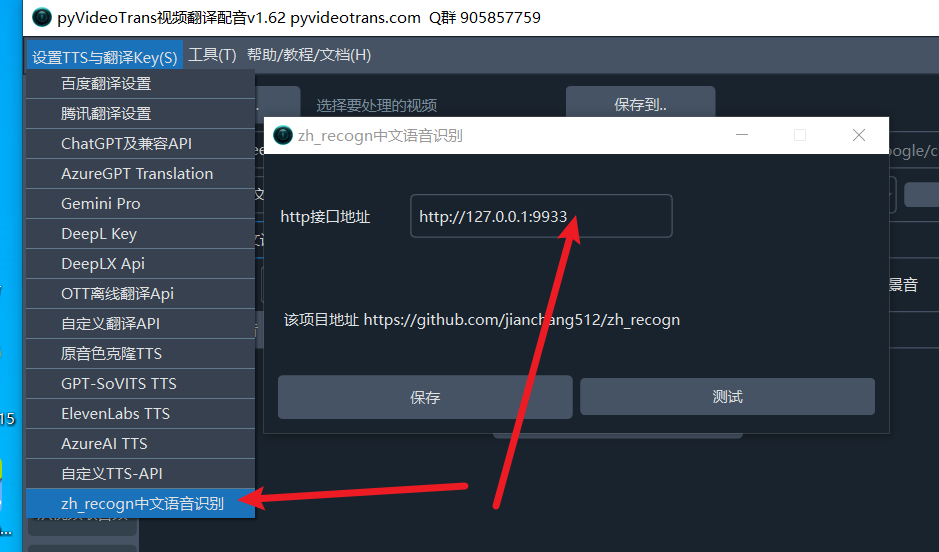
Then start it. Enter the address (default http://127.0.0.1:9933) into the software's top-left menu: Settings -> zh_recogn Chinese Speech Recognition -> Address.
Then, in the software interface, select zh_recogn from the "faster mode" dropdown. When this option is selected, there is no need to choose a model or segmentation method. 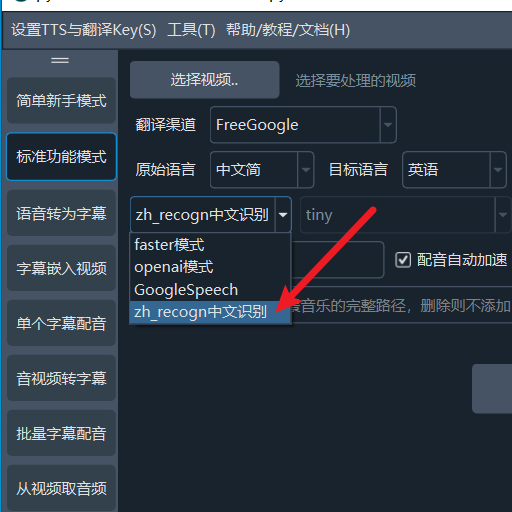
Deploying the zh_recogn Project
Source Code Deployment
First, install Python 3.10, install git, and install ffmpeg. On Windows, download ffmpeg.exe and place it in the
ffmpegfolder of this project. On Mac, usebrew install ffmpegto install.Create an empty directory with an English name. Open cmd in this directory on Windows (use Terminal on macOS and Linux) and execute the command:
git clone https://github.com/jianchang512/zh_recogn ./Continue by executing
python -m venv venv. Then, on Windows, execute.\venv\scripts\activate. On macOS and Linux, executesource ./venv/bin/activate.Continue by executing
pip install -r requirements.txt --no-deps.For CUDA acceleration on Windows and Linux, continue by executing
pip uninstall torch torchaudio, then executepip install torch torchaudio --index-url https://download.pytorch.org/whl/cu118.Start the project with
python start.py.
Pre-packaged Version / Windows 10 & 11 Only
Download link: https://github.com/jianchang512/zh_recogn/releases
After downloading, extract it to a directory with an English name and double-click
start.exe.To reduce the package size, the pre-packaged version does not support CUDA. For CUDA acceleration, please use source code deployment.
Using in the pyvideotrans Project
First, upgrade pyvideotrans to v1.62+. Then, open the top-left Settings menu -> zh_recogn Chinese Speech Recognition menu, fill in the address and port. The default is "http://127.0.0.1:9933". Do not add /api at the end.
API
API address: http://ip:port/api (default http://127.0.0.1:9933/api)
Example Python code to request the API:
import requests

audio_file="D:/audio/1.wav"
file={"audio":open(audio_file,'rb')}
res=requests.post("http://127.0.0.1:9933/api",files=file,timeout=1800)

print(res.data)

[
    {
     line:1,
     time:"00:00:01,100 --> 00:00:03,300",
     text:"Subtitle content 1"
    },
    {
     line:2,
     time:"00:00:04,100 --> 00:00:06,300",
     text:"Subtitle content 2"
    },
]When filling in the address in pyvideotrans, do not add /api at the end.
Web Interface
Notes
- The first time you use it, the model will be downloaded automatically, which may take a long time.
- Only Chinese speech recognition is supported.
- You can modify the binding address and port in the
set.inifile.