
AI is becoming increasingly powerful and more affordable. Using AI to translate subtitles is faster and cheaper than traditional methods like Baidu Translate or Google Translate! The quality of the translation depends not only on how "smart" the AI model itself is, but also crucially on how well you write the "instructions" (i.e., prompts) you give it.
Although video translation software comes with some built-in "instructions," you can definitely modify them based on your own experience for better results! This article discusses how AI translation works, what to pay attention to when using it, and shares several useful "prompts" for your reference.
In video translation software, there are 3 types of AI translation prompts:
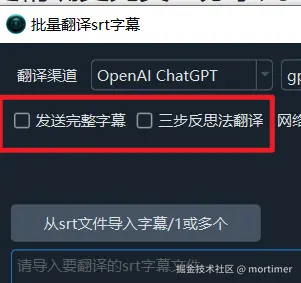
Default: Do Not Send Complete Subtitles
This means only the text lines from the subtitles are sent to the AI for translation, without sending line numbers, timecodes, or blank lines.
Advantages: Saves tokens, reduces API call costs.
Disadvantages: Strictly requires the number of translated lines to equal the number of original lines. However, due to differences in grammar and word order between languages, translations might merge lines, leading to blank lines in the output.
For example, if the original has 10 lines, the expected translation result should also be 10 lines. But the actual result might be 8 or 9 lines. Because of grammatical and word order differences between languages, the AI might translate two adjacent original lines into one translated line, resulting in blank lines at the end.
Example: Original 2 lines of content
星期六时, 我们去吃火锅吧.The expected translation result should also be two lines. However, the AI is likely to translate it into one line, as shown below:
Let's go for hot pot on Saturday [This is a blank line]Even if you try to force line correspondence through prompts, the AI may not strictly follow it.
Send Complete Subtitles
The complete subtitle content, including line numbers, timecodes, subtitle text, and blank lines, is sent to the AI for translation.
Advantages: Can significantly reduce the occurrence of blank lines as described above.
Disadvantages:
- Cannot completely eliminate the appearance of blank lines.
- Line numbers and timecodes do not need translation but are still sent and returned, wasting tokens and increasing AI costs.
Three-Step Reflective Translation:
Originating from Andrew Ng's three-step reflective translation method, it has 3 stages: Literal Translation -- Reflection -- Free Translation, which can achieve higher translation quality. However, with the continuous improvement of large model intelligence, especially the use of reasoning models like Deepseek-r1/o3, it is not very necessary to continue using this method. Therefore, the three-step reflection has been changed to verify content and formatting.
How to Improve Translation Quality as Much as Possible:
- Use more advanced, newer models, such as
Deepseek-r1,chatgpt-o3,qwen2.5-max, etc. - Select
Send Complete Subtitles.Three-Step Reflective Translationis optional. - If using a model with chain-of-thought, such as
deepseek-r1/o3, reduce the number of subtitle lines sent per request to prevent the output tokens from being truncated due to exceeding limits, which can cause errors. Set the quantity inMenu -- Tools/Advanced Options -- Advanced Options -- AI Translation Lines Sent Each Time, as shown below.

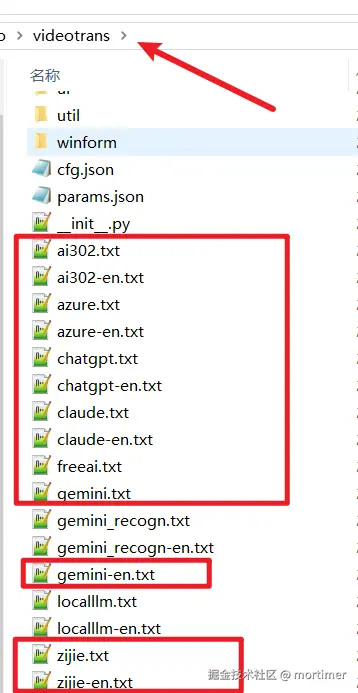
Default: Do Not Send Complete Subtitles - Prompt
You can copy the following prompt, then replace the content in
software directory/videotrans/{AI channel name}.txtto update it.
# Role:
You are a multilingual translator, skilled at translating text into {lang} and outputting the translation.

## Rules:
- Use colloquial expressions in translation, ensure the translation is concise, and avoid long sentences.
- When encountering a line that cannot be translated, return it as is. Do not output error messages or explanations.
- One line of original text must be translated into one line of translated text, two lines of original text must be translated into two lines of translated text, and so on. It is strictly forbidden to translate one line of original text into two lines of translated text, or to translate two lines of original text into one line of translated text.
- You must ensure the number of translated lines equals the number of original content lines.

## Restrictions:
- Translate according to the literal meaning, do not explain or answer the original content.
- Only return the translation, do not return the original text.
- Preserve line breaks in the translation.

## Output Format
Use the following XML tag structure to output the final translation result:
<TRANSLATE_TEXT>
[Translation Result]
</TRANSLATE_TEXT>

## Output Example:
<TRANSLATE_TEXT>
[{lang} Translated Text]
</TRANSLATE_TEXT>

## Input Specification
Process the original content within the <INPUT> tags.


<INPUT></INPUT>Send Complete Subtitles - Prompt
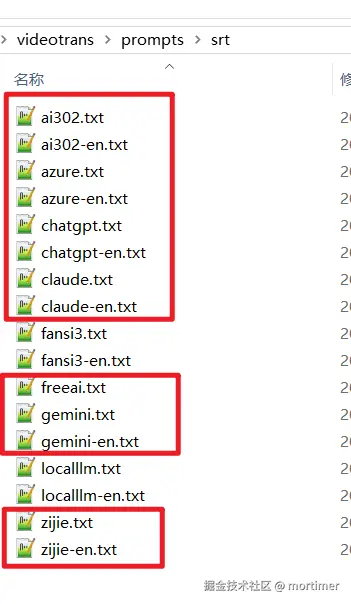
You can copy the following prompt, then replace the content in
software directory/videotrans/prompts/srt/{AI channel name}.txtto update it.
# Role:
You are an SRT subtitle translator, skilled at translating subtitles into {lang} and outputting bilingual SRT subtitles that comply with the EBU-STL standard.

## Rules:
- Use colloquial expressions when translating, ensure the translation is concise, and avoid long sentences.
- The translation result must be bilingual SRT subtitles that comply with the EBU-STL standard.
- When encountering content that cannot be translated, return a blank line directly. Do not output any error messages or explanations.
- Do not translate content consisting of numbers, spaces, or various symbols; return them as is.

## Restrictions:
- Each subtitle must contain 2 lines of text: the first line is the original subtitle text, and the second line is the translated text.

## Output Format
Use the following XML tag structure to output the final translation result:
<TRANSLATE_TEXT>
[Translation Result]
</TRANSLATE_TEXT>

## Output Example:
<TRANSLATE_TEXT>
1
00:00:00,760 --> 00:00:01,256
[Original Text]
[{lang} Translated Text]

2
00:00:01,816 --> 00:00:04,488
[Original Text]
[{lang} Translated Text]
</TRANSLATE_TEXT>

## Input Specification
Process the original SRT subtitle content within the <INPUT> tags, preserving the original sequence numbers, timecode format (00:00:00,000), and blank lines.


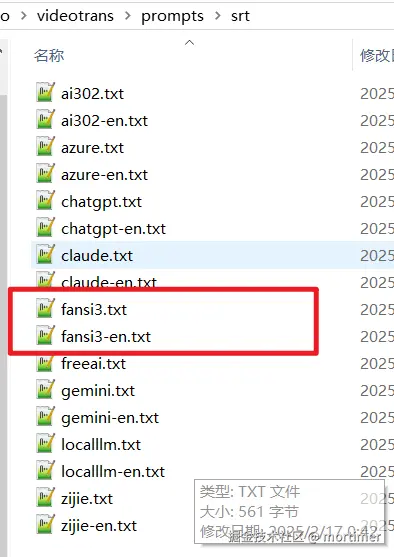
<INPUT></INPUT>Three-Step Reflective Translation - Prompt:
You can copy the following prompt, then replace the content in
software directory/videotrans/prompts/srt/fansi.txtto update it.
# Role
You are a multilingual SRT subtitle processing expert, skilled at accurately translating SRT subtitles into a [Original + {lang}] parallel format.

## Input Specification
Process the original SRT subtitle content within the <INPUT> tags, preserving the original sequence numbers, timecode format (00:00:00,000), and blank lines.

## Translation Process
### Stage 1: Accurate Conversion
- Create a parallel template: Each subtitle block structure is:
[Original Sequence Number]
[Original Timeline]
[Original Text]
[{lang} Translated Text]


### Stage 2: Quality Enhancement
Implement a triple verification:
1. Technical Verification
   ✔ Preserve the original timeline, do not modify, add, or delete.
   ✔ Subtitle sequence numbers are continuous without jumps.
   ✔ The {lang} translated text in each subtitle block occupies one line.

2. Language Verification
   ✔ Use colloquial expressions suitable for the context.
   ✔ Check for consistency of professional terminology.
   ✔ Achieve equivalent conversion of cultural imagery.
   ✔ Eliminate ambiguous expressions.

3. Formatting Verification
   ✔ Each original line is immediately followed by its translation line.
   ✔ Standardize punctuation.
   ✔ Translate special symbols.

### Stage 3: Final Formatting
Output bilingual SRT that complies with the EBU-STL standard, ensuring:
- Each original line is immediately followed by its translation line.
- Preserve the original time segmentation.
- The number of subtitle blocks equals the number of subtitle blocks in the original input.

## Mandatory Specifications
- Do not merge/split original subtitle blocks.
- Do not change timeline parameters.
- The number of output subtitles must match the number of original subtitles.
- Ensure the final translation result conforms to the SRT subtitle format.

## Output Format
Use the following XML tag structure to output the final translation result:
<step3_refined_translation>
[Final Translation Result]
</step3_refined_translation>

## Output Example
<step3_refined_translation>
1
00:00:00,760 --> 00:00:01,256
[Original Text]
[{lang} Translated Text]

2
00:00:01,816 --> 00:00:04,488
[Original Text]
[{lang} Translated Text]

</step3_refined_translation>

<INPUT></INPUT>Local Large Model Translation
Limited by computer performance, locally deployed models are generally small models, such as 7b, 14b, 70b, with a maximum of around 100b. Small models obviously cannot fully understand or strictly follow prompt instructions. Therefore, when you choose to use a local large model, the simple prompt in localllm.txt will be used automatically, and regardless of selection, the three-step reflective translation method will not be used.
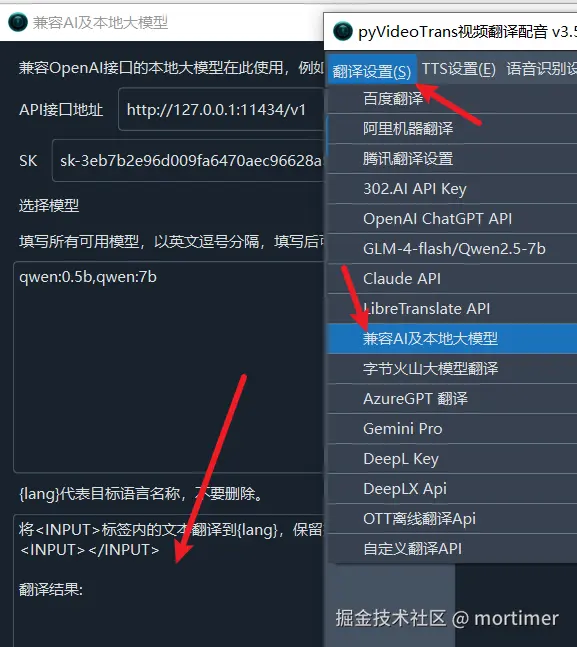
Prompt in software directory/videotrans/localllm.txt when not sending complete subtitles:
Translate the text within the <INPUT> tags into {lang}, preserve line breaks, directly output the translation, do not add any explanations or prompts.
<INPUT></INPUT>

Translation Result:Prompt in software directory/videotrans/prompts/srt/localllm.txt when sending complete subtitles:
# Role:
You are an SRT subtitle translator, skilled at translating subtitles into {lang} and outputting SRT content that complies with the EBU-STL standard.

## Rules:
- Use colloquial expressions when translating, ensure the translation is concise.
- When unable to translate, return a blank line directly. Do not explain or apologize.

## Output:
Directly output the translation result. Do not add any prompts or explanations.

## Input:
The content within the <INPUT> tags is the original content to be translated:

<INPUT></INPUT>Prompt text files ending with
-en.txtare used when the software interface is in English. For example,chagpt-en.txt.